- Preface
- New and Changed Information
- Overview
- Configuring AAA
- Configuring RADIUS
- Configuring TACACS+
- Configuring SSH and Telnet
- Configuring PKI
- Configuring User Accounts and RBAC
- Configuring 802.1X
- Configuring NAC
- Configuring Cisco TrustSec
- Configuring IP ACLs
- Configuring MAC ACLs
- Configuring VLAN ACLs
- Configuring Port Security
- Configuring DHCP Snooping
- Configuring Dynamic ARP Inspection
- Configuring IP Source Guard
- Configuring Keychain Management
- Configuring Traffic Storm Control
- Configuring Unicast RPF
- Configuring Control Plane Policing
- Configuring Rate Limits
- Index
Cisco Nexus 7000 Series NX-OS Security Configuration Guide, Release 4.2
Bias-Free Language
The documentation set for this product strives to use bias-free language. For the purposes of this documentation set, bias-free is defined as language that does not imply discrimination based on age, disability, gender, racial identity, ethnic identity, sexual orientation, socioeconomic status, and intersectionality. Exceptions may be present in the documentation due to language that is hardcoded in the user interfaces of the product software, language used based on RFP documentation, or language that is used by a referenced third-party product. Learn more about how Cisco is using Inclusive Language.
- Updated:
- August 10, 2009
Chapter: Configuring Cisco TrustSec
- Information About Cisco TrustSec
- Licensing Requirements for Cisco TrustSec
- Prerequisites for Cisco TrustSec
- Guidelines and Limitations for Cisco TrustSec
- Default Settings For Cisco TrustSec
- Configuring Cisco TrustSec
- Enabling the Cisco TrustSec Feature
- Configuring Cisco TrustSec Device Credentials
- Configuring AAA for Cisco TrustSec
- Configuring Cisco TrustSec Authentication, Authorization, SAP, and Data Path Security
- Cisco TrustSec Configuration Process for Cisco TrustSec Authentication and Authorization
- Enabling Cisco TrustSec Authentication
- Configuring Data-Path Replay Protection for Cisco TrustSec on Interfaces
- Configuring SAP Operation Modes for Cisco TrustSec on Interfaces
- Configuring SGT Propagation for Cisco TrustSec on Interfaces
- Regenerating SAP Keys on an Interface
- Configuring Cisco TrustSec Authentication in Manual Mode
- Configuring SGACL Policies
- SGACL Policy Configuration Process
- Enabling SGACL Policy Enforcement on VLANs
- Enabling SGACL Policy Enforcement on VRFs
- Manually Configuring Cisco TrustSec SGTs
- Manually Configuring IPv4-Address-to-SGACL SGT Mapping for a VLAN
- Manually Configuring IPv4-Address-to-SGACL SGT Mapping for a VRF
- Manually Configuring SGACL Policies
- Displaying the Downloaded SGACL Policies
- Refreshing the Downloaded SGACL Policies
- Clearing Cisco TrustSec SGACL Policies
- Manually Configuring SXP
- Enabling Cisco TrustSec
- Configuring AAA for Cisco TrustSec on a Seed Cisco NX-OS Device
- Enabling Cisco TrustSec Authentication on an Interface
- Configuring Cisco TrustSec Authentication in Manual Mode
- Configuring Cisco TrustSec Role-Based Policy Enforcement for the default VRF
- Configuring Cisco TrustSec Role-Based Policy Enforcement for a Nondefault VRF
- Configuring Cisco TrustSec Role-Based Policy Enforcement for a VLAN
- Configuring IPv4 Address to SGACL SGT Mapping for the Default VRF
- Configuring IPv4 Address to SGACL SGT Mapping for a Nondefault VRF
- Configuring IPv4 Address to SGACL SGT Mapping for a VLAN
- Manually Configuring Cisco TrustSec SGACLs
- Manually Configuring SXP Peer Connections
Configuring Cisco TrustSec
This chapter describes how to configure Cisco TrustSec on Cisco NX-OS devices.
This chapter includes the following sections:
- Information About Cisco TrustSec
- Licensing Requirements for Cisco TrustSec
- Prerequisites for Cisco TrustSec
- Guidelines and Limitations for Cisco TrustSec
- Default Settings For Cisco TrustSec
- Configuring Cisco TrustSec
- Verifying Cisco TrustSec Configuration
- Configuration Examples for Cisco TrustSec
- Additional References for Cisco TrustSec
- Feature History for Cisco TrustSec
- Cisco TrustSec Architecture
- Authentication
- SGACLs and SGTs
- Authorization and Policy Acquisition
- Environment Data Download
- RADIUS Relay Functionality
- Virtualization Support for Cisco TrustSec
- Enabling the Cisco TrustSec Feature
- Configuring Cisco TrustSec Device Credentials
- Configuring AAA for Cisco TrustSec
- Configuring Cisco TrustSec Authentication, Authorization, SAP, and Data Path Security
- Configuring Cisco TrustSec Authentication in Manual Mode
- Configuring SGACL Policies
- Manually Configuring SXP
- Enabling Cisco TrustSec
- Configuring AAA for Cisco TrustSec on a Seed Cisco NX-OS Device
- Enabling Cisco TrustSec Authentication on an Interface
- Configuring Cisco TrustSec Authentication in Manual Mode
- Configuring Cisco TrustSec Role-Based Policy Enforcement for the default VRF
- Configuring Cisco TrustSec Role-Based Policy Enforcement for a Nondefault VRF
- Configuring Cisco TrustSec Role-Based Policy Enforcement for a VLAN
- Configuring IPv4 Address to SGACL SGT Mapping for the Default VRF
- Configuring IPv4 Address to SGACL SGT Mapping for a Nondefault VRF
- Configuring IPv4 Address to SGACL SGT Mapping for a VLAN
- Manually Configuring Cisco TrustSec SGACLs
- Manually Configuring SXP Peer Connections
Information About Cisco TrustSec
This section provides information about Cisco TrustSec.
- Cisco TrustSec Architecture
- Authentication
- SGACLs and SGTs
- Authorization and Policy Acquisition
- Environment Data Download
- RADIUS Relay Functionality
- Virtualization Support for Cisco TrustSec
- Cisco TrustSec and Authentication
- Device Identities
- Device Credentials
- User Credentials
- Determining the Source Security Group
- Determining the Destination Security Group
- SXP for SGT Propagation Across Legacy Access Networks
Cisco TrustSec Architecture
The Cisco TrustSec security architecture builds secure networks by establishing clouds of trusted network devices. Each device in the cloud is authenticated by its neighbors. Communication on the links between devices in the cloud is secured with a combination of encryption, message integrity checks, and data-path replay protection mechanisms. Cisco TrustSec also uses the device and user identification information acquired during authentication for classifying, or coloring, the packets as they enter the network. This packet classification is maintained by tagging packets on ingress to the Cisco TrustSec network so that they can be properly identified for the purpose of applying security and other policy criteria along the data path. The tag, also called the security group tag (SGT), allows the network to enforce the access control policy by enabling the endpoint device to act upon the SGT to filter traffic.
 Note |
Ingress refers to entering the first Cisco TrustSec-capable device encountered by a packet on its path to the destination and egress refers to leaving the last Cisco TrustSec-capable device on the path. |
Figure 1. Cisco TrustSec Network Cloud Example
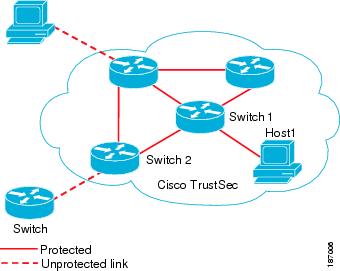
The Cisco TrustSec architecture consists of the following major components:
- Authentication
- Verifies the identity of each device before allowing them to join the Cisco TrustSec network.
- Authorization
- Decides the level of access to the Cisco TrustSec network resources for a device based on the authenticated identity of the device.
- Access control
- Applies access policies on a per-packet basis using the source tags on each packet.
- Secure communication
- Provides encryption, integrity, and data-path replay protection for the packets that flow over each link in the Cisco TrustSec network.
A Cisco TrustSec network has the following three entities:
- Supplicants
- Devices that attempt to join a Cisco TrustSec network.
- Authenticators (AT)
- Devices that are already part of a Cisco TrustSec network.
- Authorization server
- Servers that may provide authentication information, authorization information, or both.
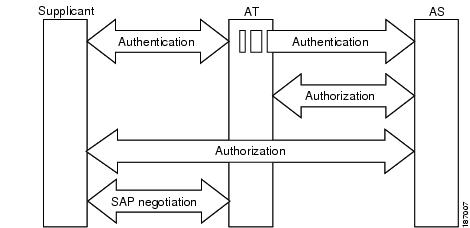
When the link between the supplicant and the AT first comes up, the following sequence of events may occur:
- Authentication (802.1X)
- The authentication server performs the authentication of the supplicant or the authentication completes trivially if you configure the devices to unconditionally authenticate each other.
- Authorization
- Each side of the link obtains policies, such as SGT and ACLs, that apply to the link. A supplicant may need to use the AT as a relay if it has no other Layer 3 route to the authentication server.
- Security Association Protocol (SAP) negotiation
- The EAPOL-Key exchange occurs between the supplicant and the AT to negotiate a cipher suite, exchange security parameter indexes (SPIs), and manage keys. Successful completion of all three tasks results in the establishment of a security association (SA).
Ports stay in the unauthorized state (blocking state) until the SAP negotiation completes.
Figure 2. SAP Negotiation
SAP negotiation can use any of the following modes of operation:
-
Galois/Counter Mode (GCM) encryption
-
GCM authentication (GMAC)
-
No encapsulation (clear text)
-
Encapsulation with no encryption or authentication
Based on the IEEE 802.1AE standard, Cisco TrustSec uses ESP-128 GCM and GMAC.
Authentication
Cisco TrustSec authenticates a device before allowing it to join the network. Cisco TrustSec uses 802.1X authentication with Extensible Authentication Protocol Flexible Authentication via Secure Tunnel (EAP-FAST) as the Extensible Authentication Protocol (EAP) method to perform the authentication.
- Cisco TrustSec and Authentication
- Device Identities
- Device Credentials
- User Credentials
- Cisco TrustSec Enhancements to EAP-FAST
- 802.1X Role Selection
- Cisco TrustSec Authentication Summary
Cisco TrustSec and Authentication
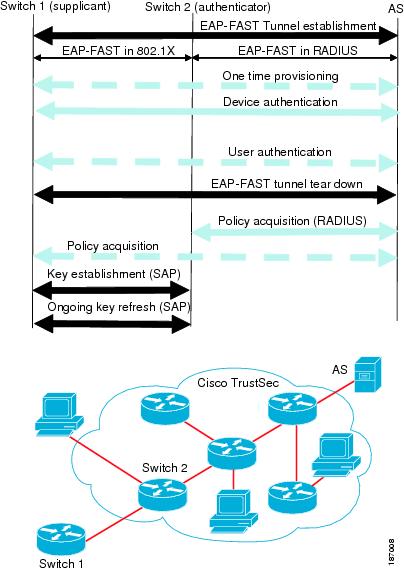
Cisco TrustSec uses EAP-FAST for authentication. EAP-FAST conversations allow for other EAP method exchanges inside the EAP-FAST tunnel using chains, which allows administrators to use traditional user authentication methods, such as Microsoft Challenge Handshake Authentication Protocol Version 2 (MSCHAPv2), while still having security provided by the EAP-FAST tunnel.
Figure 3. Cisco TrustSec Authentication
Cisco TrustSec Enhancements to EAP-FAST
The implementation of EAP-FAST for Cisco TrustSec has the following enhancements:
- Authenticate the authenticator
- Securely determines the identity of the AT by requiring the AT to use its protected access credential (PAC) to derive the shared secret between itself and the authentication server. This feature also prevents you from configuring RADIUS shared secrets on the authentication server for every possible IP address that can be used by the AT.
- Notify each peer of the identity of its neighbor
- By the end of the authentication exchange, the authentication server has identified both the supplicant and the AT. The authentication server conveys the identity of the AT, and whether the AT is Cisco TrustSec-capable, to the supplicant by using additional type-length-value parameters (TLVs) in the protected EAP-FAST termination. The authentication server also conveys the identity of the supplicant and whether the supplicant is Cisco TrustSec-capable, to the AT by using RADIUS attributes in the Access-Accept message. Because each peer knows the identity of its neighbor, it can send additional RADIUS Access-Requests to the authentication server to acquire the policy to be applied on the link.
- AT posture evaluation
- The AT provides its posture information to the authentication server whenever it starts the authentication exchange with the authentication server on behalf of the supplicant.
802.1X Role Selection
In 802.1X, the AT must have IP connectivity with the authentication server because it has to relay the authentication exchange between the supplicant and the AT using RADIUS over UDP/IP. When an endpoint device, such as a PC, connects to a network, it is obvious that it should act as a supplicant. However, in the case of a Cisco TrustSec connection between two network devices, the 802.1X role of each network device might not be immediately apparent to the other network device.
Instead of requiring manual configuration of the AT and supplicant roles for the Cisco NX-OS devices, Cisco TrustSec runs a role-selection algorithm to automatically determine which Cisco NX-OS device acts as the AT and which device acts as the supplicant. The role-selection algorithm assigns the AT role to the device that has IP reachability to a RADIUS server. Both devices start both the AT and supplicant state machines. When a Cisco NX-OS device detects that its peer has access to a RADIUS server, it terminates its own AT state machine and assumes the role of the supplicant. If both Cisco NX-OS devices have access to a RADIUS server, the algorithm compares the MAC addresses used as the source for sending the EAP over LAN (EAPOL) packets. The Cisco NX-OS device that has the MAC address with the higher value becomes the AT and the other Cisco NX-OS device becomes the supplicant.
Cisco TrustSec Authentication Summary
By the end of the Cisco TrustSec authentication process, the authentication server has performed the following actions:
-
Verified the identities of the supplicant and the AT.
-
Authenticated the user if the supplicant is an endpoint device.
At the end of the Cisco TrustSec authentication process, both the AT and the supplicant know following:
Device Identities
Cisco TrustSec does not use IP addresses or MAC addresses as device identities. Instead, you assign a name (device ID) to each Cisco TrustSec-capable Cisco NX-OS device to identify it uniquely in the Cisco TrustSec network. This device ID used for the following:
Device Credentials
Cisco TrustSec supports password-based credentials. The authentication servers may use self-signed certificates instead. Cisco TrustSec authenticates the supplicants through passwords and uses MSCHAPv2 to provide mutual authentication even if the authentication server certificate is not verifiable.
The authentication server uses these credentials to mutually authenticate the supplicant during the EAP-FAST phase 0 (provisioning) exchange where a PAC is provisioned in the supplicant. Cisco TrustSec does not perform the EAP-FAST phase 0 exchange again until the PAC expires and only performs EAP-FAST phase 1 and phase 2 exchanges for future link bringups. The EAP-FAST phase 1 exchange uses the PAC to mutually authenticate the authentication server and the supplicant. Cisco TrustSec uses the device credentials only during the PAC provisioning (or reprovisioning) steps.
The authentication server uses a temporarily configured password to authenticate the supplicant when the supplicant first joins the Cisco TrustSec network. When the supplicant first joins the Cisco TrustSec network, the authentication server authenticates the supplicant using a manufacturing certificate and then generates a strong password and pushes it to the supplicant with the PAC. The authentication server also keeps the new password in its database. The authentication server and the supplicant use this password for mutual authentication in all future EAP-FAST phase 0 exchanges.
User Credentials
Cisco TrustSec does not require a specific type of user credentials for endpoint devices. You can choose any type of authentication method for the user (for example, MSCHAPv2, LEAP, generic token card (GTC), or OTP) and use the corresponding credentials. Cisco TrustSec performs user authentication inside the EAP-FAST tunnel as part of the EAP-FAST phase 2 exchange.
SGACLs and SGTs
In security group access lists (SGACLs), you can control the operations that users can perform based on assigned security groups. The grouping of permissions into a role simplifies the management of the security policy. As you add users to the Cisco NX-OS device, you simply assign one or more security groups and they immediately receive the appropriate permissions. You can modify security groups to introduce new privileges or restrict current permissions.
Cisco TrustSec assigns a unique 16-bit tag, called the security group tag (SGT), to a security group. The number of SGTs in the Cisco NX-OS device is limited to the number of authenticated network entities. The SGT is a single label that indicates the privileges of the source within the entire enterprise. Its scope is global within a Cisco TrustSec network.
The management server derives the SGTs based on the security policy configuration. You do not have to configure them manually.
Once authenticated, Cisco TrustSec tags any packet that originates from a device with the SGT that represents the security group to which the device is assigned. The packet carries this SGT throughout the network within the Cisco TrustSec header. Because this tag represents the group of the source, the tag is referred to as the source SGT. At the egress edge of the network, Cisco TrustSec determines the group that is assigned to the packet destination device and applies the access control policy.
Cisco TrustSec defines access control policies between the security groups. By assigning devices within the network to security groups and applying access control between and within the security groups, Cisco TrustSec essentially achieves access control within the network.
Figure 4. SGACL Policy Example
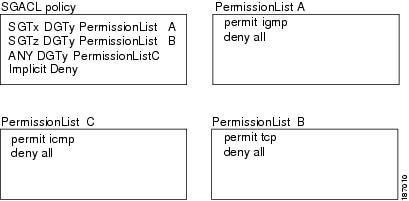
Figure 5. SGT and SGACL in Cisco TrustSec Network
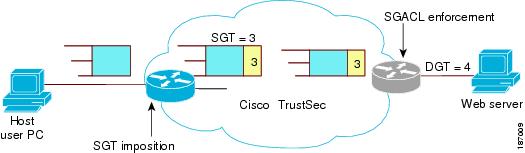
The Cisco NX-OS device defines Cisco TrustSec access control policy for a group of devices as opposed to IP addresses in traditional ACLs. With such a decoupling, the network devices are free to move throughout the network and change IP addresses. Entire network topologies can change. As long as the roles and the permissions remain the same, changes to the network do not change the security policy. This feature greatly reduces size of ACLs and simplifies their maintenance.
In traditional IP networks, the number of access control entries (ACEs) configured is determined as follows:
# of ACEs = (# of sources specified) X (# of destinations specified) X (# of permissions specified)
Cisco TrustSec uses the following formula:
# of ACEs = # of permissions specified
- Determining the Source Security Group
- Determining the Destination Security Group
- SXP for SGT Propagation Across Legacy Access Networks
Determining the Source Security Group
A network device at the ingress of the Cisco TrustSec cloud needs to determine the SGT of the packet entering the Cisco TrustSec cloud so that it can tag the packet with that SGT when it forwards it into the Cisco TrustSec cloud. The egress network device needs to determine the SGT of the packet so that it can apply the SGACLs.
The network device can determine the SGT for a packet in one of the following methods:
-
Obtain the source SGT during policy acquisition—After the Cisco TrustSec authentication phase,a network device acquires a policy from an authentication server. Authentication server indicates whether the peer device is trusted or not. If a peer device is not trusted then the authentication server can also provide an SGT to apply to all packets coming from the peer device.
-
Obtain the source SGT field from the Cisco TrustSec header—If a packet comes from a trusted peer device, the Cisco TrustSec header carries the correct SGT field if the network device is not the first network device in the Cisco TrustSec cloud for the packet.
-
Look up the source SGT based on the source IP address—In some cases, you can manually configure the policy to decide the SGT of a packet based on the source IP address. The SGT Exchange Protocol (SXP) can also populate the IP-address-to-SGT mapping table.
Determining the Destination Security Group
The egress network device in a Cisco TrustSec cloud determines the destination group for applying the SGACL. In some cases, ingress devices or other nonegress devices might have destination group information available. In those cases, SGACLs might be applied in these devices rather than in egress devices.
Cisco TrustSec determines the destination group for the packet in following ways:
SXP for SGT Propagation Across Legacy Access Networks
The Cisco NX-OS device hardware in the access layer supports Cisco TrustSec. Without the Cisco TrustSec hardware, the Cisco TrustSec software cannot tag the packets with SGTs. You can use SXP to propagate the SGTs across network devices that do not have hardware support for Cisco TrustSec.
SXP operates between access layer devices and distribution layer devices. The access layer devices use SXP to pass the IP addresses of the Cisco TrustSec-authenticated devices with their SGTs to the distribution switches. Distribution devices with both Cisco TrustSec-enabled software and hardware can use this information to tag packets appropriately and enforce SGACL policies.
Figure 6. Using SXP to Propagate SGT Information
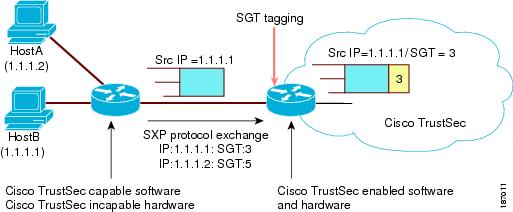
Tagging packets with SGTs requires hardware support. You might have devices in your network that cannot tag packets with SGTs. To allow these devices to send IP address-to-SGT mappings to a device that has Cisco TrustSec-capable hardware, you must manually set up the SXP connections. Manually setting up an SXP connection requires the following:
- If you require SXP data integrity and authentication, you must configure both the same SXP password on both of the peer devices. You can configure the SXP password either explicitly for each peer connection or globally for the device. The SXP password is not required.
- You must configure each peer on the SXP connection as either an SXP speaker or an SXP listener. The speaker device distributes the SXP information to the listener device.
- You can specify a source IP address to use for each peer relationship or you can configure a default source IP address for peer connections where you have not configured a specific source IP address.
Authorization and Policy Acquisition
After authentication ends, both the supplicant and AT obtain the security policy from the authentication server. The supplicant and AT enforce the policy against each other. Both the supplicant and AT provide the peer device ID that each receives after authentication. If the peer device ID is not available, Cisco TrustSec can use a manually configured peer device ID.
The authentication server returns the following policy attributes:
- Cisco TrustSec trust
- Indicates whether the neighbor device is to be trusted for the purpose of putting the SGT in the packets.
- Peer SGT
- Indicates the security group that the peer belongs to. If the peer is not trusted, all packets received from the peer are tagged with this SGT. If the device does not know if the SGACLs are associated with the peer’s SGT, the device may send a follow-up request to fetch the SGACLs.
- Authorization expiry time
- Indicates the number of seconds before the policy expires. The Cisco-proprietary attribute-value (AV) pairs indicates the expiration time of an authorization or policy response to a Cisco TrustSec device. A Cisco TrustSec device should refresh its policy and authorization before it times out.
 Tip |
Each Cisco TrustSec device should support some minimal default access policy in case it is not able to contact the authentication server to get an appropriate policy for the peer. |
Environment Data Download
The Cisco TrustSec environment data is a collection of information or policies that assists a device to function as a Cisco TrustSec node. The device acquires the environment data from the authentication server when the device first joins a Cisco TrustSec cloud, although you might also manually configure some of the data on a device. For example, you must configure the seed Cisco TrustSec device with the authentication server information, which can later be augmented by the server list that the device acquires from the authentication server.
The device must refresh the Cisco TrustSec environment data before it expires. The device can also cache the data and reuse it after a reboot if the data has not expired.
The device uses RADIUS to acquire the following environment data from the authentication server:
- Server lists
- List of servers that the client can use for future RADIUS requests (for both authentication and authorization).
- Device SGT
- Security group to which the device itself belongs.
- Expiry timeout
- Interval that controls how often the Cisco TrustSec device should refresh its environment data.
RADIUS Relay Functionality
The Cisco NX-OS device that plays the role of the Cisco TrustSec AT in the 802.1X authentication process has IP connectivity to the authentication server, which allows it to acquire the policy and authorization from the authentication server by exchanging RADIUS messages over UDP/IP. The supplicant device may not have IP connectivity with the authentication server. In such cases, Cisco TrustSec allows the AT to act as a RADIUS relay for the supplicant.
The supplicant sends a special EAP over LAN (EAPOL) message to the Cisco TrustSec AT that contains the RADIUS server IP address and UDP port and the complete RADIUS request. The Cisco TrustSec AT extracts the RADIUS request from the received EAPOL message and sends it over UDP/IP to the authentication server. When the RADIUS response returns from the authentication server, the Cisco TrustSec AT forwards the message back to the supplicant, encapsulated in an EAPOL frame.
Virtualization Support for Cisco TrustSec
Cisco TrustSec configuration and operation are local to the virtual device context (VDC). For more information on VDCs, see the Cisco Nexus 7000 Series NX-OS Virtual Device Context Configuration Guide, Release 4.2.
Licensing Requirements for Cisco TrustSec
The following table shows the licensing requirements for this feature:
| Product |
License Requirement |
||
|---|---|---|---|
| Cisco NX-OS |
Configuring Cisco TrustSec requires an Advanced Services license. For an explanation of the Cisco NX-OS licensing scheme and how to obtain and apply licenses, see the Cisco Nexus 7000 Series NX-OS Virtual Device Context Configuration Guide, Release 4.2.
|
Prerequisites for Cisco TrustSec
Cisco TrustSec has the following prerequisites:
Guidelines and Limitations for Cisco TrustSec
Cisco TrustSec has the following guidelines and limitations:
-
Cisco TrustSec uses RADIUS for authentication.
-
You cannot configure both Cisco TrustSec and 802.1X on an interface; you can configure only one or the other. However, you must enable the 802.1X feature for Cisco TrustSec to use EAP-FAST authentication.
-
AAA authentication and authorization for Cisco TrustSec is only supported by the Cisco Secure Access Control Server (ACS).
-
Cisco TrustSec supports IPv4 addressing only.
-
SXP cannot use the management (mgmt 0) interface.
-
You cannot enable Cisco TrustSec on interfaces in half-duplex mode.
-
You cannot clear the Cisco TrustSec policies.
-
If SGACL is applied to the packets being routed through SVI, SGACL has to be enabled on all the VLANs and the VRF involved.
Default Settings For Cisco TrustSec
| Parameters |
Default |
|---|---|
| Cisco TrustSec |
Disabled |
| SXP |
Disabled |
| SXP default password |
None |
| SXP reconcile period |
120 seconds (2 minutes) |
| SXP retry period |
60 seconds (1 minute) |
| Caching |
Disabled |
Configuring Cisco TrustSec
This section provides information about the configuration tasks for Cisco TrustSec.
- Enabling the Cisco TrustSec Feature
- Configuring Cisco TrustSec Device Credentials
- Configuring AAA for Cisco TrustSec
- Configuring Cisco TrustSec Authentication, Authorization, SAP, and Data Path Security
- Configuring Cisco TrustSec Authentication in Manual Mode
- Configuring SGACL Policies
- Manually Configuring SXP
- Configuring AAA on the Cisco TrustSec Seed Cisco NX-OS Devices
- Configuring AAA on Cisco TrustSec Nonseed Cisco NX-OS Devices
- Cisco TrustSec Configuration Process for Cisco TrustSec Authentication and Authorization
- Enabling Cisco TrustSec Authentication
- Configuring Data-Path Replay Protection for Cisco TrustSec on Interfaces
- Configuring SAP Operation Modes for Cisco TrustSec on Interfaces
- Configuring SGT Propagation for Cisco TrustSec on Interfaces
- Regenerating SAP Keys on an Interface
- SGACL Policy Configuration Process
- Enabling SGACL Policy Enforcement on VLANs
- Enabling SGACL Policy Enforcement on VRFs
- Manually Configuring Cisco TrustSec SGTs
- Manually Configuring IPv4-Address-to-SGACL SGT Mapping for a VLAN
- Manually Configuring IPv4-Address-to-SGACL SGT Mapping for a VRF
- Manually Configuring SGACL Policies
- Displaying the Downloaded SGACL Policies
- Refreshing the Downloaded SGACL Policies
- Clearing Cisco TrustSec SGACL Policies
- Cisco TrustSec SXP Configuration Process
- Enabling Cisco TrustSec SXP
- Configuring Cisco TrustSec SXP Peer Connections
- Configuring the Default SXP Password
- Configuring the Default SXP Source IPv4 Address
- Changing the SXP Reconcile Period
- Changing the SXP Retry Period
Enabling the Cisco TrustSec Feature
You must enable both the 802.1X and Cisco TrustSec features on the Cisco NX-OS device before you can configure Cisco TrustSec.
Note |
You cannot disable the 802.1X feature after you enable the Cisco TrustSec feature. |
Ensure that you have installed the Advanced Services license.
7.
(Optional) copy running-config startup-config
DETAILED STEPS
| Command or Action | Purpose | |
|---|---|---|
| Step 1 | configure terminal Example: switch# configure terminal switch(config)# |
Enters configuration mode. |
| Step 2 | feature dot1x Example: switch(config)# feature dot1x |
Enables the 802.1X feature. |
| Step 3 | feature cts Example: switch(config)# feature cts |
Enables the Cisco TrustSec feature. |
| Step 4 | exit Example: switch(config)# exit switch# |
Exits configuration mode. |
| Step 5 | show cts Example: switch# show cts |
(Optional) Displays the Cisco TrustSec configuration. |
| Step 6 | show feature Example: switch# show feature |
(Optional) Displays the enabled status for features. |
| Step 7 | copy running-config startup-config Example: switch# copy running-config startup-config |
(Optional) Copies the running configuration to the startup configuration. |
Configuring Cisco TrustSec Device Credentials
You must configure unique Cisco TrustSec credentials on each Cisco TrustSec-enabled Cisco NX-OS device in your network. Cisco TrustSec uses the password in the credentials for device authentication.
Note |
You must also configure the Cisco TrustSec credentials for the Cisco NX-OS device on the Cisco Secure ACS (see the documentation at the following URL: http://www.cisco.com/en/US/products/sw/secursw/ps5338/products_installation_and_configuration_guides_list.html). |
Ensure that you enabled Cisco TrustSec.
2.
cts device-id name password password
5.
(Optional) copy running-config startup-config
DETAILED STEPS
| Command or Action | Purpose | |
|---|---|---|
| Step 1 | configure terminal Example: switch# configure terminal switch(config)# |
Enters configuration mode. |
| Step 2 | cts device-id name password password Example: switch(config)# cts device-id MyDevice1 password CiscO321 |
Configures a unique device ID and password. The name argument has a maximum length of 32 characters and is case sensitive. |
| Step 3 | exit Example: switch(config)# exit switch# |
Exits configuration mode. |
| Step 4 | show cts Example: switch# show cts |
(Optional) Displays the Cisco TrustSec configuration. |
| Step 5 | copy running-config startup-config Example: switch# copy running-config startup-config |
(Optional) Copies the running configuration to the startup configuration. |
Configuring AAA for Cisco TrustSec
You can use Cisco Secure ACS for Cisco TrustSec authentication. You must configure RADIUS server groups and specify the default AAA authentication and authorization methods on one of the Cisco TrustSec-enabled Cisco NX-OS devices in your network cloud. Because Cisco TrustSec supports RADIUS relay, you need to configure AAA only on a seed Cisco NX-OS device that is directly connected to a Cisco Secure ACS. For all the other Cisco TrustSec-enabled Cisco NX-OS devices, Cisco TrustSec automatically provides a private AAA server group, aaa-private-sg. The seed Cisco NX-OS devices uses the management VRF to communicate with the Cisco Secure ACS.
Note |
Only the Cisco Secure ACS supports Cisco TrustSec. |
- Configuring AAA on the Cisco TrustSec Seed Cisco NX-OS Devices
- Configuring AAA on Cisco TrustSec Nonseed Cisco NX-OS Devices
Configuring AAA on the Cisco TrustSec Seed Cisco NX-OS Devices
This section describes how to configure AAA on the seed Cisco NX-OS device in your Cisco TrustSec network cloud.
Note |
When you configure the AAA RADIUS server group for the seed Cisco NX-OS device, you must specify a VRF. If you use the management VRF, no further configuration is necessary for the nonseed devices in the network cloud. If you use a different VRF, you must configure the nonseed devices with that VRF. |
Obtain the IPv4 or IPv6 address or hostname for the Cisco ACS.
Ensure that you enabled Cisco TrustSec.
2.
radius-server host {ipv4-address | ipv6-address | hostname} key [0 | 7] key pac
3.
(Optional) show radius-server
4.
aaa group server radius group-name
5.
server {ipv4-address | ipv6-address | hostname}
8.
aaa authentication dot1x default group group-name
9.
aaa authorization cts default group group-name
11.
(Optional) show radius-server groups [group-name]
12.
(Optional) show aaa authentication
13.
(Optional) show aaa authorization
15.
(Optional) copy running-config startup-config
DETAILED STEPS
| Command or Action | Purpose | |||
|---|---|---|---|---|
| Step 1 | configure terminal Example: switch# configure terminal switch(config)# |
Enters global configuration mode. |
||
| Step 2 | radius-server host {ipv4-address | ipv6-address | hostname} key [0 | 7] key pac Example: switch(config)# radius-server host 10.10.1.1 key L1a0K2s9 pac |
Configures a RADIUS server host with a key and PAC. The hostname augument is The key augument is alphanumeric, case sensitive, and has a maximum length of 63 characters. The 0 option indicates that the key is in clear text. The 7 option indicates that the key is encrypted. The default is clear text. |
||
| Step 3 | show radius-server Example: switch# show radius-server |
(Optional) Displays the RADIUS server configuration. |
||
| Step 4 | aaa group server radius group-name Example: switch(config)# aaa group server radius Rad1 switch(config-radius)# |
Specifies the RADIUS server group and enters RADIUS server group configuration mode. |
||
| Step 5 | server {ipv4-address | ipv6-address | hostname} Example: switch(config-radius)# server 10.10.1.1 |
Specifies the RADIUS server host address. |
||
| Step 6 | use-vrf vrf-name Example: switch(config-radius)# use-vrf management |
Specifies the management VRF for the AAA server group.
|
||
| Step 7 | exit Example: switch(config-radius)# exit switch(config)# |
Exits RADIUS server group configuration mode. |
||
| Step 8 | aaa authentication dot1x default group group-name Example: switch(config)# aaa authentication dot1x default group Rad1 |
Specifies the RADIUS server groups to use for 802.1X authentication. |
||
| Step 9 | aaa authorization cts default group group-name Example: switch(config)# aaa authentication cts default group Rad1 |
Specifies the RADIUS server groups to use for Cisco TrustSec authorization. |
||
| Step 10 | exit Example: switch(config)# exit switch# |
Exits configuration mode. |
||
| Step 11 | show radius-server groups [group-name] Example: switch# show radius-server group rad2 |
(Optional) Displays the RADIUS server group configuration. |
||
| Step 12 | show aaa authentication Example: switch# show aaa authentication |
(Optional) Displays the AAA authentication configuration. |
||
| Step 13 | show aaa authorization Example: switch# show aaa authorization |
(Optional) Displays the AAA authorization configuration. |
||
| Step 14 | show cts pacs Example: switch# show cts pacs |
(Optional) Displays the Cisco TrustSec PAC information. |
||
| Step 15 | copy running-config startup-config Example: switch# copy running-config startup-config |
(Optional) Copies the running configuration to the startup configuration. |
Configuring AAA on Cisco TrustSec Nonseed Cisco NX-OS Devices
Cisco TrustSec configures an AAA server group named aaa-private-sg on the nonseed Cisco NX-OS devices in the network cloud. By default, the aaa-private-sg server group uses the management VRF to communicate with the Cisco Secure ACS and no further configuration is required on the nonseed Cisco NX-OS devices. However, if you choose to use a different VRF, you must change the aaa-private-sg on the nonseed Cisco NX-OS device to use the correct VRF.
Ensure that you enabled Cisco TrustSec.
Ensure that you have configured a seed Cisco NX-OS device in your network.
2.
aaa group server radius aaa-private-sg
5.
(Optional) show radius-server groups aaa-private-sg
6.
(Optional) copy running-config startup-config
DETAILED STEPS
| Command or Action | Purpose | |
|---|---|---|
| Step 1 | configure terminal Example: switch# configure terminal switch(config)# |
Enters global configuration mode. |
| Step 2 | aaa group server radius aaa-private-sg Example: switch(config)# aaa group server radius aaa-private-sg switch(config-radius)# |
Specifies the RADIUS server group aaa-private-sg and enters RADIUS server group configuration mode. |
| Step 3 | use-vrf vrf-name Example: switch(config-radius)# use-vrf MyVRF |
Specifies the management VRF for the AAA server group. |
| Step 4 | exit Example: switch(config-radius)# exit switch(config)# |
Exits configuration mode. |
| Step 5 | show radius-server groups aaa-private-sg Example: switch(config)# show radius-server groups aaa-private-sg |
(Optional) Displays the RADIUS server group configuration for the default server group. |
| Step 6 | copy running-config startup-config Example: switch(config)# copy running-config startup-config |
(Optional) Copies the running configuration to the startup configuration. |
Configuring Cisco TrustSec Authentication, Authorization, SAP, and Data Path Security
This section provides information about the configuration tasks for Cisco TrustSec authentication, authorization, SAP, and data path security.
- Cisco TrustSec Configuration Process for Cisco TrustSec Authentication and Authorization
- Enabling Cisco TrustSec Authentication
- Configuring Data-Path Replay Protection for Cisco TrustSec on Interfaces
- Configuring SAP Operation Modes for Cisco TrustSec on Interfaces
- Configuring SGT Propagation for Cisco TrustSec on Interfaces
- Regenerating SAP Keys on an Interface
Cisco TrustSec Configuration Process for Cisco TrustSec Authentication and Authorization
Follow these steps to configure Cisco TrustSec authentication and authorization:
1. Enable the Cisco TrustSec feature.
2. Enable Cisco TrustSec authentication.
3. Enable 802.1X authentication for Cisco TrustSec on the interfaces.
DETAILED STEPS
| Step 1 | Enable the Cisco TrustSec feature. |
| Step 2 | Enable Cisco TrustSec authentication. |
| Step 3 | Enable 802.1X authentication for Cisco TrustSec on the interfaces. |
Enabling Cisco TrustSec Authentication
You must enable Cisco TrustSec authentication on the interfaces. By default, the data path replay protection feature is enabled and the SAP operating mode is GCM-encrypt.
 Caution |
For the Cisco TrustSec authentication configuration to take effect, you must enable and disable the interface, which disrupts traffic on the interface. |
Note |
Enabling 802.1X mode for Cisco TrustSec automatically enables authorization and SAP on the interface. |
2.
interface ethernet slot/port [- port2]
4.
(Optional) no replay-protection
5.
(Optional) sap modelist {gcm-encrypt | gmac | no-encap | null}
10.
(Optional) show cts interface all
11.
(Optional) copy running-config startup-config
DETAILED STEPS
| Command or Action | Purpose | |
|---|---|---|
| Step 1 | configure terminal Example: switch# configure terminal switch(config)# |
Enters global configuration mode. |
| Step 2 | interface ethernet slot/port [- port2] Example: switch(config)# interface ethernet 2/2 switch(config-if)# |
Specifies a single port or a range of ports and enters interface configuration mode. |
| Step 3 | cts dot1x Example: switch(config-if)# cts dot1x switch(config-if-cts-dot1x)# |
Enables 802.1X authentication for Cisco TrustSec and enters Cisco TrustSec 802.1X configuration mode. |
| Step 4 | no replay-protection Example: switch(config-if-cts-dot1x)# no replay-protection |
(Optional) Disables replay protection. The default is enabled. |
| Step 5 | sap modelist {gcm-encrypt | gmac | no-encap | null} Example: switch(config-if-cts-dot1x)# sap modelist gcm-encrypt |
(Optional) Configures the SAP operation mode on the interface.
The default is gcm-encrypt. |
| Step 6 | exit Example: switch(config-if-cts-dot1x)# exit switch(config-if)# |
Exits Cisco TrustSec 802.1X configuration mode. |
| Step 7 | shutdown Example: switch(config-if)# shutdown |
Disables the interface. |
| Step 8 | no shutdown Example: switch(config-if)# no shutdown |
Enables the interface and enables Cisco TrustSec authentication on the interface. |
| Step 9 | exit Example: switch(config-if)# exit switch(config)# |
Exits interface configuration mode. |
| Step 10 | show cts interface all Example: switch(config)# show cts interface all |
(Optional) Displays the Cisco TrustSec configuration on the interfaces. |
| Step 11 | copy running-config startup-config Example: switch(config)# copy running-config startup-config |
(Optional) Copies the running configuration to the startup configuration. |
Configuring Data-Path Replay Protection for Cisco TrustSec on Interfaces
By default, the Cisco NX-OS software enables the data-path reply protection feature. You can disable the data-path replay protection feature on the interfaces for Layer 2 Cisco TrustSec if the connecting device does not support SAP.
Caution |
For the data-path replay protection configuration to take effect, you must enable and disable the interface, which disrupts traffic on the interface. |
Ensure that you enabled Cisco TrustSec authentication on the interface.
2.
interface ethernet slot/port [- port2]
9.
(Optional) show cts interface all
10.
(Optional) copy running-config startup-config
DETAILED STEPS
| Command or Action | Purpose | |
|---|---|---|
| Step 1 | configure terminal Example: switch# configure terminal switch(config)# |
Enters global configuration mode. |
| Step 2 | interface ethernet slot/port [- port2] Example: switch(config)# interface ethernet 2/2 switch(config-if)# |
Specifies a single port or a range of ports and enters interface configuration mode. |
| Step 3 | cts dot1x Example: switch(config-if)# cts dot1x switch(config-if-cts-dot1x)# |
Enables 802.1X authentication for Cisco TrustSec and enters Cisco TrustSec 802.1X configuration mode. |
| Step 4 | no replay-protection Example: switch(config-if-cts-dot1x)# no replay-protection |
Disables data-path replay protection. The default is enabled. Use the replay-protection command to enable data-path replay protection on the interface. |
| Step 5 | exit Example: switch(config-if-cts-dot1x)# exit switch(config-if)# |
Exits Cisco TrustSec 802.1X configuration mode. |
| Step 6 | shutdown Example: switch(config-if)# shutdown |
Disables the interface. |
| Step 7 | no shutdown Example: switch(config-if)# no shutdown |
Enables the interface and disables the data-path reply protection feature on the interface. |
| Step 8 | exit Example: switch(config-if)# exit switch(config)# |
Exits interface configuration mode. |
| Step 9 | show cts interface all Example: switch(config)# show cts interface all |
(Optional) Displays the Cisco TrustSec configuration on the interface. |
| Step 10 | copy running-config startup-config Example: switch(config)# copy running-config startup-config |
(Optional) Copies the running configuration to the startup configuration. |
Configuring SAP Operation Modes for Cisco TrustSec on Interfaces
You can configure the SAP operation mode on the interfaces for Layer 2 Cisco TrustSec. The default SAP operation mode is GCM-encrypt.
Caution |
For the SAP operation mode configuration to take effect, you must enable and disable the interface, which disrupts traffic on the interface. |
Ensure that you enabled Cisco TrustSec authentication on the interface.
2.
interface ethernet slot/port [- port2]
4.
sap modelist [gcm-encrypt | gmac | no-encap | null]
9.
(Optional) show cts interface all
10.
(Optional) copy running-config startup-config
DETAILED STEPS
| Command or Action | Purpose | |
|---|---|---|
| Step 1 | configure terminal Example: switch# configure terminal switch(config)# |
Enters global configuration mode. |
| Step 2 | interface ethernet slot/port [- port2] Example: switch(config)# interface ethernet 2/2 switch(config-if)# |
Specifies a single interface or a range of interfaces and enters interface configuration mode. |
| Step 3 | cts dot1x Example: switch(config-if)# cts dot1x switch(config-if-cts-dot1x)# |
Enables 802.1X authentication for Cisco TrustSec and enters Cisco TrustSec 802.1X configuration mode. |
| Step 4 | sap modelist [gcm-encrypt | gmac | no-encap | null] Example: switch(config-if-cts-dot1x)# sap modelist gmac |
Configures the SAP authentication mode on the interface.
The default is gcm-encrypt. |
| Step 5 | exit Example: switch(config-if-cts-dot1x)# exit switch(config-if)# |
Exits Cisco TrustSec 802.1X configuration mode. |
| Step 6 | shutdown Example: switch(config-if)# shutdown |
Disables the interface. |
| Step 7 | no shutdown Example: switch(config-if)# no shutdown |
Enables the interface and SAP operation mode on the interface. |
| Step 8 | exit Example: switch(config-if)# exit switch(config)# |
Exits interface configuration mode. |
| Step 9 | show cts interface all Example: switch(config)# show cts interface all |
(Optional) Displays the Cisco TrustSec configuration on the interface. |
| Step 10 | copy running-config startup-config Example: switch(config)# copy running-config startup-config |
(Optional) Copies the running configuration to the startup configuration. |
Configuring SGT Propagation for Cisco TrustSec on Interfaces
The SGT propagation feature on the Layer 2 interface is enabled by default. You can disable the SGT propagation feature on an interface if the peer device connected to the interface can not handle Cisco TrustSec packets tagged with an SGT.
Caution |
For the SGT propagation configuration to take effect, you must enable and disable the interface, which disrupts traffic on the interface. |
Ensure that you enabled Cisco TrustSec authentication on the interface.
2.
interface ethernet slot/port [- port2]
9.
(Optional) show cts interface all
10.
(Optional) copy running-config startup-config
DETAILED STEPS
| Command or Action | Purpose | |
|---|---|---|
| Step 1 | configure terminal Example: switch# configure terminal switch(config)# |
Enters global configuration mode. |
| Step 2 | interface ethernet slot/port [- port2] Example: switch(config)# interface ethernet 2/2 switch(config-if)# |
Specifies a single port or a range of ports and enters interface configuration mode. |
| Step 3 | cts dot1x Example: switch(config-if)# cts dot1x switch(config-if-cts-dot1x)# |
Enables 802.1X authentication for Cisco TrustSec and enters Cisco TrustSec 802.1X configuration mode. |
| Step 4 | no propagate-sgt Example: switch(config-if-cts-dot1x)# no propagate-sgt |
Disables SGT propagation. The default is enabled. Use the propagate-sgt command to enable SGT propagation on the interface. |
| Step 5 | exit Example: switch(config-if-cts-dot1x)# exit switch(config-if)# |
Exits Cisco TrustSec 802.1X configuration mode. |
| Step 6 | shutdown Example: switch(config-if)# shutdown |
Disables the interface. |
| Step 7 | no shutdown Example: switch(config-if)# no shutdown |
Enables the interface and disables the data-path reply protection feature on the interface. |
| Step 8 | exit Example: switch(config-if)# exit switch(config)# |
Exits interface configuration mode. |
| Step 9 | show cts interface all Example: switch(config)# show cts interface all |
(Optional) Displays the Cisco TrustSec configuration on the interface. |
| Step 10 | copy running-config startup-config Example: switch(config)# copy running-config startup-config |
(Optional) Copies the running configuration to the startup configuration. |
Regenerating SAP Keys on an Interface
You can trigger an SAP exchange to generate a new set of keys and protect the data traffic flowing on an interface.
Ensure that you enabled Cisco TrustSec.
1.
cts rekey ethernet slot/port
2.
(Optional) show cts interface all
DETAILED STEPS
| Command or Action | Purpose | |
|---|---|---|
| Step 1 | cts rekey ethernet slot/port Example: switch# cts rekey ethernet 2/3 |
Generates the SAP keys for an interface. |
| Step 2 | show cts interface all Example: switch# show cts interface all |
(Optional) Displays the Cisco TrustSec configuration on the interfaces. |
Configuring Cisco TrustSec Authentication in Manual Mode
You can manually configure Cisco TrustSec on an interface if your Cisco NX-OS device does not have access to a Cisco Secure ACS or authentication is not needed because you have the MAC address authentication bypass feature enabled. You must manually configure the interfaces on both ends of the connection.
Note |
You cannot enable Cisco TrustSec on interfaces in half-duplex mode. Use the show interface command to determine if an interface is configured for half-duplex mode. |
Caution |
For the Cisco TrustSec manual mode configuration to take effect, you must enable and disable the interface, which disrupts traffic on the interface. |
Ensure that you enabled Cisco TrustSec.
2.
interface ethernet slot/port
4.
sap pmk {key | use-dot1x} [modelist {gcm-encrypt | gmac | no-encap | null}]
5.
policy dynamic identity peer-name
6.
policy static sgt tag [trusted]
11.
(Optional) show cts interface all
12.
(Optional) copy running-config startup-config
DETAILED STEPS
| Command or Action | Purpose | |||
|---|---|---|---|---|
| Step 1 | configure terminal Example: switch# configure terminal switch(config)# |
Enters global configuration mode. |
||
| Step 2 | interface ethernet slot/port Example: switch(config)# interface ethernet 2/2 switch(config-if)# |
Specifies an interface and enters interface configuration mode. |
||
| Step 3 | cts manual Example: switch(config-if)# cts manual switch(config-if-cts-manual)# |
Enters Cisco TrustSec manual configuration mode.
|
||
| Step 4 | sap pmk {key | use-dot1x} [modelist {gcm-encrypt | gmac | no-encap | null}] Example: switch(config-if-cts-manual)# sap pmk fedbaa modelist gmac |
Configures the SAP pairwise master key (PMK) and operation mode. SAP is disabled by default in Cisco TrustSec manual mode. The key argument is a hexadecimal value with an even number of characters and a maximum length of 32 characters. Use the use-dot1x keyword when the peer device does not support Cisco TrustSec 802.1X authentication or authorization but does support SAP data path encryption and authentication. The mode list configures the cipher mode for the data path encryption and authentication as follows:
The default mode is gcm-encrypt. |
||
| Step 5 | policy dynamic identity peer-name Example: switch(config-if-cts-manual)# policy dynamic identity MyDevice2 |
Configures dynamic authorization policy download. The peer-name argument is the Cisco TrustSec device ID for the peer device. The peer name is case sensitive.
|
||
| Step 6 | policy static sgt tag [trusted] Example: switch(config-if-cts-manual)# policy static sgt 0x2 |
Configures a static authorization policy. The tag argument is in hexadecimal format and the range is from 0x2 to 0xffef. The trusted keyword indicates that traffic coming on the interface with this SGT should not have its tag overridden. |
||
| Step 7 | exit Example: switch(config-if-cts-manual)# exit switch(config-if)# |
Exits Cisco TrustSec manual configuration mode. |
||
| Step 8 | shutdown Example: switch(config-if)# shutdown |
Disables the interface. |
||
| Step 9 | no shutdown Example: switch(config-if)# no shutdown |
Enables the interface and enables Cisco TrustSec authentication on the interface. |
||
| Step 10 | exit Example: switch(config-if)# exit switch(config)# |
Exits interface configuration mode. |
||
| Step 11 | show cts interface all Example: switch# show cts interface all |
(Optional) Displays the Cisco TrustSec configuration for the interfaces. |
||
| Step 12 | copy running-config startup-config Example: switch# copy running-config startup-config |
(Optional) Copies the running configuration to the startup configuration. |
Configuring SGACL Policies
This section provides information about the configuration tasks for SGACL policies.
- SGACL Policy Configuration Process
- Enabling SGACL Policy Enforcement on VLANs
- Enabling SGACL Policy Enforcement on VRFs
- Manually Configuring Cisco TrustSec SGTs
- Manually Configuring IPv4-Address-to-SGACL SGT Mapping for a VLAN
- Manually Configuring IPv4-Address-to-SGACL SGT Mapping for a VRF
- Manually Configuring SGACL Policies
- Displaying the Downloaded SGACL Policies
- Refreshing the Downloaded SGACL Policies
- Clearing Cisco TrustSec SGACL Policies
SGACL Policy Configuration Process
Follow these steps to configure Cisco TrustSec SGACL policies:
1. For Layer 2 interfaces, enable SGACL policy enforcement for the VLANs with Cisco TrustSec-enabled interfaces.
2. For Layer 3 interfaces, enable SGACL policy enforcement for the VRFs with Cisco TrustSec-enabled interfaces.
3. If you are not using AAA on a Cisco Secure ACS to download the SGACL policy configuration, manually configure the SGACL mapping and policies.
DETAILED STEPS
Enabling SGACL Policy Enforcement on VLANs
If you use SGACLs, you must enable SGACL policy enforcement in the VLANs that have Cisco TrustSec-enabled Layer 2 interfaces.
Ensure that you enabled Cisco TrustSec.
5.
(Optional) show cts role-based enable
6.
(Optional) copy running-config startup-config
DETAILED STEPS
| Command or Action | Purpose | |
|---|---|---|
| Step 1 | configure terminal Example: switch# configure terminal switch(config)# |
Enters configuration mode. |
| Step 2 | vlan vlan-id Example: switch(config)# vlan 10 switch(config-vlan)# |
Specifies a VLAN and enters VLAN configuration mode. |
| Step 3 | cts role-based enforcement Example: switch(config-vlan)# cts role-based enforcement |
Enables Cisco TrustSec SGACL policy enforcement on the VLAN. |
| Step 4 | exit Example: switch(config-vlan)# exit switch(config)# |
Exits VLAN configuration mode. |
| Step 5 | show cts role-based enable Example: switch(config)# show cts role-based enable |
(Optional) Displays the Cisco TrustSec SGACL enforcement configuration. |
| Step 6 | copy running-config startup-config Example: switch(config)# copy running-config startup-config |
(Optional) Copies the running configuration to the startup configuration. |
Enabling SGACL Policy Enforcement on VRFs
If you use SGACLs, you must enable SGACL policy enforcement in the VRFs that have Cisco TrustSec-enabled Layer 3 interfaces.
Note |
You cannot enable SGACL policy enforcement on the management VRF. |
Ensure that you enabled Cisco TrustSec.
Ensure that you enabled dynamic Address Resolution Protocol (ARP) inspection or Dynamic Host Configuration Protocol (DHCP) snooping.
5.
(Optional) show cts role-based enable
6.
(Optional) copy running-config startup-config
DETAILED STEPS
| Command or Action | Purpose | |
|---|---|---|
| Step 1 | configure terminal Example: switch# configure terminal switch(config)# |
Enters configuration mode. |
| Step 2 | vrf context vrf-name Example: switch(config)# vrf context MyVrf switch(config-vrf)# |
Specifies a VRF and enters VRF configuration mode. |
| Step 3 | cts role-based enforcement Example: switch(config-vrf)# cts role-based enforcement |
Enables Cisco TrustSec SGACL policy enforcement on the VRF. |
| Step 4 | exit Example: switch(config-vrf)# exit switch(config)# |
Exits VRF configuration mode. |
| Step 5 | show cts role-based enable Example: switch(config)# show cts role-based enable |
(Optional) Displays the Cisco TrustSec SGACL enforcement configuration. |
| Step 6 | copy running-config startup-config Example: switch(config)# copy running-config startup-config |
(Optional) Copies the running configuration to the startup configuration. |
Manually Configuring Cisco TrustSec SGTs
You can manually configure unique Cisco TrustSec security group tags (SGTs) for the packets subject to SGACL enforcement.
Note |
You must also configure the Cisco TrustSec credentials for the Cisco NX-OS device on the Cisco Secure ACS. |
Ensure that you have enabled Cisco TrustSec.
4.
(Optional) show cts environment-data
5.
(Optional) copy running-config startup-config
DETAILED STEPS
| Command or Action | Purpose | |
|---|---|---|
| Step 1 | configure terminal Example: switch# configure terminal switch(config)# |
Enters configuration mode. |
| Step 2 | cts sgt tag Example: switch(config)# cts sgt 0x00a2 |
Configures the SGT for packets sent from the device. The tag argument is a hexadecimal value in the format 0xhhhh. The range is from 0x2 to 0xffef. |
| Step 3 | exit Example: switch(config)# exit switch# |
Exits configuration mode. |
| Step 4 | show cts environment-data Example: switch# show cts environment-data |
(Optional) Displays the Cisco TrustSec environment data information. |
| Step 5 | copy running-config startup-config Example: switch# copy running-config startup-config |
(Optional) Copies the running configuration to the startup configuration. |
Manually Configuring IPv4-Address-to-SGACL SGT Mapping for a VLAN
You can manually configure IPv4 address to SGACL SGT mapping on either a VLAN if a Cisco Secure ACS is not available to download the SGACL policy configuration. You can use this feature if you do not have Cisco Secure ACS, dynamic ARP inspection, or DHCP snooping available on your Cisco NX-OS device.
Ensure that you enabled Cisco TrustSec.
Ensure that you enabled SGACL policy enforcement on the VLAN.
3.
cts role-based sgt-map ipv4-address tag
5.
(Optional) show cts role-based sgt-map
6.
(Optional) copy running-config startup-config
DETAILED STEPS
| Command or Action | Purpose | |
|---|---|---|
| Step 1 | configure terminal Example: switch# configure terminal switch(config)# |
Enters configuration mode. |
| Step 2 | vlan vlan-id Example: switch(config)# vlan 10 switch(config-vlan)# |
Specifies a VLAN and enters VLAN configuration mode. |
| Step 3 | cts role-based sgt-map ipv4-address tag Example: switch(config-vlan)# cts role-based sgt-map 10.10.1.1 100 |
Configures SGT mapping for the SGACL policies for the VLAN. |
| Step 4 | exit Example: switch(config-vlan)# exit switch(config)# |
Exits VLAN configuration mode. |
| Step 5 | show cts role-based sgt-map Example: switch(config)# show cts role-based sgt-map |
(Optional) Displays the Cisco TrustSec SGACL SGT mapping configuration. |
| Step 6 | copy running-config startup-config Example: switch(config)# copy running-config startup-config |
(Optional) Copies the running configuration to the startup configuration. |
Manually Configuring IPv4-Address-to-SGACL SGT Mapping for a VRF
You can manually configure IPv4 address to SGACL SGT mapping on either a VRF if a Cisco Secure ACS is not available to download the SGACL policy configuration. You can use this feature if you do not have Cisco Secure ACS, dynamic ARP inspection, or DHCP snooping available on your Cisco NX-OS device.
Ensure that you enabled Cisco TrustSec.
Ensure that you enabled SGACL policy enforcement on the VRF.
3.
cts role-based sgt-map ipv4-address tag
5.
(Optional) show cts role-based sgt-map
6.
(Optional) copy running-config startup-config
DETAILED STEPS
| Command or Action | Purpose | |
|---|---|---|
| Step 1 | configure terminal Example: switch# configure terminal switch(config)# |
Enters configuration mode. |
| Step 2 | vrf context vrf-name Example: switch(config)# vrf accounting switch(config-vrf)# |
Specifies a VRF and enters VRF configuration mode. |
| Step 3 | cts role-based sgt-map ipv4-address tag Example: switch(config-vrf)# cts role-based sgt-map 10.10.1.1 100 |
Configures SGT mapping for the SGACL policies for the VLAN. |
| Step 4 | exit Example: switch(config-vrf)# exit switch(config)# |
Exits VRF configuration mode. |
| Step 5 | show cts role-based sgt-map Example: switch(config)# show cts role-based sgt-map |
(Optional) Displays the Cisco TrustSec SGACL SGT mapping configuration. |
| Step 6 | copy running-config startup-config Example: switch(config)# copy running-config startup-config |
(Optional) Copies the running configuration to the startup configuration. |
Manually Configuring SGACL Policies
You can manually configure SGACL policies on your Cisco NX-OS device if a Cisco Secure ACS is not available to download the SGACL policy configuration.
Ensure that you have enabled Cisco TrustSec.
Ensure that you have enabled SGACL policy enforcement on the VLAN and VRF.
2.
cts role-based access-list list-name
3.
(Optional) {deny | permit} all
4.
(Optional) {deny | permit} icmp
5.
(Optional) {deny | permit} igmp
6.
(Optional) {deny | permit} ip
7.
(Optional) {deny | permit} tcp [{dst | src} {{eq | gt | lt | neq} port-number | range port-number1 port-number2}]
8.
{deny | permit} udp [{dst | src} {{eq | gt | lt | neq} port-number | range port-number1 port-number2}]
10.
cts role-based sgt {sgt-value | any | unknown} dgt {dgt-value | any | unknown} access-list list-name
11.
(Optional) show cts role-based access-list
12.
(Optional) copy running-config startup-config
DETAILED STEPS
| Command or Action | Purpose | |||
|---|---|---|---|---|
| Step 1 | configure terminal Example: switch# configure terminal switch(config)# |
Enters global configuration mode. |
||
| Step 2 | cts role-based access-list list-name Example: switch(config)# cts role-based access-list MySGACL switch(config-rbacl)# |
Specifies an SGACL and enters role-based access list configuration mode. The list-name argument value is alphanumeric, case sensitive, and has a maximum length of 32 characters. |
||
| Step 3 | {deny | permit} all Example: switch(config-rbacl)# deny all |
(Optional) Denies or permits all traffic. |
||
| Step 4 | {deny | permit} icmp Example: switch(config-rbacl)# permit icmp |
(Optional) Denies or permits Internet Control Message Protocol (ICMP) traffic. |
||
| Step 5 | {deny | permit} igmp Example: switch(config-rbacl)# deny igmp |
(Optional) Denies or permits Internet Group Management Protocol (IGMP) traffic. |
||
| Step 6 | {deny | permit} ip Example: switch(config-rbacl)# permit ip |
(Optional) Denies or permits IP traffic. |
||
| Step 7 | {deny | permit} tcp [{dst | src} {{eq | gt | lt | neq} port-number | range port-number1 port-number2}] Example: switch(config-rbacl)# deny tcp dst eq 100 |
(Optional) Denies or permits TCP traffic. The default permits all TCP traffic. The range for the port-number, port-number1, and port-number2 arguments is from 0 to 65535. |
||
| Step 8 | {deny | permit} udp [{dst | src} {{eq | gt | lt | neq} port-number | range port-number1 port-number2}] Example: switch(config-rbacl)# permit udp src eq 1312 |
Denies or permits UDP traffic. The default permits all UDP traffic. The range for the port-number, port-number1, and port-number2 arguments is from 0 to 65535. |
||
| Step 9 | exit Example: switch(config-rbacl)# exit switch(config)# |
Exits role-based access-list configuration mode. |
||
| Step 10 | cts role-based sgt {sgt-value | any | unknown} dgt {dgt-value | any | unknown} access-list list-name Example: switch(config)# cts role-based sgt 3 dgt 10 access-list MySGACL |
Maps the SGT values to the SGACL. The sgt-value and dgt-value argument values range from 0 to 65520.
|
||
| Step 11 | show cts role-based access-list Example: switch(config)# show cts role-based access-list |
(Optional) Displays the Cisco TrustSec SGACL configuration. |
||
| Step 12 | copy running-config startup-config Example: switch(config)# copy running-config startup-config |
(Optional) Copies the running configuration to the startup configuration. |
Displaying the Downloaded SGACL Policies
After you configure the Cisco TrustSec device credentials and AAA, you can verify the Cisco TrustSec SGACL policies downloaded from the Cisco Secure ACS. The Cisco NX-OS software download the SGACL policies when it learns of a new SGT through authentication and authorization on an interface, from SXP, or from manual IPv4 address to SGACL SGT mapping.
Ensure that you enabled Cisco TrustSec.
1.
show cts role-based access-list
DETAILED STEPS
| Command or Action | Purpose | |
|---|---|---|
| Step 1 | show cts role-based access-list Example: switch# show cts role-based access-list |
Displays Cisco TrustSec SGACLs, both downloaded from the Cisco Secure ACS and manually configured on the Cisco NX-OS device. |
Refreshing the Downloaded SGACL Policies
You can refresh the SGACL policies downloaded to the Cisco NX-OS device by the Cisco Secure ACS.
Ensure that you enabled Cisco TrustSec.
2.
(Optional) show cts role-based policy
DETAILED STEPS
| Command or Action | Purpose | |
|---|---|---|
| Step 1 | cts refresh policy Example: switch# cts refresh policy |
Refreshes the Cisco TrustSec SGACL policies from the Cisco Secure ACS. |
| Step 2 | show cts role-based policy Example: switch# show cts role-based policy |
(Optional) Displays the Cisco TrustSec SGACL policies. |
Clearing Cisco TrustSec SGACL Policies
You can clear the Cisco TrustSec SGACL policies.
Ensure that you enabled Cisco TrustSec.
1.
(Optional) show cts role-based policy
2.
clear cts policy {all | peer device-name | sgt sgt-value}
DETAILED STEPS
| Command or Action | Purpose | |
|---|---|---|
| Step 1 | show cts role-based policy Example: switch# clear cts policy all |
(Optional) Displays the Cisco TrustSec RBACL policy configuration. |
| Step 2 | clear cts policy {all | peer device-name | sgt sgt-value} Example: switch# clear cts policy all |
Clear the policies for Cisco TrustSec connection information. |
Manually Configuring SXP
You can use the SGT Exchange Protocol (SXP) to propagate the SGTs across network devices that do not have hardware support for Cisco TrustSec. This section describes how to configure Cisco TrustSec SXP on Cisco NX-OS devices in your network.
- Cisco TrustSec SXP Configuration Process
- Enabling Cisco TrustSec SXP
- Configuring Cisco TrustSec SXP Peer Connections
- Configuring the Default SXP Password
- Configuring the Default SXP Source IPv4 Address
- Changing the SXP Reconcile Period
- Changing the SXP Retry Period
Cisco TrustSec SXP Configuration Process
Follow these steps to manually configure Cisco TrustSec SXP:
1. Enable the Cisco TrustSec feature.
2. Enable SGACL policy enforcement on the VRF.
4. Configure SXP peer connections.
DETAILED STEPS
Enabling Cisco TrustSec SXP
You must enable Cisco TrustSec SXP before you can configure peer connections.
Ensure that you enabled Cisco TrustSec.
5.
(Optional) copy running-config startup-config
DETAILED STEPS
| Command or Action | Purpose | |
|---|---|---|
| Step 1 | configure terminal Example: switch# configure terminal switch(config)# |
Enters configuration mode. |
| Step 2 | cts sxp enable Example: switch(config)# cts sxp enable |
Enables SXP for Cisco TrustSec. |
| Step 3 | exit Example: switch(config)# exit switch# |
Exits configuration mode. |
| Step 4 | show cts sxp Example: switch# show cts sxp |
(Optional) Displays the SXP configuration. |
| Step 5 | copy running-config startup-config Example: switch# copy running-config startup-config |
(Optional) Copies the running configuration to the startup configuration. |
Configuring Cisco TrustSec SXP Peer Connections
You must configure the SXP peer connection on both of the devices. One device is the speaker and the other is the listener. When using password protection, make sure to use the same password on both ends.
Note |
If the default SXP source IP address is not configured and you do not specify the SXP source address in the connection, the Cisco NX-OS software derives the SXP source IP address from existing local IP addresses. The SXP source address could be different for each TCP connection initiated from the Cisco NX-OS device. |
Ensure that you enabled Cisco TrustSec.
Ensure that you enabled SXP.
Ensure that you enabled RBACL policy enforcement in the VRF.
2.
cts sxp connection peer peer-ipv4-addr [source src-ipv4-addr] password {default | none | required password} mode {speaker | listener} [vrf vrf-name]
5.
(Optional) copy running-config startup-config
DETAILED STEPS
| Command or Action | Purpose | |||
|---|---|---|---|---|
| Step 1 | configure terminal Example: switch# configure terminal switch(config)# |
Enters configuration mode. |
||
| Step 2 | cts sxp connection peer peer-ipv4-addr [source src-ipv4-addr] password {default | none | required password} mode {speaker | listener} [vrf vrf-name] Example: switch(config)# cts sxp connection peer 10.10.1.1 source 20.20.1.1 password default mode speaker |
Configures the SXP address connection. The source keyword specifies the IPv4 address of the source device. The default source is IPv4 address you configured using the cts sxp default source-ip command. The password keyword specifies the password that SXP should use for the connection using the following options:
The vrf keyword specifies the VRF to the peer. The default is the default VRF. The mode keyword specifies the role of the remote peer device:
|
||
| Step 3 | exit Example: switch(config)# exit switch# |
Exits configuration mode. |
||
| Step 4 | show cts sxp Example: switch# show cts sxp |
(Optional) Displays the SXP configuration. |
||
| Step 5 | copy running-config startup-config Example: switch# copy running-config startup-config |
(Optional) Copies the running configuration to the startup configuration. |
Configuring the Default SXP Password
By default, SXP uses no password when setting up connections. You can configure a default SXP password for the Cisco NX-OS device.
Ensure that you enabled Cisco TrustSec.
Ensure that you enabled SXP.
2.
cts sxp default password password
5.
(Optional) show running-config cts
6.
(Optional) copy running-config startup-config
DETAILED STEPS
| Command or Action | Purpose | |
|---|---|---|
| Step 1 | configure terminal Example: switch# configure terminal switch(config)# |
Enters configuration mode. |
| Step 2 | cts sxp default password password Example: switch(config)# cts sxp default password A2Q3d4F5 |
Configures the SXP default password. |
| Step 3 | exit Example: switch(config)# exit switch# |
Exits configuration mode. |
| Step 4 | show cts sxp Example: switch# show cts sxp |
(Optional) Displays the SXP configuration. |
| Step 5 | show running-config cts Example: switch# show running-config cts |
(Optional) Displays the SXP configuration in the running configuration. |
| Step 6 | copy running-config startup-config Example: switch# copy running-config startup-config |
(Optional) Copies the running configuration to the startup configuration. |
Configuring the Default SXP Source IPv4 Address
The Cisco NX-OS software uses the default source IPv4 address in all new TCP connections where a source IPv4 address is not specified. There is no effect on existing TCP connections when you configure the default SXP source IPv4 address.
Ensure that you enabled Cisco TrustSec.
Ensure that you enabled SXP.
2.
cts sxp default source-ip src-ip-addr
5.
(Optional) copy running-config startup-config
DETAILED STEPS
| Command or Action | Purpose | |
|---|---|---|
| Step 1 | configure terminal Example: switch# configure terminal switch(config)# |
Enters configuration mode. |
| Step 2 | cts sxp default source-ip src-ip-addr Example: switch(config)# cts sxp default source-ip 10.10.3.3 |
Configures the SXP default source IPv4 address. |
| Step 3 | exit Example: switch(config)# exit switch# |
Exits configuration mode. |
| Step 4 | show cts sxp Example: switch# show cts sxp |
(Optional) Displays the SXP configuration. |
| Step 5 | copy running-config startup-config Example: switch# copy running-config startup-config |
(Optional) Copies the running configuration to the startup configuration. |
Changing the SXP Reconcile Period
After a peer terminates an SXP connection, an internal hold-down timer starts. If the peer reconnects before the internal hold-down timer expires, the SXP reconcile period timer starts. While the SXP reconcile period timer is active, the Cisco NX-OS software retains the SGT mapping entries learned from the previous connection and removes invalid entries. The default value is 120 seconds (2 minutes). Setting the SXP reconcile period to 0 seconds disables the timer and causes all entries from the previous connection to be removed.
Ensure that you enabled Cisco TrustSec.
Ensure that you enabled SXP.
2.
cts sxp reconcile-period seconds
5.
(Optional) copy running-config startup-config
DETAILED STEPS
| Command or Action | Purpose | |
|---|---|---|
| Step 1 | configure terminal Example: switch# configure terminal switch(config)# |
Enters configuration mode. |
| Step 2 | cts sxp reconcile-period seconds Example: switch(config)# cts sxp reconcile-period 180 |
Changes the SXP reconcile timer period. The default value is 120 seconds (2 minutes). The range is from 0 to 64000. |
| Step 3 | exit Example: switch(config)# exit switch# |
Exits configuration mode. |
| Step 4 | show cts sxp Example: switch# show cts sxp |
(Optional) Displays the SXP configuration. |
| Step 5 | copy running-config startup-config Example: switch# copy running-config startup-config |
(Optional) Copies the running configuration to the startup configuration. |
Changing the SXP Retry Period
The SXP retry period determines how often the NX-OS software retries an SXP connection. When an SXP connection is not successfully set up, the NX-OS software makes a new attempt to set up the connection after the SXP retry period timer expires. The default value is 60 seconds (1 minute). Setting the SXP retry period to 0 seconds disables the timer and retries are not attempted.
Ensure that you enabled Cisco TrustSec.
Ensure that you enabled SXP.
2.
cts sxp retry-period seconds
5.
(Optional) copy running-config startup-config
DETAILED STEPS
| Command or Action | Purpose | |
|---|---|---|
| Step 1 | configure terminal Example: switch# configure terminal switch(config)# |
Enters configuration mode. |
| Step 2 | cts sxp retry-period seconds Example: switch(config)# cts sxp retry-period 120 |
Changes the SXP retry timer period. The default value is 60 seconds (1 minute). The range is from 0 to 64000. |
| Step 3 | exit Example: switch(config)# exit switch# |
Exits configuration mode. |
| Step 4 | show cts sxp Example: switch# show cts sxp |
(Optional) Displays the SXP configuration. |
| Step 5 | copy running-config startup-config Example: switch# copy running-config startup-config |
(Optional) Copies the running configuration to the startup configuration. |
Verifying Cisco TrustSec Configuration
To display Cisco TrustSec configuration information, perform one of the following tasks:
| Command |
Purpose |
|---|---|
| show cts |
Displays Cisco TrustSec information. |
| show cts credentials |
Displays Cisco TrustSec credentials for EAP-FAST. |
| show cts environment-data |
Displays Cisco TrustSec environmental data. |
| show cts interface |
Displays the Cisco TrustSec configuration for the interfaces. |
| show cts pacs |
Displays Cisco TrustSec authorization information and PACs in the device key store. |
| show cts role-based access-list |
Displays Cisco TrustSec SGACL information. |
| show cts role-based enable |
Displays Cisco TrustSec SGACL enforcement status. |
| show cts role-based policy |
Displays Cisco TrustSec SGACL policy information. |
| show cts role-based sgt-map |
Displays Cisco TrustSec SGACL SGT map configuration. |
| show cts sxp |
Displays Cisco TrustSec SXP information. |
| show running-config cts |
Displays the Cisco TrustSec information in the running configuration. |
Configuration Examples for Cisco TrustSec
This section provides configuration examples for Cisco TrustSec.
- Enabling Cisco TrustSec
- Configuring AAA for Cisco TrustSec on a Seed Cisco NX-OS Device
- Enabling Cisco TrustSec Authentication on an Interface
- Configuring Cisco TrustSec Authentication in Manual Mode
- Configuring Cisco TrustSec Role-Based Policy Enforcement for the default VRF
- Configuring Cisco TrustSec Role-Based Policy Enforcement for a Nondefault VRF
- Configuring Cisco TrustSec Role-Based Policy Enforcement for a VLAN
- Configuring IPv4 Address to SGACL SGT Mapping for the Default VRF
- Configuring IPv4 Address to SGACL SGT Mapping for a Nondefault VRF
- Configuring IPv4 Address to SGACL SGT Mapping for a VLAN
- Manually Configuring Cisco TrustSec SGACLs
- Manually Configuring SXP Peer Connections
Enabling Cisco TrustSec
The following example shows how to enable Cisco TrustSec:
feature dot1x
feature cts
cts device-id device1 password Cisco321
Configuring AAA for Cisco TrustSec on a Seed Cisco NX-OS Device
The following example shows how to configure AAA for Cisco TrustSec on the seed Cisco NX-OS device:
radius-server host 10.10.1.1 key Cisco123 pac
aaa group server radius Rad1
  server 10.10.1.1
  use-vrf management
aaa authentication dot1x default group Rad1
aaa authorization cts default group Rad1
Enabling Cisco TrustSec Authentication on an Interface
The following example shows how to enable Cisco TrustSec authentication with a clear text password on an interface:
interface ethernet 2/1
  cts dot1x
  shutdown
  no shutdown
Configuring Cisco TrustSec Authentication in Manual Mode
The following example shows how to configure Cisco TrustSec authentication in manual mode static policy on an interface:
interface ethernet 2/1
  cts manual
    sap pmk abcdef modelist gmac
    policy static sgt 0x20
The following example shows how to configure Cisco TrustSec authentication in manual mode dynamic policy on an interface:
interface ethernet 2/2
  cts manual
    policy dynamic identity device2
Configuring Cisco TrustSec Role-Based Policy Enforcement for the default VRF
The following example shows how to enable Cisco TrustSec role-based policy enforcement for the default VRF:
cts role-based enforcement
Configuring Cisco TrustSec Role-Based Policy Enforcement for a Nondefault VRF
The following example shows how to enable Cisco TrustSec role-based policy enforcement for a nondefault VRF:
vrf context test
  cts role-based enforcement
Configuring Cisco TrustSec Role-Based Policy Enforcement for a VLAN
The following example shows how to enable Cisco TrustSec role-based policy enforcement for a VLAN:
vlan 10
  cts role-based enforcement
Configuring IPv4 Address to SGACL SGT Mapping for the Default VRF
The following example shows how to manually configure IPv4 address to SGACL SGT mapping for Cisco TrustSec role-based policies for the default VRF:
cts role-based sgt-map 10.1.1.1 20
Configuring IPv4 Address to SGACL SGT Mapping for a Nondefault VRF
The following example shows how to manually configure IPv4 address to SGACL SGT mapping for Cisco TrustSec role-based policies for a nondefault VRF:
vrf context test
  cts role-based sgt-map 30.1.1.1 30
Configuring IPv4 Address to SGACL SGT Mapping for a VLAN
The following example shows how to manually configure IPv4 address to SGACL SGT mapping for Cisco TrustSec role-based policies for a VLAN:
vlan 10
  cts role-based sgt-map 20.1.1.1 20
Manually Configuring Cisco TrustSec SGACLs
The following example shows how to manually configure Cisco TrustSec SGACLs:
cts role-based access-list abcd
  permit icmp
cts role-based sgt 10 dgt 20 access-list abcd
Manually Configuring SXP Peer Connections
Figure 7. Example SXP Peer Connections
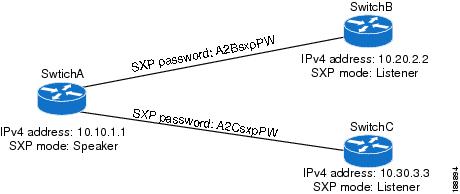
The following example shows how to configure the SXP peer connections on SwitchA:
feature cts
cts role-based enforcement
cts sxp enable
cts sxp connection peer 10.20.2.2 password required A2BsxpPW mode listener
cts sxp connection peer 10.30.3.3 password required A2CsxpPW mode listener
The following example shows how to configure the SXP peer connection on SwitchB:
feature cts
cts role-based enforcement
cts sxp enable
cts sxp connection peer 10.10.1.1 password required A2BsxpPW mode speaker
The following example shows how to configure the SXP peer connection on SwitchC:
feature cts
cts role-based enforcement
cts sxp enable
cts sxp connection peer 10.10.1.1 password required A2CsxpPW mode speaker
Additional References for Cisco TrustSec
This sections provides additional information related to implementing Cisco TrustSec.
Related Documentation
| Related Topic |
Document Title |
|---|---|
| Cisco NX-OS licensing |
Cisco Nexus 7000 Series NX-OS Licensing Guide, Release 4.2 |
Command Reference |
Cisco Nexus 7000 Series NX-OS Security Command Reference, Release 4.2 |
Feature History for Cisco TrustSec
| Feature Name |
Releases |
Feature Information |
|---|---|---|
| Cisco TrustSec |
4.2(1) |
No change from Release 4.1. |
 Feedback