Cisco Nexus Virtual Services Appliance Software Installation and Upgrade Guide, Release 4.2(1)SP1(5.1)
Bias-Free Language
The documentation set for this product strives to use bias-free language. For the purposes of this documentation set, bias-free is defined as language that does not imply discrimination based on age, disability, gender, racial identity, ethnic identity, sexual orientation, socioeconomic status, and intersectionality. Exceptions may be present in the documentation due to language that is hardcoded in the user interfaces of the product software, language used based on RFP documentation, or language that is used by a referenced third-party product. Learn more about how Cisco is using Inclusive Language.
- Updated:
- September 14, 2012
Chapter: Overview
Overview
This chapter describes the Cisco Nexus Virtual Services Appliance and includes the following sections:
Information About Cisco Nexus Virtual Services Appliance
The Cisco Nexus Virtual Services Appliance (VSA) product family includes Cisco Nexus 1010 and Cisco Nexus 1010-X. See the Cisco Nexus Virtual Services Appliance Hardware Installation Guide for more information.
The Cisco Nexus Virtual Services Appliance product family are networking appliances that can host up to six virtual service blades (VSBs) on Cisco Nexus 1010 and up to 10 VSBs on Cisco Nexus 1010-X.
Cisco Nexus Virtual Services Appliance product family supports VSBs like Cisco Nexus 1000V Virtual Supervisor Module (VSM), Network Analysis Module (NAM), and Virtual Security Gateway (VSG). The Cisco Nexus Virtual Services Appliance provides dedicated hardware for the Cisco Nexus 1000V VSM. VSMs that were hosted on VMware virtual machines can now be hosted on a Cisco Nexus Virtual Services Appliance . This allows you to install and manage the VSM like a standard Cisco switch. The services (VSM, VSG, or NAM) managed by the Cisco Nexus Virtual Services Appliance product family are called virtual service blades (VSBs).
See Cisco Nexus Virtual Services Appliance Software Configuration Guide, Release 4.2(1)SP1(5.1) for more information.
Cisco Integrated Management Controller
The Cisco Integrated Management Controller (CIMC) is a software interface included with the Cisco Nexus Virtual Services Appliance. CIMC allows you to configure serial over LAN (SoL) access and set up remote management in the event the device becomes unreachable. For more information about remote management, see the Cisco Nexus Virtual Services Appliance Software Configuration Guide, Release 4.2(1)SP1(5.1) .
When installing the Cisco Nexus Virtual Services Appliance, you have the option to configure the CIMC interface. To configure the CIMC software while installing the Cisco Nexus Virtual Services Appliance, see the Cisco Nexus Virtual Services Appliance Hardware Installation Guide .
Supported PIDs for Cisco Nexus Virtual Services Appliance Product Family
This release supports the following hardware PIDs for the Cisco Nexus Virtual Services Appliance product family.
|
|
|
|---|---|
Software Included
The Cisco Nexus Virtual Services Appliance product family is shipped with the following software.
|
|
|
|
|---|---|---|
Image for the Cisco Nexus 1010 or Cisco Nexus 1010-X Manager virtual machine which manages the shelf and redundancy group configuration. |
nexus-1010.4.2.1.SP1.5.1.iso 1 |
|
Used to create a VSB for the Cisco Nexus 1000V VSM on the Cisco Nexus Virtual Services Appliance product family |
nexus-1000v.4.2.1.SV1.5.1.iso2 |
|
Used to create a VSB for Cisco NAM on the Cisco Nexus Virtual Services Appliance product family |
||
Used to create a VSB for Cisco VSG on the Cisco Nexus Virtual Services Appliance product family. |
||
A software interface that allows you to manage the Cisco Nexus Virtual Services Appliance should it become unreachable. |
Flow Chart: Installing and Configuring the Cisco Nexus Virtual Services Appliance
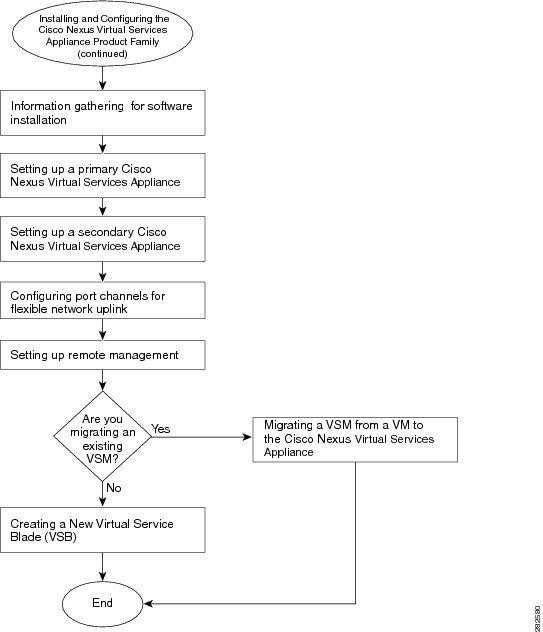
Figure 1-1 and Figure 1-2 show the basic steps for installing and configuring a Cisco Nexus Virtual Services Appliance. To install the Cisco Nexus Virtual Services Appliance hardware see the Cisco Nexus Virtual Services Appliance Hardware Installation Guide . To configure the Cisco Nexus Virtual Services Appliance product family see the Cisco Nexus Virtual Services Appliance Software Configuration Guide, Release 4.2(1)SP1(5.1) .
Figure 1-1 Flow Chart: Installing and Configuring the Cisco Nexus Virtual Services Appliance
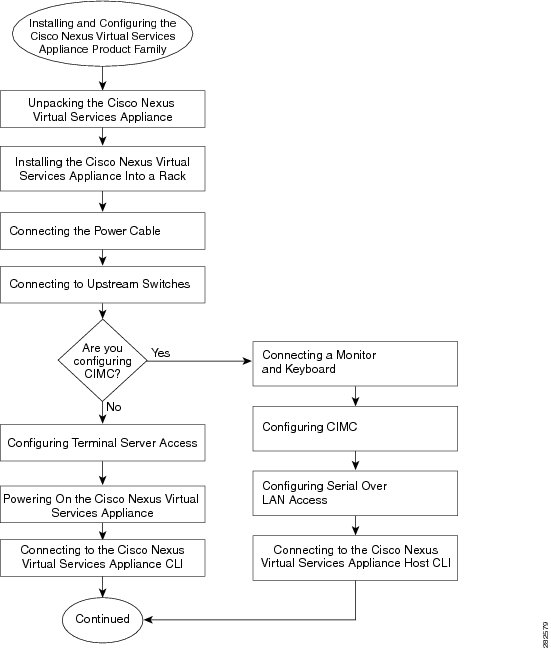
Figure 1-2 Flow Chart: Installing and Configuring the Cisco Nexus Virtual Services Appliance (continued)
 Feedback