- New and Changed Information
- Preface
- Documentation Roadmap
- Introduction
- Getting Started
- Licensing Requirements
- Using configTOOL
- Using perfectHOST
- Ports and Protocols
- KNX Deployment
- Getting Started with Mediator Web Client
- Managing Events
- Managing Security
- Managing Trends
- Managing Schedules
- Customizing HTML Pages with Web Express
- Energywise Manager
- Using Enterprise Navigation Tree
- Global Setpoints
- ADR Client
Getting Started with Mediator Web Client
The Mediator web client is a web-based GUI application that provides easy access to Mediator applications from a remote workstation. The web client displays real-time, onsite data and allows you to remotely monitor and manage the Mediator from a web browser.
You can view current conditions at a site, query and graph trend data points, export trend data, remotely edit system conditions and behavior by adjusting schedules, initiating overrides, changing set points, directly access error logs, alarms, events, and so on, from your work station.
The Mediator web client is a web application that allows you to manage a Mediator. You can connect to the Mediator web client from any PC on a local network, on a remote network, or over the Internet using a standard web browser.
This chapter includes the following sections:
• Launching Mediator Web Client
•Understanding Mediator Web Client
System Requirements
Before you access the Mediator web client, you must verify that your system meets the following recommended prerequisites:
•Browser—Internet Explorer 7, 8 or Mozilla Firefox 3.5 and later
•Browser plug-in—Adobe Flash Player 9 or later
Launching Mediator Web Client
To start the Mediator web client, perform the following steps:
Step 1 Enter the hostname or the IP address of the Mediator in the Address text box of the browser.
Step 2 Press Enter.
The Mediator web client login appears as shown in Figure 8-1.
Figure 8-1 Mediator Web Client Login Page

Step 3 Enter the username and password for the Mediator, and click OK.
The Mediator web client homepage appears in the Internet browser window.
Understanding Mediator Web Client
The Mediator web client is a software suite used to program and configure the Mediator and includes several web-based services that reside on the Mediator. All the software and instructions you need to set up your Mediator system are built into the web client.
Because the Mediator web client uses Dynamically Generated HTML (DGHTML) technology, you can reconfigure the Mediator without requiring a reboot after configuring or editing operations.
The Mediator web client homepage appears as shown in Figure 8-2.
Figure 8-2 Mediator Web Client Homepage
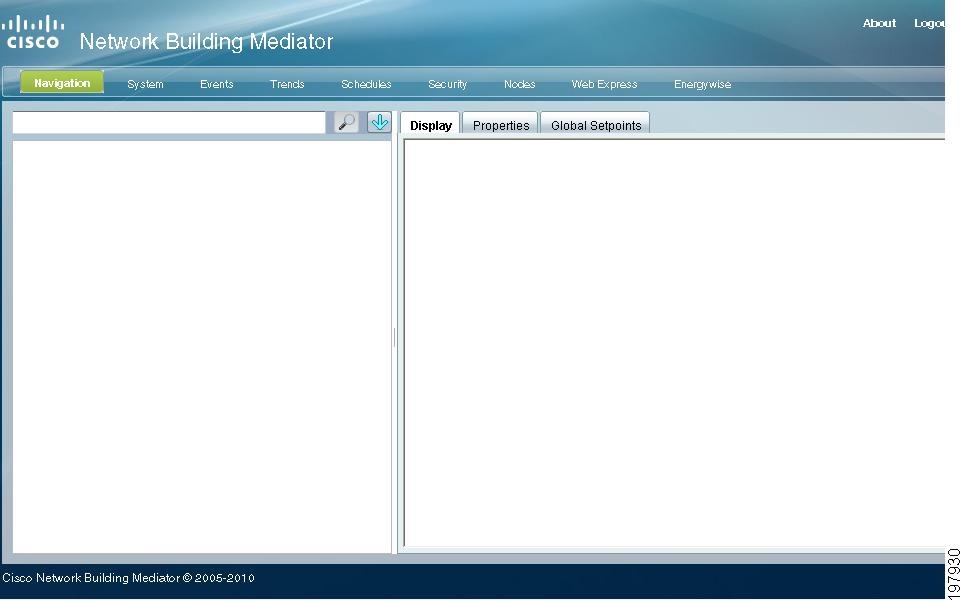
Table 8-1 describes the Mediator web client components.
 Feedback