Feedback
Table Of Contents
SNMP Trap Support for the Virtual Switch Interface Master MIB
Prerequisites for SNMP Trap Support for the Virtual Switch Interface Master MIB
Restrictions for SNMP Trap Support for the Virtual Switch Interface Master MIB
Information About SNMP Trap Support for the Virtual Switch Interface Master MIB
VSI Components That You Can Monitor with the VSI Master MIB
How to Configure SNMP Trap Support for the Virtual Switch Interface Master MIB
Verifying That the SNMP Agent Has Been Enabled
Enabling the VSI Master MIB Traps by Using Commands
Enabling the VSI Master MIB Traps by Using SNMP MIB Objects
Setting Thresholds for Cross-Connects
Configuration Examples for SNMP Trap Support for the Virtual Switch Interface Master MIB
Enabling the SNMP Agent: Example
Enabling the SNMP Agent with a Community String: Example
Enabling the SNMP Agent with Read-Only Access to Access List Members: Example
Enabling Traps and Specifying the Trap Recipient: Example
Feature Information for SNMP Trap Support for the Virtual Switch Interface Master MIB
SNMP Trap Support for the Virtual Switch Interface Master MIB
First Published: May 25, 2001Last Updated: September 12, 2008This feature module explains how to use the virtual switch interface (VSI) Master MIB to monitor and manage ATM switches that are connected to routers through the virtual switch interface.
Finding Feature Information in This Module
Your Cisco IOS software release may not support all of the features documented in this module. For the latest feature information and caveats, see the release notes for your platform and software release. To reach links to specific feature documentation in this module and to see a list of the releases in which each feature is supported, use the "Feature Information for SNMP Trap Support for the Virtual Switch Interface Master MIB" section.
Finding Support Information for Platforms and Cisco IOS and Catalyst OS Software Images
Use Cisco Feature Navigator to find information about platform support and Cisco IOS and Catalyst OS software image support. To access Cisco Feature Navigator, go to http://www.cisco.com/go/cfn. An account on Cisco.com is not required.
Contents
•
Prerequisites for SNMP Trap Support for the Virtual Switch Interface Master MIB
•
•
•
•
•
Prerequisites for SNMP Trap Support for the Virtual Switch Interface Master MIB
Memory Requirements
•
•
Performance
The VSI cross-connect error messages can be invoked hundreds of times every second. To prevent a performance impact on the label switch controller (LSC), enable rate-limiting to control the amount of traffic that passes into or out of an interface.
Restrictions for SNMP Trap Support for the Virtual Switch Interface Master MIB
The VSI Master MIB is for ATM-LSRs running Multiprotocol Label Switching (MPLS).
Information About SNMP Trap Support for the Virtual Switch Interface Master MIB
To configure the SNMP Trap Support for the Virtual Switch Interface Master MIB feature, you should understand the following concepts:
•
VSI Master and Slave
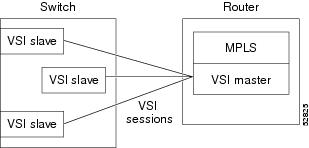
The VSI master is a software module that resides on a router. The VSI master enables an application to control an ATM switch that is connected to the router. The VSI protocol runs between the VSI master and a VSI slave. The VSI master can communicate with more than one slave across a control interface that connects the router to the switch. Each master/slave connection is called a VSI session. Figure 1 illustrates VSI sessions between a VSI master and slaves.
Figure 1 VSI Master and VSI Slaves
VSI Components That You Can Monitor with the VSI Master MIB
The VSI Master MIB allows you to monitor the operation of the switch. It also displays the results of the operations. Specifically, the VSI Master MIB allows you to monitor:
•
•
•
MIB Traps
The VSI Master MIB allows you to enable traps on the following components:
•
•
•
•
•
MIB Objects
The following is a partial list of the supported MIB objects.
Controllers
You can obtain the following information about the controller:
•
•
•
•
•
•
Sessions
You can obtain the following information about the VSI sessions:
•
•
•
•
•
•
Logical Interfaces
Logical interfaces represent external interfaces that are available for connections. When you pair two external interfaces (represented by two logical interfaces), they provide a physical path through the switch. These physical paths support cross-connects. You can gather the following information about each logical interface:
•
•
•
•
•
•
•
•
•
•
•
Cross-Connects
Cross-connects are virtual links across two interfaces. The participating interfaces that support these links are listed in the MIB's vsiLogicalIfTable entries. You can gather the following information about the cross-connects:
•
•
•
•
How to Configure SNMP Trap Support for the Virtual Switch Interface Master MIB
See the following sections for configuration tasks for the VSI Master MIB feature. Each task in the list indicates whether the task is optional or required.
•
•
•
•
Enabling the SNMP Agent
The SNMP agent for the VSI Master MIB is disabled by default. To enable the SNMP agent, perform the steps in this section.
SUMMARY STEPS
1.
2.
3.
4.
5.
6.
DETAILED STEPS
Verifying That the SNMP Agent Has Been Enabled
To verify that the SNMP agent has been enabled, perform the steps in this section.
SUMMARY STEPS
1.
2.
DETAILED STEPS
Enabling Traps
SNMP notifications can be sent as traps or inform requests. A trap is an unsolicited message sent by an SNMP agent to an SNMP manager, indicating that some event has occurred. You can enable SNMP traps for the VSI Master MIB through the command line interface (CLI) or through an SNMP MIB object. The following sections explain these options.
Enabling the VSI Master MIB Traps by Using Commands
To enable SNMP traps, use the snmp-server enable traps command. An SNMP agent can be configured to send traps when one of the VSI Master MIB objects changes. To enable VSI Master MIB traps to be sent from the agent to the manager, perform the following tasks in global configuration mode:
SUMMARY STEPS
1.
2.
3.
4.
5.
DETAILED STEPS
Table 1 lists the CLI commands for enabling traps of specific VSI components.
Enabling the VSI Master MIB Traps by Using SNMP MIB Objects
You can also use MIB objects to specify which VSI components should send traps. To enable all VSI Master traps, use the vsiVSITrapEnable MIB object.
Controller Traps
To enable traps about the status of the controller, use the vsiControllerTrapEnable MIB object. Table 2 lists the MIB objects that are specific to the controller.
Table 2 Controller Traps
A controller is added
vsiControllerAdded
A controller is deleted
vsiControllerDeleted
VSI Session Traps
To enable traps about the status of the VSI sessions, use the vsiSessionTrapEnable MIB object. Table 3 lists the MIB objects that are specific to the VSI sessions.
Table 3 VSI Session Traps
A VSI session is established
vsiSessionUp
A VSI session is disconnected
vsiSessionDown
Logical Interfaces
To enable traps about the status of the logical interfaces, use the vsiLogicalIfTrapEnable MIB object. Table 4 lists the MIB objects that are specific to the logical interfaces.
Table 4 Logical Interface Traps
A logical interface is active
vsiLogicalIfUp
A logical interface fails
vsiLogicalIfDown
Cross-Connects
To enable traps about the status of the cross-connects, use the vsiXCTrapEnable MIB object. Table 5 lists the MIB objects that are specific to the cross-connects.
Setting Thresholds for Cross-Connects
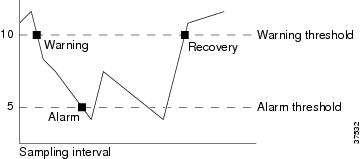
When cross-connects on XtagATM interfaces are created or deleted, a counter keeps a tally of the available logical channel number (LCN) resources. If the LCN resources become too low, the MIB sends messages to alert you of the possibility of resource exhaustion.
You must first set the warning and alarm thresholds for the number of LCNs. To set the warning threshold, use the vsiAvailableChnlWarnThreshold MIB object. To set the alarm threshold, use the vsiAvailableChnlAlarmThreshold MIB object. The following list explains the usage guidelines of these MIB objects:
•
•
•
•
The following list explains the conditions under which warnings, alarms, and other messages are sent. Figure 2 illustrates the thresholds.
•
•
•
•
To prevent an overwhelming number of warnings or alarms from being generated during a sampling period, only one warning or alarm is generated when the number of LCNs falls below the threshold. The number of LCNs must return to normal before another warning or alarm is generated.
Figure 2 Warning and Alarm Thresholds
Note
Configuration Examples for SNMP Trap Support for the Virtual Switch Interface Master MIB
This section provides the following configuration examples:
•
•
•
•
Enabling the SNMP Agent: Example
In the following example, the SNMP agent is enabled.
snmp-server communityEnabling the SNMP Agent with a Community String: Example
In the following example, SNMPv1 and SNMPv2C are enabled. The configuration permits any SNMP manager to access all objects with read-only permissions using the community string public.
snmp-server community publicEnabling the SNMP Agent with Read-Only Access to Access List Members: Example
In the following example, read-only access is granted for all objects to members of access list 4 that specify a community string named comaccess. No other SNMP managers have access to any objects.
snmp-server community comaccess ro 4Enabling Traps and Specifying the Trap Recipient: Example
In the following example VSI Master MIB traps are sent to the host cisco.com. The community string is restricted. The first line enables the router to send VSI Master MIB traps in addition to any traps previously enabled. The second line specifies the destination of these traps and overwrites any previous snmp-server host commands for the host cisco.com.
snmp-server enable traps vsimastersnmp-server host cisco.com restricted vsimasterAdditional References
The following sections provide references related to the SNMP Trap Support for the Virtual Switch Interface Master MIB feature.
Related Documents
ATM commands
MPLS concepts
Multiprotocol Label Switching Overview chapter of the Cisco IOS Multiprotocol Label Switching Configuration Guide, Release 12.4T
Standards
MIBs
CISCO-VSIMASTER-MIB
To locate and download MIBs for selected platforms, Cisco IOS releases, and feature sets, use Cisco MIB Locator found at the following URL:
RFCs
No new or modified RFCs are supported by this feature, and support for existing RFCs has not been modified by this feature.
—
Technical Assistance
Command Reference
The following commands are introduced or modified in the feature or features documented in this module. For information about these commands, see the Cisco IOS Asynchronous Transfer Mode Command Reference at http://www.cisco.com/en/US/docs/ios/atm/command/reference/atm_book.html. For information about all Cisco IOS commands, use the Command Lookup Tool at http://tools.cisco.com/Support/CLILookup or a Cisco IOS master commands list.
•
•
•
Feature Information for SNMP Trap Support for the Virtual Switch Interface Master MIB
Table 6 lists the features in this module and provides links to specific configuration information. Only features that were introduced or modified in Cisco IOS Releases 12.2(1), 12.0(3)S, 12.2(33)SRA, 12.2(33)SXH, or later releases appear in the table.
Not all commands may be available in your Cisco IOS software release. For release information about a specific command, see the command reference documentation.
Use Cisco Feature Navigator to find information about platform support and software image support. Cisco Feature Navigator enables you to determine which Cisco IOS and Catalyst OS software images support a specific software release, feature set, or platform. To access Cisco Feature Navigator, go to http://www.cisco.com/go/cfn. An account on Cisco.com is not required.
Note
Table 6 Feature Information for SNMP Trap Support for the Virtual Switch Interface Master MIB
SNMP Trap Support for the Virtual Switch Interface Master MIB
12.2(2)T, 12.4(20)T
This feature module explains how to use the virtual switch interface (VSI) Master MIB to monitor and manage ATM switches that are connected to routers through the virtual switch interface.
The following sections provide information about this feature:
•
•
•
The following commands were introduced or modified: snmp-server community, snmp-server enable traps, snmp-server host.
Support was removed for this feature in Cisco IOS Release 12.4(20)T and later releases.
Glossary
agent—A process in the device that handles SNMP requests.
alarm—A message that is triggered when defined values cross a given threshold. For instance, you can specify the number of Ethernet collisions, plus a time interval, such as 1 second, and a threshold, such as 60 collisions. Given this scenario, an alarm is generated when the number of Ethernet collisions exceeds 60 in 1 second.
event—The action that is triggered as result of an alarm. Alarms and events are logically connected. For example, when the number of collisions on an Ethernet segment exceeds 60 per second, the corresponding event can cause a trap message to be sent to one or more management stations.
An event is generated by the RMON agent, which could be triggered by a threshold crossing. An event can be signaled as a trap, a new entry in the MIB log table, both, or neither.
inform request—A message sent by an SNMP agent to a network management station, console, or terminal to indicate that a significant event occurred. SNMP inform requests are more reliable than traps because an inform request acknowledges the message with an SNMP response protocol data unit (PDU). If the manager does not receive an inform request, it does not send a response. If the sender never receives a response, the inform request can be sent again. Thus, informs are more likely to reach their intended destination.
Management Information Base—See MIB.
MIB-Management Information Base. Database of network management information that is used and maintained by a network management protocol such as SNMP. The value of a MIB object can be changed or retrieved by SNMP commands, usually through a network management system. MIB objects are organized in a tree structure that includes public (standard) and private (proprietary) branches.
MPLS—Multiprotocol label switching. MPLS is a method for forwarding packets (frames) through a network. It enables routers at the edge of a network to apply labels to packets (frames). ATM switches or existing routers in the network core can switch packets according to the labels.
Multiprotocol Label switching—See MPLS.
Simple Network Management Protocol—See SNMP.
SNMP—Simple Network Management Protocol. Management protocol used almost exclusively in TCP/IP networks. SNMP provides a means to monitor and control network devices, and to manage configurations, statistics collection, performance, and security.
threshold—The range in which you expect your network to perform. If a performance exceeds or goes below the expected bounds, you can examine these areas for potential problems. You can create thresholds for a specific device.
trap—Message sent by an SNMP agent to a network management station, console, or terminal to indicate that a significant event occurred. Traps are less reliable than inform requests, because the receiver does not send an acknowledgment when it receives a trap. The sender cannot determine if the trap was received.
VSI—Virtual Switch Interface. A proposed common control interface to Cisco switches. The VSI can manage connections and discover configuration information about the switch.
VSI controller—A controller, such as a PNNI SVC controller, Portable AutoRoute or MPLS controller, that controls a switch using the VSI.
VSI master—A process implementing the master side of the VSI protocol in a VSI controller. Sometimes the whole VSI controller might be referred to as a "VSI Master," but this is not strictly correct. Also, the VSI master is a device that controls a VSI switch, for example, a VSI Label Switch Controller.
VSI slave—A VSI slave is either of the following:
1.
2.
CCDE, CCENT, Cisco Eos, Cisco HealthPresence, the Cisco logo, Cisco Lumin, Cisco Nexus, Cisco StadiumVision, Cisco TelePresence, Cisco WebEx, DCE, and Welcome to the Human Network are trademarks; Changing the Way We Work, Live, Play, and Learn and Cisco Store are service marks; and Access Registrar, Aironet, AsyncOS, Bringing the Meeting To You, Catalyst, CCDA, CCDP, CCIE, CCIP, CCNA, CCNP, CCSP, CCVP, Cisco, the Cisco Certified Internetwork Expert logo, Cisco IOS, Cisco Press, Cisco Systems, Cisco Systems Capital, the Cisco Systems logo, Cisco Unity, Collaboration Without Limitation, EtherFast, EtherSwitch, Event Center, Fast Step, Follow Me Browsing, FormShare, GigaDrive, HomeLink, Internet Quotient, IOS, iPhone, iQuick Study, IronPort, the IronPort logo, LightStream, Linksys, MediaTone, MeetingPlace, MeetingPlace Chime Sound, MGX, Networkers, Networking Academy, Network Registrar, PCNow, PIX, PowerPanels, ProConnect, ScriptShare, SenderBase, SMARTnet, Spectrum Expert, StackWise, The Fastest Way to Increase Your Internet Quotient, TransPath, WebEx, and the WebEx logo are registered trademarks of Cisco Systems, Inc. and/or its affiliates in the United States and certain other countries.
All other trademarks mentioned in this document or website are the property of their respective owners. The use of the word partner does not imply a partnership relationship between Cisco and any other company. (0812R)
Any Internet Protocol (IP) addresses used in this document are not intended to be actual addresses. Any examples, command display output, and figures included in the document are shown for illustrative purposes only. Any use of actual IP addresses in illustrative content is unintentional and coincidental.
© 2001, 2009 Cisco Systems, Inc. All rights reserved.