



 Feedback
Contents
- Frame Relay Point-Multipoint Wireless
- Finding Feature Information
- Feature Overview
- Benefits
- Restrictions
- Related Features and Technologies
- Related Documents
- Supported Platforms
- Supported Standards and MIBs and RFCs
- Prerequisites
- Configuration Tasks
- Creating the Virtual Frame Relay Interface
- Verifying Virtual Frame Relay
- Troubleshooting Tips
- Configuration Examples
- Headend Example
- Subscriber Unit Example
Frame Relay Point-Multipoint Wireless
Feature History
|
Release |
Modification |
|---|---|
|
Prior to 12.2(2)T |
This feature was introduced on various platforms. |
|
12.2(2)T |
Support for this feature was added to multipoint fixed wireless. |
This feature module describes Frame Relay support for multipoint fixed wireless. It includes information on the benefits of the new feature, supported platforms, related documents, and other information.
Finding Feature Information
Your software release may not support all the features documented in this module. For the latest feature information and caveats, see the release notes for your platform and software release. To find information about the features documented in this module, and to see a list of the releases in which each feature is supported, see the Feature Information Table at the end of this document.
Use Cisco Feature Navigator to find information about platform support and Cisco software image support. To access Cisco Feature Navigator, go to www.cisco.com/go/cfn. An account on Cisco.com is not required.
Feature Overview
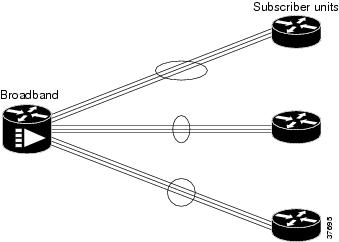
This feature provides an end-to-end Frame Relay network for customers using wireless interfaces in their Frame Relay network. Several new commands are used to establish a virtual Frame Relay interface, then link it to a specific multipoint destination MAC address. The configuration information is associated with a new interface type, virtual Frame Relay and new interface commands, interface virtual-framerelay and frame-relay over radio.
Using the new interface enables Cisco uBR7200 series, Cisco 3600 series, and Cisco 2600 series routers to provide a seamless transition from a serial interface to a multipoint Frame Relay interface. By implementing RFC 1315, Frame Relay DTE MIB, a virtual Frame Relay interface can be linked to a specific multipoint radio interface and destination MAC address. The headend router acts as a Frame Relay switch, receiving radio frequency signals from subscriber units. Once received, the multipoint link is switched to a serial link and then to an upstream router.
Benefits
This feature provides a seamless extension of Frame Relay services over fixed wireless. The look and feel of the interface is consistent with existing Frame Relay services.
The existing Frame Relay infrastructure is leveraged by creating a virtual interface. No hardware upgrade is required.
Restrictions
The wireless network module must be installed and configured correctly and use the Cisco IOS Release 12.2(2)T image. The virtual Frame Relay interface is used only in conjunction with the multipoint radio interface. It cannot be used in conjunction with the cable interface.
Frame Relay over fixed wireless offers a lower payload than over a serial interface. The payload is 1488 bytes compared to 1500 bytes when Frame Relay is on a serial link.
Related Features and Technologies
The multipoint fixed wireless interface must be used to take advantage of the new functionality.
Related Documents
For detailed information about Cisco multipoint wireless support on the Cisco uBR7200 series universal broadband routers, and the Cisco 2600 series and Cisco 3600 series routers, see the following documents:
Headend Documents
- Cisco uBR7200 Series Multipoint Wireless Modem Card and Subsystem Installation
- Cisco Multipoint Headend Wireless Transverter Duplexer Replacement Instructions
- Cisco Multipoint Headend Power Feed Panel Replacement Instructions
- Cisco Multipoint Headend Wireless Transverter Replacement Instructions
- Multipoint Wireless Support for Cisco uBR7200 Series Universal Broadband Router
Subscriber Unit Documents
- Multipoint Wireless Support for the Cisco 2600 and Cisco 3600 Series Routers
- Cisco 2600 Series Hardware Installation Guide
- Software Configuration Guide (for Cisco 3600 series and Cisco 2600 series routers)
- Cisco Network Modules Hardware Installation Guide (for Cisco 3600 series and Cisco 2600 series routers)
Supported Platforms
The Frame Relay Point-Multipoint Wireless feature is supported on following platforms:
- Cisco 2610
- Cisco 2611
- Cisco 2620
- Cisco 2621
- Cisco 2650
- Cisco 2651
- Cisco 3620
- Cisco 3640
- Cisco 3661
- Cisco 3662
- Cisco uBR7223
- Cisco uBR7246
- Cisco uBR7246 VXR
Supported Standards and MIBs and RFCs
Standards
DOCSIS 1.0 and 1.0+. The DOCSIS 1.0+ implementation is DOCSIS 1.0 with quality-of-service (QoS) support.
MIBs
This feature is supported by:
- Cisco uBR7200 series MIBs and DOCSIS MIBs
- Frame Relay DTE MIB (RFC 1315)
To obtain lists of supported MIBs by platform and Cisco IOS release, and to download MIB modules, go to the Cisco MIB web site on cisco.com at the following URL:
http://www.cisco.com/public/sw-center/netmgmt/cmtk/mibs.shtml .
Configuration Tasks
Creating the Virtual Frame Relay Interface
To create a virtual Frame Relay interface, enter these commands beginning in the global configuration mode:
DETAILED STEPS
| Command or Action | Purpose | |
|---|---|---|
Step 1 |
Router(config)# interface virtual-framerelaynumber |
Creates the virtual Frame Relay interface and assigns a number to the interface. |
Step 2 |
Router(config-if)# frame-relay over radiointerface destination |
Identifies the slot and port numbers of the interface. |
Configuration Examples
Headend Example
The example shows the virtual Frame Relay interface being created. The number assigned at the end of the interface virtual-framerelay command is the number assigned to the virtual interface. The frame-relay over radio command is used to link the interface to a specific MAC address after the interface has been created.
!
interface virtual-framerelay1
 ip address 10.6.24.20 255.255.0.0
 frame-relay map ip 11.6.24.21 16
 frame-relay intf-type dce
 frame-relay route 100 interface Hssi1/0 100
 frame-relay route 200 interface Hssi1/0 300
 frame-relay over Radio3/0 0002.b905.fc30
!
interface virtual-framerelay2
 ip address 10.30.36.12 255.255.255.0
 frame-relay map ip 11.30.36.12 16
 frame-relay intf-type dce
 frame-relay route 100 interface Hssi1/0 200
 frame-relay route 200 interface Hssi1/0 400
 frame-relay over Radio3/0 0002.fd50.bf90
interface Hssi1/0
 no ip address
 encapsulation frame-relay
 no ip mroute-cache
 hssi internal-clock
 frame-relay lmi-type cisco
 frame-relay intf-type dce
 frame-relay route 100 interface Virtual-FrameRelay1 100
 frame-relay route 200 interface Virtual-FrameRelay2 100
 frame-relay route 300 interface Virtual-FrameRelay1 200
 frame-relay route 400 interface Virtual-FrameRelay2 200
!
interface radio3/0 point-to-multipoint
 ip address 10.30.38.0 255.255.255.0
 no ip mroute-cache
 no keepalive
 radio cable-loss 1 4 1
 radio transmit-power 31
 radio upstream frequency 2156000 width 6.0
 radio upstream 0 subchannel 3 modulation-profile 8
 radio upstream 0 target-receive-power -72
 no radio upstream 0 shutdown
 radio upstream 1 target-receive-power -72
 radio upstream 1 shutdown
 radio upstream 2 target-receive-power -72
 radio upstream 2 shutdown
 radio upstream 3 target-receive-power -72
 radio upstream 3 shutdown
 radio downstream frequency 2530000 width 6.0
 radio downstream subchannel 2 modulation-profile 1
 radio su-onoff-trap interval 600
interface virtual-frameRelay1
Virtual-FrameRelay1 is up, line protocol is up
  Hardware is Virtual Frame Relay interface
  MTU 1488 bytes, BW 100000 Kbit, DLY 100000 usec,
     reliability 255/255, txload 1/255, rxload 1/255
  Encapsulation FRAME-RELAY, loopback not set
  Keepalive set (10 sec)
  LMI enq sent  0, LMI stat recvd 0, LMI upd recvd 0
  LMI enq recvd 1175, LMI stat sent  1175, LMI upd sent  0, DCE LMI up
  LMI DLCI 1023  LMI type is CISCO  frame relay DCE
  Broadcast queue 0/64, broadcasts sent/dropped 0/0, interface broadcasts 0
  Last input 00:00:07, output never, output hang never
  Last clearing of "show interface" counters 4d03h
  Queueing strategy:fifo
  Output queue 0/40, 0 drops; input queue 0/75, 0 drops
  5 minute input rate 9000 bits/sec, 2 packets/sec
  5 minute output rate 0 bits/sec, 0 packets/sec
2094 packets input, 229655 bytes, 0 no buffer
     Received 0 broadcasts, 0 runts, 0 giants, 0 throttles
     0 input errors, 0 CRC, 0 frame, 0 overrun, 0 ignored, 0 abort
     1175 packets output, 66954 bytes, 0 underruns
     0 output errors, 0 collisions, 0 interface resets
     0 output buffer failures, 0 output buffers swapped out
     0 carrier transitions
Subscriber Unit Example
The example shows the interface virtual-framerelay command being used on the subscriber unit to create the virtual Frame Relay interface. The frame-relay over radio command is used to link the interface to a specific MAC address, after the interface has been created.
interface virtual-framerelay1
 ip address 11.6.24.21 255.255.0.0
 frame-relay over Radio1/0 0030.80ac.a054
!
interface virtual-framerelay
1.1 point-to-point
 ip address 192.168.0.0 255.255.255.0
 no cdp enable
 frame-relay interface-dlci 100
!
interface virtual-framerelay
1.2 multipoint
 ip address 192.168.1.1 255.255.255.0
 frame-relay map ip 192.168.1.0 200
!
interface radio1/0 point-to-multipoint
 ip address docsis
 no ip route-cache
 no ip dvmrp auto-summary
 no ip mroute-cache
 docsis boot admin 2
 docsis boot oper 5
 docsis upstream channel 1 only
 docsis mac-timer t2 180000
 no docsis compliant bridge
 radio cable-loss 1 2 1
 no cdp enable
show interface virtual-frameRelay1
Virtual-FrameRelay1 is up, line protocol is up
  Hardware is Virtual Frame Relay interface
  MTU 1488 bytes, BW 100000 Kbit, DLY 100000 usec,
     reliability 255/255, txload 1/255, rxload 1/255
  Encapsulation FRAME-RELAY, loopback not set
  Keepalive set (10 sec)
  LMI enq sent  1579, LMI stat recvd 1224, LMI upd recvd 0, DTE LMI up
  LMI enq recvd 0, LMI stat sent  0, LMI upd sent  0
  LMI DLCI 1023  LMI type is CISCO  frame relay DTE
  Broadcast queue 0/64, broadcasts sent/dropped 0/0, interface broadcasts 0
  Last input 00:00:08, output never, output hang never
  Last clearing of "show interface" counters 4d03h
  Queueing strategy:fifo
  Output queue 0/40, 0 drops; input queue 0/75, 0 drops
  3 minutes, 30 seconds input rate 0 bits/sec, 0 packets/sec
  3 minutes, 30 seconds output rate 0 bits/sec, 0 packets/sec
     1984 packets input, 395391 bytes, 0 no buffer
     Received 0 broadcasts, 0 runts, 0 giants, 0 throttles
     0 input errors, 0 CRC, 0 frame, 0 overrun, 0 ignored, 0 abort
     2474 packets output, 875444 bytes, 0 underruns
     0 output errors, 0 collisions, 0 interface resets
     0 output buffer failures, 0 output buffers swapped out
     0 carrier transitions
Cisco and the Cisco Logo are trademarks of Cisco Systems, Inc. and/or its affiliates in the U.S. and other countries. A listing of Cisco's trademarks can be found at www.cisco.com/go/trademarks. Third party trademarks mentioned are the property of their respective owners. The use of the word partner does not imply a partnership relationship between Cisco and any other company. (1005R)
Any Internet Protocol (IP) addresses and phone numbers used in this document are not intended to be actual addresses and phone numbers. Any examples, command display output, network topology diagrams, and other figures included in the document are shown for illustrative purposes only. Any use of actual IP addresses or phone numbers in illustrative content is unintentional and coincidental.