



 Feedback
Contents
- Configuring IP SLAs UDP Echo Operations
- Finding Feature Information
- Restrictions for IP SLAs UDP Echo Operations
- Information About IP SLAs UDP Echo Operations
- UDP Echo Operation
- How to Configure IP SLAs UDP Echo Operations
- Configuring the IP SLAs Responder on the Destination Device
- Configuring a UDP Echo Operation on the Source Device
- Configuring a Basic UDP Echo Operation on the Source Device
- Configuring a UDP Echo Operation with Optional Parameters on the Source Device
- Scheduling IP SLAs Operations
- Troubleshooting Tips
- What to Do Next
- Configuration Examples for IP SLAs UDP Echo Operations
- Example Configuring a UDP Echo Operation
- Additional References
- Feature Information for the IP SLAs UDP Echo Operation
Configuring IP SLAs UDP Echo Operations
This module describes how to configure an IP Service Level Agreements (SLAs) User Datagram Protocol (UDP) Echo operation to monitor end-to-end response time between a Cisco router and devices using IPv4 or IPv6. UDP echo accuracy is enhanced by using the IP SLAs Responder at the destination Cisco router. This module also demonstrates how the results of the UDP echo operation can be displayed and analyzed to determine how a UDP application is performing.
Finding Feature Information
Your software release may not support all the features documented in this module. For the latest feature information and caveats, see the release notes for your platform and software release. To find information about the features documented in this module, and to see a list of the releases in which each feature is supported, see the Feature Information Table at the end of this document.
Use Cisco Feature Navigator to find information about platform support and Cisco software image support. To access Cisco Feature Navigator, go to http://www.cisco.com/go/cfn. An account on Cisco.com is not required.
Restrictions for IP SLAs UDP Echo Operations
We recommend using a Cisco networking device as the destination device, although any networking device that supports RFC 862, Echo Protocol , can be used.
Information About IP SLAs UDP Echo Operations
UDP Echo Operation
The UDP echo operation measures end-to-end response time between a Cisco router and devices using IP. UDP is a transport layer (Layer 4) Internet protocol that is used for many IP services. UDP echo is used to measure response times and test end-to-end connectivity.
In the figure below Router A has been configured as an IP SLAs Responder and Router B is configured as the source IP SLAs device.
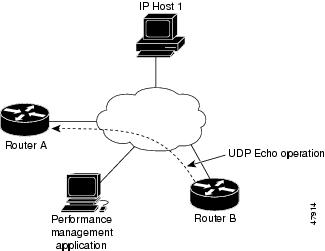
Response time (round-trip time) is computed by measuring the time taken between sending a UDP echo request message from Router B to the destination router--Router A--and receiving a UDP echo reply from Router A. UDP echo accuracy is enhanced by using the IP SLAs Responder at Router A, the destination Cisco router. If the destination router is a Cisco router, then IP SLAs sends a UDP datagram to any port number that you specified. Using the IP SLAs Responder is optional for a UDP echo operation when using Cisco devices. The IP SLAs Responder cannot be configured on non-Cisco devices.
The results of a UDP echo operation can be useful in troubleshooting issues with business-critical applications by determining the round-trip delay times and testing connectivity to both Cisco and non-Cisco devices.
How to Configure IP SLAs UDP Echo Operations
- Configuring the IP SLAs Responder on the Destination Device
- Configuring a UDP Echo Operation on the Source Device
- Scheduling IP SLAs Operations
Configuring the IP SLAs Responder on the Destination Device
If you are using the IP SLAs Responder, ensure that the networking device to be used as the responder is a Cisco device and that you have connectivity to that device through the network.
DETAILED STEPS
Configuring a UDP Echo Operation on the Source Device
Perform only one of the following tasks:
- Configuring a Basic UDP Echo Operation on the Source Device
- Configuring a UDP Echo Operation with Optional Parameters on the Source Device
Configuring a Basic UDP Echo Operation on the Source Device
If you are using the IP SLAs Responder, ensure that you have completed the "Configuring the IP SLAs Responder on the Destination Device" section before you start this task.
DETAILED STEPS
Configuring a UDP Echo Operation with Optional Parameters on the Source Device
If you are using the IP SLAs Responder, ensure that you have completed the "Configuring the IP SLAs Responder on the Destination Device" section before you start this task.
DETAILED STEPS
Scheduling IP SLAs Operations

- ip sla schedule operation-number [life {forever | seconds}] [start-time {hh : mm[: ss] [month day | day month] | pending | now | after hh : mm : ss}] [ageout seconds] [recurring]
- ip sla group schedule group-operation-number operation-id-numbers schedule-period schedule-period-range [ageout seconds] [frequency group-operation-frequency] [life{forever | seconds}] [start-time{hh:mm[:ss] [month day | day month] | pending | now | after hh:mm:ss}]
DETAILED STEPS
Troubleshooting Tips
- If the IP SLAs operation is not running and generating statistics, add the verify-data command to the configuration of the operation (while configuring in IP SLA configuration mode) to enable data verification. When enabled, each operation response is checked for corruption. Use the verify-data command with caution during normal operations because it generates unnecessary overhead.
- Use the debugipsla trace and debug ip sla error commands to help troubleshoot issues with an IP SLAs operation.
What to Do Next
To add proactive threshold conditions and reactive triggering for generating traps, or for starting another operation, to an IP SLAs operation, see the "Configuring Proactive Threshold Monitoring" section.
To view and interpret the results of an IP SLAs operation use the show ip sla statistics command. Checking the output for fields that correspond to criteria in your service level agreement will help you determine whether the service metrics are acceptable.
Additional References
Related Documents
MIBs
Technical Assistance
|
Description |
Link |
|---|---|
|
The Cisco Support and Documentation website provides online resources to download documentation, software, and tools. Use these resources to install and configure the software and to troubleshoot and resolve technical issues with Cisco products and technologies. Access to most tools on the Cisco Support and Documentation website requires a Cisco.com user ID and password. |
Feature Information for the IP SLAs UDP Echo Operation
The following table provides release information about the feature or features described in this module. This table lists only the software release that introduced support for a given feature in a given software release train. Unless noted otherwise, subsequent releases of that software release train also support that feature.
Use Cisco Feature Navigator to find information about platform support and Cisco software image support. To access Cisco Feature Navigator, go to http://www.cisco.com/go/cfn. An account on Cisco.com is not required.
|
Feature Name |
Releases |
Feature Information |
|---|---|---|
|
IP SLAs UDP Jitter Operation |
12.2(31)SB2 12.2(33)SRB1 12.2(33)SXH 12.3(14)T 15.0(1)S Cisco IOS XE 3.1.0SG |
The Cisco IOS IP SLAs User Datagram Protocol (UDP) jitter operation allows you to measure round-trip delay, one-way delay, one-way jitter, one-way packet loss, and connectivity in networks that carry UDP traffic. |
|
IPv6 - IP SLAs (UDP Jitter, UDP Echo, ICMP Echo, TCP Connect) |
12.2(33)SRC 12.2(33)SB 12.4(20)T Cisco IOS XE 3.1.0SG |
Support was added for operability in IPv6 networks. |
Cisco and the Cisco Logo are trademarks of Cisco Systems, Inc. and/or its affiliates in the U.S. and other countries. A listing of Cisco's trademarks can be found at www.cisco.com/go/trademarks. Third party trademarks mentioned are the property of their respective owners. The use of the word partner does not imply a partnership relationship between Cisco and any other company. (1005R)
Any Internet Protocol (IP) addresses and phone numbers used in this document are not intended to be actual addresses and phone numbers. Any examples, command display output, network topology diagrams, and other figures included in the document are shown for illustrative purposes only. Any use of actual IP addresses or phone numbers in illustrative content is unintentional and coincidental.