This module describes the basic tasks to configure a basic Border Gateway Protocol (BGP) network. BGP is an interdomain routing protocol that is designed to provide loop-free routing between organizations. The Cisco IOS implementation of the neighbor and address family commands is explained. This module also contains tasks to configure and customize BGP peers, implement BGP route aggregation, configure BGP route origination, and define BGP backdoor routes. BGP peer group definition is documented, peer session templates are introduced, and update groups are explained,
Your software release may not support all the features documented in this module. For the latest caveats and feature information, see
Bug Search Tool and the release notes for your platform and software release. To find information about the features documented in this module, and to see a list of the releases in which each feature is supported, see the feature information table at the end of this module.
Use Cisco Feature Navigator to find information about platform support and Cisco software image support. To access Cisco Feature Navigator, go to
www.cisco.com/go/cfn. An account on Cisco.com is not required.
Prerequisites for Configuring a Basic BGP Network
Before configuring a basic BGP network, you should be familiar with the “Cisco BGP Overview” module.
Restrictions for Configuring a Basic BGP Network
A device that runs Cisco software can be configured to run only one BGP routing process and to be a member of only one BGP autonomous system. However, a BGP routing process and autonomous system can support multiple address family configurations.
Cisco Implementation of BGP Global and Address Family Configuration Commands
The address family model for configuring BGP is based on splitting apart the configuration for each address family. All commands that are independent of the address family are grouped together at the beginning (highest level) of the configuration, and these are followed by separate submodes for commands specific to each address family (with the exception that commands relating to IPv4 unicast can also be entered at the beginning of the configuration). When a network operator configures BGP, the flow of BGP configuration categories is represented by the following bullets in order:
Global configuration—Configuration that is applied to BGP in general, rather than to specific neighbors. For example, the
network,
redistribute, and
bgpbestpath commands.
Address family-dependent configuration—Configuration that applies to a specific address family such as policy on an individual neighbor.
The relationship between BGP global and BGP address family-dependent configuration categories is shown in the table below.
Table 1 Relationships Between BGP Configuration Categories
BGP Configuration Category
Configuration Sets Within Category
Global address family-independent
One set of global address family-independent configurations
Address family-dependent
One set of global address family-dependent configurations per address family
Note
Address family configuration must be entered within the address family submode to which it applies.
The following is an example of BGP configuration statements showing the grouping of global address family-independent and address family-dependent commands.
router bgp <AS>
! AF independent part
neighbor <ip-address> <command> ! Session config; AF independent
address-family ipv4 unicast
! AF dependant part
neighbor <ip-address> <command> ! Policy config; AF dependant
exit-address-family
address-family ipv4 multicast
! AF dependant part
neighbor <ip-address> <command> ! Policy config; AF dependant
exit-address-family
address-family ipv4 unicast vrf <vrf-name>
! VRF specific AS independent commands
! VRF specific AS dependant commands
neighbor <ip-address> <command> ! Session config; AF independent
neighbor <ip-address> <command> ! Policy config; AF dependant
exit-address-family
The following example shows actual BGP commands that match the BGP configuration statements in the previous example:
The
bgpupgrade-cli command simplifies the migration of BGP networks and existing configurations from the network layer reachability information (NLRI) format to the address family format. Network operators can configure commands in the address family identifier (AFI) format and save these command configurations to existing NLRI formatted configurations. The BGP hybrid command-line interface (CLI) does not add support for complete AFI and NLRI integration because of the limitations of the NLRI format. For complete support of AFI commands and features, we recommend upgrading existing NLRI configurations with the
bgpupgrade-cli command. For an example of migrating BGP configurations from the NLRI format to the address family format, see the “Example: NLFI to AFI Configuration” section later in this module.
Conditional BGP Route Injection
Routes that are advertised through the BGP are commonly aggregated to minimize the number of routes that are used and reduce the size of global routing tables. However, common route aggregation can obscure more specific routing information that is more accurate but not necessary to forward packets to their destinations. Routing accuracy is obscured by common route aggregation because a prefix that represents multiple addresses or hosts over a large topological area cannot be accurately reflected in a single route. Cisco software provides several methods by which you can originate a prefix into BGP. Prior to the BGP conditional route injection feature, the existing methods included redistribution and using the
network or
aggregate-address command. However, these methods assume the existence of more specific routing information (matching the route to be originated) in either the routing table or the BGP table.
BGP conditional route injection allows you to originate a prefix into a BGP routing table without the corresponding match. This feature allows more specific routes to be generated based on administrative policy or traffic engineering information in order to provide more specific control over the forwarding of packets to these more specific routes, which are injected into the BGP routing table only if the configured conditions are met. Enabling this feature will allow you to improve the accuracy of common route aggregation by conditionally injecting or replacing less specific prefixes with more specific prefixes. Only prefixes that are equal to or more specific than the original prefix may be injected. BGP conditional route injection is enabled with the
bgpinject-mapexist-mapcommand and uses two route maps (inject map and exist map) to install one (or more) more specific prefixes into a BGP routing table. The exist map specifies the prefixes that the BGP speaker will track. The inject map defines the prefixes that will be created and installed into the local BGP table.
BGP Update Group
The introduction of the BGP (dynamic) update group provides a different type of BGP peer grouping from existing BGP peer groups. Existing peer groups are not affected but peers with the same outbound policy configured that are not members of a current peer group can be grouped into an update group. The members of this update group will use the same update generation engine. When BGP update groups are configured an algorithm dynamically calculates the BGP update group membership based on outbound policies. Optimal BGP update message generation occurs automatically and independently. BGP neighbor configuration is no longer restricted by outbound routing policies, and update groups can belong to different address families.
BGP Dynamic Update Group Configuration
In Cisco IOS Release 12.0(24)S, 12.2(18)S, 12.3(4)T, 12.2(27)SBC, and later releases, a new algorithm was introduced that dynamically calculates and optimizes update groups of neighbors that share the same outbound policies and can share the same update messages. No configuration is required to enable the BGP dynamic update group and the algorithm runs automatically. When a change to outbound policy occurs, the router automatically recalculates update group memberships and applies the changes by triggering an outbound soft reset after a 1-minute timer expires. This behavior is designed to provide the network operator with time to change the configuration if a mistake is made. You can manually enable an outbound soft reset before the timer expires by entering the clearipbgpip-addresssoftoutcommand.
Note
In Cisco IOS Release 12.0(22)S, 12.2(14)S, 12.3(2)T, and prior releases, the update group recalculation delay timer is set to 3 minutes.
For the best optimization of BGP update group generation, we recommend that the network operator keeps outbound routing policy the same for neighbors that have similar outbound policies.
BGP Peer Templates
To address some of the limitations of peer groups such as configuration management, BGP peer templates were introduced to support the BGP update group configuration.
A peer template is a configuration pattern that can be applied to neighbors that share policies. Peer templates are reusable and support inheritance, which allows the network operator to group and apply distinct neighbor configurations for BGP neighbors that share policies. Peer templates also allow the network operator to define very complex configuration patterns through the capability of a peer template to inherit a configuration from another peer template.
There are two types of peer templates:
Peer session templates are used to group and apply the configuration of general session commands that are common to all address family and NLRI configuration modes.
Peer policy templates are used to group and apply the configuration of commands that are applied within specific address families and NLRI configuration modes.
Peer templates improve the flexibility and enhance the capability of neighbor configuration. Peer templates also provide an alternative to peer group configuration and overcome some limitations of peer groups. BGP peer routers using peer templates also benefit from automatic update group configuration. With the configuration of the BGP peer templates and the support of the BGP dynamic update peer groups, the network operator no longer needs to configure peer groups in BGP and the network can benefit from improved configuration flexibility and faster convergence.
Note
A BGP neighbor cannot be configured to work with both peer groups and peer templates. A BGP neighbor can be configured to belong only to a peer group or to inherit policies from peer templates.
The following restrictions apply to the peer policy templates:
A peer policy template can directly or indirectly inherit up to eight peer policy templates.
A BGP neighbor cannot be configured to work with both peer groups and peer templates. A BGP neighbor can be configured to belong only to a peer group or to inherit policies only from peer templates.
Inheritance in Peer Templates
The inheritance capability is a key component of peer template operation. Inheritance in a peer template is similar to node and tree structures commonly found in general computing, for example, file and directory trees. A peer template can directly or indirectly inherit the configuration from another peer template. The directly inherited peer template represents the tree in the structure. The indirectly inherited peer template represents a node in the tree. Because each node also supports inheritance, branches can be created that apply the configurations of all indirectly inherited peer templates within a chain back to the directly inherited peer template or the source of the tree.
This structure eliminates the need to repeat configuration statements that are commonly reapplied to groups of neighbors because common configuration statements can be applied once and then indirectly inherited by peer templates that are applied to neighbor groups with common configurations. Configuration statements that are duplicated separately within a node and a tree are filtered out at the source of the tree by the directly inherited template. A directly inherited template will overwrite any indirectly inherited statements that are duplicated in the directly inherited template.
Inheritance expands the scalability and flexibility of neighbor configuration by allowing you to chain together peer templates configurations to create simple configurations that inherit common configuration statements or complex configurations that apply very specific configuration statements along with common inherited configurations. Specific details about configuring inheritance in peer session templates and peer policy templates are provided in the following sections.
When BGP neighbors use inherited peer templates it can be difficult to determine which policies are associated with a specific template. The
detail keyword was added to the
showipbgptemplatepeer-policy command to display the detailed configuration of local and inherited policies associated with a specific template.
Peer Session Templates
Peer session templates are used to group and apply the configuration of general session commands to groups of neighbors that share session configuration elements. General session commands that are common for neighbors that are configured in different address families can be configured within the same peer session template. Peer session templates are created and configured in peer session configuration mode. Only general session commands can be configured in a peer session template. The following general session commands are supported by peer session templates:
description
disable-connected-check
ebgp-multihop
exitpeer-session
inheritpeer-session
local-as
password
remote-as
shutdown
timers
translate-update
update-source
version
General session commands can be configured once in a peer session template and then applied to many neighbors through the direct application of a peer session template or through indirect inheritance from a peer session template. The configuration of peer session templates simplifies the configuration of general session commands that are commonly applied to all neighbors within an autonomous system.
Peer session templates support direct and indirect inheritance. A peer can be configured with only one peer session template at a time, and that peer session template can contain only one indirectly inherited peer session template.
Note
If you attempt to configure more than one inherit statement with a single peer session template, an error message will be displayed.
This behavior allows a BGP neighbor to directly inherit only one session template and indirectly inherit up to seven additional peer session templates. This allows you to apply up to a maximum of eight peer session configurations to a neighbor: the configuration from the directly inherited peer session template and the configurations from up to seven indirectly inherited peer session templates. Inherited peer session configurations are evaluated first and applied starting with the last node in the branch and ending with the directly applied peer session template configuration at the source of the tree. The directly applied peer session template will have priority over inherited peer session template configurations. Any configuration statements that are duplicated in inherited peer session templates will be overwritten by the directly applied peer session template. So, if a general session command is reapplied with a different value, the subsequent value will have priority and overwrite the previous value that was configured in the indirectly inherited template. The following examples illustrate the use of this feature.
In the following example, the general session command remote-as1 is applied in the peer session template named SESSION-TEMPLATE-ONE:
Peer session templates support only general session commands. BGP policy configuration commands that are configured only for a specific address family or NLRI configuration mode are configured with peer policy templates.
Peer Policy Templates
Peer policy templates are used to group and apply the configuration of commands that are applied within specific address families and NLRI configuration mode. Peer policy templates are created and configured in peer policy configuration mode. BGP policy commands that are configured for specific address families are configured in a peer policy template. The following BGP policy commands are supported by peer policy templates:
advertisement-interval
allowas-in
as-override
capability
default-originate
distribute-list
dmzlink-bw
exit-peer-policy
filter-list
inheritpeer-policy
maximum-prefix
next-hop-self
next-hop-unchanged
prefix-list
remove-private-as
route-map
route-reflector-client
send-community
send-label
soft-reconfiguration
unsuppress-map
weight
Peer policy templates are used to configure BGP policy commands that are configured for neighbors that belong to specific address families. Like peer session templates, peer policy templates are configured once and then applied to many neighbors through the direct application of a peer policy template or through inheritance from peer policy templates. The configuration of peer policy templates simplifies the configuration of BGP policy commands that are applied to all neighbors within an autonomous system.
Like a peer session template, a peer policy template supports inheritance. However, there are minor differences. A directly applied peer policy template can directly or indirectly inherit configurations from up to seven peer policy templates. So, a total of eight peer policy templates can be applied to a neighbor or neighbor group. Like route maps, inherited peer policy templates are configured with sequence numbers. Also like a route map, an inherited peer policy template is evaluated starting with the
inherit peer-policy statement with the lowest sequence number and ending with the highest sequence number. However, there is a difference; a peer policy template will not collapse like a route map. Every sequence is evaluated, and if a BGP policy command is reapplied with a different value, it will overwrite any previous value from a lower sequence number.
The directly applied peer policy template and the
inherit peer-policy statement with the highest sequence number will always have priority and be applied last. Commands that are reapplied in subsequent peer templates will always overwrite the previous values. This behavior is designed to allow you to apply common policy configurations to large neighbor groups and specific policy configurations only to certain neighbors and neighbor groups without duplicating individual policy configuration commands.
Peer policy templates support only policy configuration commands. BGP policy configuration commands that are configured only for specific address families are configured with peer policy templates.
The configuration of peer policy templates simplifies and improves the flexibility of BGP configuration. A specific policy can be configured once and referenced many times. Because a peer policy supports up to eight levels of inheritance, very specific and very complex BGP policies can also be created.
BGP IPv6 Neighbor Activation Under the IPv4 Address Family
Prior to Cisco IOS Release 12.2(33)SRE4, by default, both IPv6 and IPv4 capability is exchanged with a BGP peer that has an IPv6 address. When an IPv6 peer is configured, that neighbor is automatically activated under the IPv4 unicast address family.
Beginning with Cisco IOS Release 12.2(33)SRE4, when a new
IPv6 neighbor is being configured, it is no longer automatically activated under the IPv4 address family. You can manually activate the IPv6 neighbor under the IPv4 address family if, for example, you have a dual stack environment and want to send IPv6 and IPv4 prefixes.
If you do not want an existing
IPv6 peer to be activated under the IPv4 address family, you can manually deactivate the peer with the noneighboractivate command. Until then, existing configurations that activate an IPv6 neighbor under the IPv4 unicast address family will continue to try to establish a session.
How to Configure a Basic BGP Network
Configuring a basic BGP network consists of a few required tasks and many optional tasks. A BGP routing process must be configured and BGP peers must be configured, preferably using the address family configuration model. If the BGP peers are part of a VPN network, the BGP peers must be configured using the IPv4 VRF address family task. The other tasks in the following list are optional:
Perform this task to configure a BGP routing process. You must perform the required steps at least once to enable BGP. The optional steps here allow you to configure additional features in your BGP network. Several of the features, such as logging neighbor resets and immediate reset of a peer when its link goes down, are enabled by default but are presented here to enhance your understanding of how your BGP network operates.
Note
A device that runs Cisco software can be configured to run only one BGP routing process and to be a member of only one BGP autonomous system. However, a BGP routing process and autonomous system can support multiple concurrent BGP address family and subaddress family configurations.
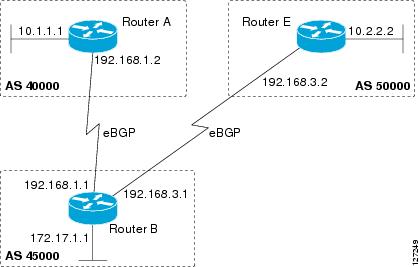
The configuration in this task is done at Router A in the figure below and would need to be repeated with appropriate changes to the IP addresses (for example, at Router B) to fully achieve a BGP process between the two devices. No address family is configured here for the BGP routing process, so routing information for the IPv4 unicast address family is advertised by default.
Figure 1. BGP Topology with Two Autonomous Systems
(Optional) Specifies a network as local to this autonomous system and adds it to the BGP routing table.
For exterior protocols, the
network command controls which networks are advertised. Interior protocols use the
network command to determine where to send updates.
Step 5
bgprouter-idip-address
Example:
Device(config-router)# bgp router-id 10.1.1.99
(Optional) Configures a fixed 32-bit router ID as the identifier of the local device running BGP.
Use the
ip-address argument to specify a unique router ID within the network.
Note
Configuring a router ID using the
bgprouter-id command resets all active BGP peering sessions.
Step 6
timersbgpkeepaliveholdtime
Example:
Device(config-router)# timers bgp 70 120
(Optional) Sets BGP network timers.
Use the
keepalive argument to specify the frequency, in seconds, with which the software sends keepalive messages to its BGP peer. By default, the keepalive timer is set to 60 seconds.
Use the
holdtime argument to specify the interval, in seconds, after which the software, having not received a keepalive message, declares a BGP peer dead. By default, the holdtime timer is set to 180 seconds.
Step 7
bgpfast-external-fallover
Example:
Device(config-router)# bgp fast-external-fallover
(Optional) Enables the automatic resetting of BGP sessions.
By default, the BGP sessions of any directly adjacent external peers are reset if the link used to reach them goes down.
Step 8
bgplog-neighbor-changes
Example:
Device(config-router)# bgp log-neighbor-changes
(Optional) Enables logging of BGP neighbor status changes (up or down) and neighbor resets.
Use this command for troubleshooting network connectivity problems and measuring network stability. Unexpected neighbor resets might indicate high error rates or high packet loss in the network and should be investigated.
Step 9
end
Example:
Device(config-router)# end
Exits router configuration mode and enters privileged EXEC mode.
Step 10
showipbgp [network] [network-mask]
Example:
Device# show ip bgp
(Optional) Displays the entries in the BGP routing table.
Note
Only the syntax applicable to this task is used in this example. For more details, see the
Cisco IOS IP Routing: BGP Command Reference.
Examples
The following sample output from the
showipbgp command shows the BGP routing table for Router A in the figure above after this task has been configured on Router A. You can see an entry for the network 10.1.1.0 that is local to this autonomous system.
BGP table version is 12, local router ID is 10.1.1.99
Status codes: s suppressed, d damped, h history, * valid, > best, i - internal,
r RIB-failure, S Stale
Origin codes: i - IGP, e - EGP, ? - incomplete
Network Next Hop Metric LocPrf Weight Path
*> 10.1.1.0/24 0.0.0.0 0 32768 i
Troubleshooting Tips
Use the ping command to check basic network connectivity between the BGP routers.
Configuring a BGP Peer
Perform this task to configure BGP between two IPv4 routers (peers). The address family configured here is the default IPv4 unicast address family and the configuration is done at Router A in the figure above. Remember to perform this task for any neighbor routers that are to be BGP peers.
Before You Begin
Before you perform this task, perform the “Configuring a BGP Routing Process” task shown in the prior section.
Note
By default, neighbors that are defined using the
neighborremote-as command in router configuration mode exchange only IPv4 unicast address prefixes. To exchange other address prefix types, such as IPv6 prefixes, neighbors must also be activated using the
neighboractivate command in address family configuration mode for the other prefix types, such as IPv6 prefixes.
Specifies the IPv4 address family and enters address family configuration mode.
The
unicast keyword specifies the IPv4 unicast address family. By default, the router is placed in configuration mode for the IPv4 unicast address family if the
unicast keyword is not specified with the
address-familyipv4 command.
The
multicast keyword specifies IPv4 multicast address prefixes.
The
vrf keyword and
vrf-name argument specify the name of the virtual routing and forwarding (VRF) instance to associate with subsequent IPv4 address family configuration mode commands.
Enables the neighbor to exchange prefixes for the IPv4 unicast address family with the local router.
Step 7
end
Example:
Router(config-router-af)# end
Exits address family configuration mode and enters privileged EXEC mode.
Step 8
showipbgp [network] [network-mask]
Example:
Router# show ip bgp
(Optional) Displays the entries in the BGP routing table.
Note
Only the syntax applicable to this task is used in this example. For more details, see the
Cisco IOS IP Routing: BGP Command Reference.
Step 9
showipbgpneighbors [neighbor-address]
Example:
Router(config-router-af)# show ip bgp neighbors 192.168.2.2
(Optional) Displays information about the TCP and BGP connections to neighbors.
Note
Only the syntax applicable to this task is used in this example. For more details, see the
Cisco IOS IP Routing: BGP Command Reference.
Examples
The following sample output from the
showipbgp command shows the BGP routing table for Router A in the figure above after this task has been configured on Router A and Router B. You can now see an entry for the network 172.17.1.0 in autonomous system 45000.
BGP table version is 13, local router ID is 10.1.1.99
Status codes: s suppressed, d damped, h history, * valid, > best, i - internal,
r RIB-failure, S Stale
Origin codes: i - IGP, e - EGP, ? - incomplete
Network Next Hop Metric LocPrf Weight Path
*> 10.1.1.0/24 0.0.0.0 0 32768 i
*> 172.17.1.0/24 192.168.1.1 0 0 45000 i
The following sample output from the
showipbgpneighbors command shows information about the TCP and BGP connections to the BGP neighbor 192.168.1.1 of Router A in the figure above after this task has been configured on Router A:
BGP neighbor is 192.168.1.1, remote AS 45000, external link
BGP version 4, remote router ID 172.17.1.99
BGP state = Established, up for 00:06:55
Last read 00:00:15, last write 00:00:15, hold time is 120, keepalive intervals
Configured hold time is 120,keepalive interval is 70 seconds, Minimum holdtims
Neighbor capabilities:
Route refresh: advertised and received (old & new)
Address family IPv4 Unicast: advertised and received
Message statistics:
InQ depth is 0
OutQ depth is 0
Sent Rcvd
Opens: 1 1
Notifications: 0 0
Updates: 1 2
Keepalives: 13 13
Route Refresh: 0 0
Total: 15 16
Default minimum time between advertisement runs is 30 seconds
For address family: IPv4 Unicast
BGP table version 13, neighbor version 13/0
Output queue size : 0
Index 1, Offset 0, Mask 0x2
1 update-group member
Sent Rcvd
Prefix activity: ---- ----
Prefixes Current: 1 1 (Consumes 52 bytes)
Prefixes Total: 1 1
Implicit Withdraw: 0 0
Explicit Withdraw: 0 0
Used as bestpath: n/a 1
Used as multipath: n/a 0
Outbound Inbound
Local Policy Denied Prefixes: -------- -------
AS_PATH loop: n/a 1
Bestpath from this peer: 1 n/a
Total: 1 1
Number of NLRIs in the update sent: max 0, min 0
Connections established 1; dropped 0
Last reset never
Connection state is ESTAB, I/O status: 1, unread input bytes: 0
Connection is ECN Disabled
Local host: 192.168.1.2, Local port: 179
Foreign host: 192.168.1.1, Foreign port: 37725
Enqueued packets for retransmit: 0, input: 0 mis-ordered: 0 (0 bytes)
Event Timers (current time is 0x12F4F2C):
Timer Starts Wakeups Next
Retrans 14 0 0x0
TimeWait 0 0 0x0
AckHold 13 8 0x0
SendWnd 0 0 0x0
KeepAlive 0 0 0x0
GiveUp 0 0 0x0
PmtuAger 0 0 0x0
DeadWait 0 0 0x0
iss: 165379618 snduna: 165379963 sndnxt: 165379963 sndwnd: 16040
irs: 3127821601 rcvnxt: 3127821993 rcvwnd: 15993 delrcvwnd: 391
SRTT: 254 ms, RTTO: 619 ms, RTV: 365 ms, KRTT: 0 ms
minRTT: 12 ms, maxRTT: 300 ms, ACK hold: 200 ms
Flags: passive open, nagle, gen tcbs
IP Precedence value : 6
Datagrams (max data segment is 1460 bytes):
Rcvd: 20 (out of order: 0), with data: 15, total data bytes: 391
Sent: 22 (retransmit: 0, fastretransmit: 0, partialack: 0, Second Congestion: 04
Troubleshooting Tips
Use the ping command to verify basic network connectivity between the BGP routers.
Configuring a BGP Routing Process and Peers Using 4-Byte Autonomous System Numbers
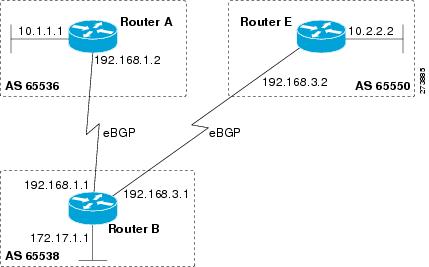
Perform this task to configure a BGP routing process and BGP peers when the BGP peers are located in an AS that uses 4-byte autonomous system numbers. The address family configured here is the default IPv4 unicast address family, and the configuration is done at Router B in the figure above (in the “Cisco Implementation of 4-Byte Autonomous System Numbers” section). The 4-byte autonomous system numbers in this task are formatted in the default asplain (decimal value) format; for example, Router B is in autonomous system number 65538 in the figure above. Remember to perform this task for any neighbor routers that are to be BGP peers.
Before You Begin
Note
By default, neighbors that are defined using the
neighborremote-as command in router configuration mode exchange only IPv4 unicast address prefixes. To exchange other address prefix types, such as IPv6 prefixes, neighbors must also be activated using the
neighboractivate command in address family configuration mode for the other prefix types.
Specifies the IPv4 address family and enters address family configuration mode.
The
unicast keyword specifies the IPv4 unicast address family. By default, the router is placed in configuration mode for the IPv4 unicast address family if the
unicast keyword is not specified with the
address-familyipv4 command.
The
multicast keyword specifies IPv4 multicast address prefixes.
The
vrf keyword and
vrf-name argument specify the name of the virtual routing and forwarding (VRF) instance to associate with subsequent IPv4 address family configuration mode commands.
(Optional) Specifies a network as local to this autonomous system and adds it to the BGP routing table.
For exterior protocols the
network command controls which networks are advertised. Interior protocols use the
network command to determine where to send updates.
Step 10
end
Example:
Router(config-router-af)# end
Exits address family configuration mode and returns to privileged EXEC mode.
Step 11
showipbgp [network] [network-mask]
Example:
Router# show ip bgp 10.1.1.0
(Optional) Displays the entries in the BGP routing table.
Note
Only the syntax applicable to this task is used in this example. For more details, see the
Cisco IOS IP Routing: BGP Command Reference.
Step 12
showipbgpsummary
Example:
Router# show ip bgp summary
(Optional) Displays the status of all BGP connections.
Examples
The following output from the
showipbgp command at Router B shows the BGP routing table entry for network 10.1.1.0 learned from the BGP neighbor at 192.168.1.2 in Router A in the figure above with its 4-byte autonomous system number of 65536 displayed in the default asplain format.
RouterB# show ip bgp 10.1.1.0
BGP routing table entry for 10.1.1.0/24, version 2
Paths: (1 available, best #1)
Advertised to update-groups:
2
65536
192.168.1.2 from 192.168.1.2 (10.1.1.99)
Origin IGP, metric 0, localpref 100, valid, external, best
The following output from the
showipbgpsummary command shows the 4-byte autonomous system number 65536 for the BGP neighbor 192.168.1.2 of Router A in the figure above after this task has been configured on Router B:
RouterB# show ip bgp summary
BGP router identifier 172.17.1.99, local AS number 65538
BGP table version is 3, main routing table version 3
2 network entries using 234 bytes of memory
2 path entries using 104 bytes of memory
3/2 BGP path/bestpath attribute entries using 444 bytes of memory
1 BGP AS-PATH entries using 24 bytes of memory
0 BGP route-map cache entries using 0 bytes of memory
0 BGP filter-list cache entries using 0 bytes of memory
BGP using 806 total bytes of memory
BGP activity 2/0 prefixes, 2/0 paths, scan interval 60 secs
Neighbor V AS MsgRcvd MsgSent TblVer InQ OutQ Up/Down Stated
192.168.1.2 4 65536 6 6 3 0 0 00:01:33 1
Troubleshooting Tips
Use the ping command to verify basic network connectivity between the BGP routers.
Modifying the Default Output and Regular Expression Match Format for 4-Byte Autonomous System Numbers
Perform this task to modify the default output format for 4-byte autonomous system numbers from asplain format to asdot notation format. The
showipbgpsummary command is used to display the changes in output format for the 4-byte autonomous system numbers.
SUMMARY STEPS
1.enable
2.showipbgpsummary
3.configureterminal
4.routerbgpautonomous-system-number
5.bgpasnotationdot
6.end
7.clearipbgp*
8.showipbgpsummary
9.showipbgpregexpregexp
10.configureterminal
11.routerbgpautonomous-system-number
12.nobgpasnotationdot
13.end
14.clearipbgp*
DETAILED STEPS
Command or Action
Purpose
Step 1
enable
Example:
Router> enable
Enables privileged EXEC mode.
Enter your password if prompted.
Step 2
showipbgpsummary
Example:
Router# show ip bgp summary
Displays the status of all BGP connections.
Step 3
configureterminal
Example:
Router# configure terminal
Enters global configuration mode.
Step 4
routerbgpautonomous-system-number
Example:
Router(config)# router bgp 65538
Enters router configuration mode for the specified routing process.
In this example, the 4-byte autonomous system number, 65538, is defined in asplain notation.
Step 5
bgpasnotationdot
Example:
Router(config-router)# bgp asnotation dot
Changes the default output format of BGP 4-byte autonomous system numbers from asplain (decimal values) to dot notation.
Note
4-byte autonomous system numbers can be configured using either asplain format or asdot format. This command affects only the output displayed for
show commands or the matching of regular expressions.
Step 6
end
Example:
Router(config-router)# end
Exits address family configuration mode and returns to privileged EXEC mode.
Step 7
clearipbgp*
Example:
Router# clear ip bgp *
Clears and resets all current BGP sessions.
In this example, a hard reset is performed to ensure that the 4-byte autonomous system number format change is reflected in all BGP sessions.
Note
Only the syntax applicable to this task is used in this example. For more details, see the
Cisco IOS IP Routing: BGP Command Reference.
Step 8
showipbgpsummary
Example:
Router# show ip bgp summary
Displays the status of all BGP connections.
Step 9
showipbgpregexpregexp
Example:
Router# show ip bgp regexp ^1\.0$
Displays routes that match the autonomous system path regular expression.
In this example, a regular expression to match a 4-byte autonomous system path is configured using asdot format.
Step 10
configureterminal
Example:
Router# configure terminal
Enters global configuration mode.
Step 11
routerbgpautonomous-system-number
Example:
Router(config)# router bgp 65538
Enters router configuration mode for the specified routing process.
In this example, the 4-byte autonomous system number, 65538, is defined in asplain notation.
Step 12
nobgpasnotationdot
Example:
Router(config-router)# no bgp asnotation dot
Resets the default output format of BGP 4-byte autonomous system numbers back to asplain (decimal values).
Note
4-byte autonomous system numbers can be configured using either asplain format or asdot format. This command affects only the output displayed for
show commands or the matching of regular expressions.
Step 13
end
Example:
Router(config-router)# end
Exits router configuration mode and returns to privileged EXEC mode.
Step 14
clearipbgp*
Example:
Router# clear ip bgp *
Clears and resets all current BGP sessions.
In this example, a hard reset is performed to ensure that the 4-byte autonomous system number format change is reflected in all BGP sessions.
Note
Only the syntax applicable to this task is used in this example. For more details, see the
Cisco IOS IP Routing: BGP Command Reference.
Examples
The following output from the
showipbgpsummary command shows the default asplain format of the 4-byte autonomous system numbers. Note the asplain format of the 4-byte autonomous system numbers, 65536 and 65550.
Router# show ip bgp summary
BGP router identifier 172.17.1.99, local AS number 65538
BGP table version is 1, main routing table version 1
Neighbor V AS MsgRcvd MsgSent TblVer InQ OutQ Up/Down Statd
192.168.1.2 4 65536 7 7 1 0 0 00:03:04 0
192.168.3.2 4 65550 4 4 1 0 0 00:00:15 0
After the
bgpasnotationdot command is configured (followed by the
clearipbgp* command to perform a hard reset of all current BGP sessions), the output is converted to asdot notation format as shown in the following output from the
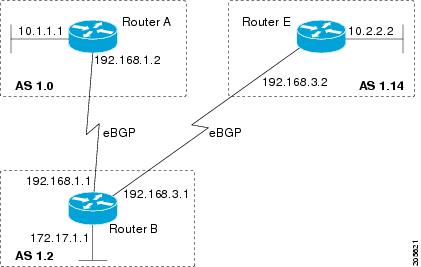
showipbgpsummary command. Note the asdot format of the 4-byte autonomous system numbers, 1.0 and 1.14 (these are the asdot conversions of the 65536 and 65550 autonomous system numbers.
Router# show ip bgp summary
BGP router identifier 172.17.1.99, local AS number 1.2
BGP table version is 1, main routing table version 1
Neighbor V AS MsgRcvd MsgSent TblVer InQ OutQ Up/Down Statd
192.168.1.2 4 1.0 9 9 1 0 0 00:04:13 0
192.168.3.2 4 1.14 6 6 1 0 0 00:01:24 0
After the
bgpasnotationdot command is configured (followed by the
clearipbgp* command to perform a hard reset of all current BGP sessions), the regular expression match format for 4-byte autonomous system paths is changed to asdot notation format. Although a 4-byte autonomous system number can be configured in a regular expression using either asplain format or asdot format, only 4-byte autonomous system numbers configured using the current default format are matched. In the first example below, the
showipbgpregexp command is configured with a 4-byte autonomous system number in asplain format. The match fails because the default format is currently asdot format and there is no output. In the second example using asdot format, the match passes and the information about the 4-byte autonomous system path is shown using the asdot notation.
Note
The asdot notation uses a period, which is a special character in Cisco regular expressions. To remove the special meaning, use a backslash before the period.
Router# show ip bgp regexp ^65536$
Router# show ip bgp regexp ^1\.0$
BGP table version is 2, local router ID is 172.17.1.99
Status codes: s suppressed, d damped, h history, * valid, > best, i - internal,
r RIB-failure, S Stale
Origin codes: i - IGP, e - EGP, ? - incomplete
Network Next Hop Metric LocPrf Weight Path
*> 10.1.1.0/24 192.168.1.2 0 0 1.0 i
Configuring a BGP Peer for the IPv4 VRF Address Family
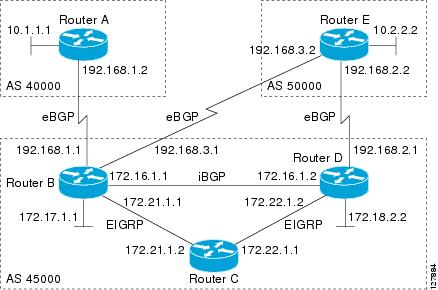
Perform this optional task to configure BGP between two IPv4 routers (peers) that must exchange IPv4 VRF information because they exist in a VPN. The address family configured here is the IPv4 VRF address family and the configuration is done at Router B in the figure below with the neighbor 192.168.3.2 at Router E in autonomous system 50000. Remember to perform this task for any neighbor routers that are to be BGP IPv4 VRF address family peers.
This task does not show the complete configuration required for VPN routing. For some complete example configurations and an example configuration showing how to create a VRF with a route-target that uses a 4-byte autonomous system number, see .
Figure 2. BGP Topology for IPv4 VRF Address Family
Creates a route target extended community for a VRF.
Use the
import keyword to import routing information from the target VPN extended community.
Use the
export keyword to export routing information to the target VPN extended community.
Use the
both keyword to import both import and export routing information to the target VPN extended community.
Use the
route-target-ext-community argument to add the route target extended community attributes to the VRF's list of import, export, or both (import and export) route target extended communities.
Step 6
exit
Example:
Router(config-vrf)# exit
Exits VRF configuration mode and enters global configuration mode.
Step 7
routerbgpautonomous-system-number
Example:
Router(config)# router bgp 45000
Enters router configuration mode for the specified routing process.
Specifies the IPv4 address family and enters address family configuration mode.
Use the
unicast keyword to specify the IPv4 unicast address family. By default, the router is placed in configuration mode for the IPv4 unicast address family if the
unicast keyword is not specified with the
address-familyipv4 command.
Use the
multicast keyword to specify IPv4 multicast address prefixes.
Use the
vrf keyword and
vrf-name argument to specify the name of the VRF instance to associate with subsequent IPv4 address family configuration mode commands.
Controls how many prefixes can be received from a neighbor.
Use the
maximum argument to specify the maximum number of prefixes allowed from the specified neighbor. The number of prefixes that can be configured is limited only by the available system resources on a router.
Use the
threshold argument to specify an integer representing a percentage of the maximum prefix limit at which the router starts to generate a warning message.
Use the
warning-only keyword to allow the router to generate a log message when the maximum prefix limit is exceeded, instead of terminating the peering session.
Enables the neighbor to exchange prefixes for the IPv4 VRF address family with the local router.
Step 12
end
Example:
Router(config-router-af)# end
Exits address family configuration mode and enters privileged EXEC mode.
Troubleshooting Tips
Use the ping command to verify basic network connectivity between the BGP routers, and use the showipvrf command to verify that the VRF instance has been created.
Customizing a BGP Peer
Perform this task to customize your BGP peers. Although many of the steps in this task are optional, this task demonstrates how the neighbor and address family configuration command relationships work. Using the example of the IPv4 multicast address family, neighbor address family-independent commands are configured before the IPv4 multicast address family is configured. Commands that are address family-dependent are then configured and the
exitaddress-family command is shown. An optional step shows how to disable a neighbor.
The configuration in this task is done at Router B in the figure below and would need to be repeated with appropriate changes to the IP addresses, for example, at Router E to fully configure a BGP process between the two devices.
Figure 3. BGP Peer Topology
Note
By default, neighbors that are defined using the
neighborremote-as command in router configuration mode exchange only IPv4 unicast address prefixes. To exchange other address prefix types, such as IPv6 prefixes, neighbors must also be activated using the
neighboractivate command in address family configuration mode for the other prefix types, such as IPv6 prefixes.
Enters router configuration mode for the specified routing process.
Step 4
nobgpdefaultipv4-unicast
Example:
Device(config-router)# no bgp default ipv4-unicast
Disables the IPv4 unicast address family for the BGP routing process.
Note
Routing information for the IPv4 unicast address family is advertised by default for each BGP routing session configured with the
neighborremote-as router configuration command unless you configure the
nobgpdefaultipv4-unicast router configuration command before configuring the
neighborremote-as command. Existing neighbor configurations are not affected.
Specifies the IPv4 address family and enters address family configuration mode.
The
unicast keyword specifies the IPv4 unicast address family. By default, the device is placed in configuration mode for the IPv4 unicast address family if the
unicast keyword is not specified with the
address-familyipv4 command.
The
multicast keyword specifies IPv4 multicast address prefixes.
The
vrf keyword and
vrf-name argument specify the name of the VRF instance to associate with subsequent IPv4 address family configuration mode commands.
(Optional) Specifies a network as local to this autonomous system and adds it to the BGP routing table.
For exterior protocols the
network command controls which networks are advertised. Interior protocols use the
network command to determine where to send updates.
(Optional) Displays information about the TCP and BGP connections to neighbors.
Examples
The following sample output from the
showipbgpipv4multicast command shows BGP IPv4 multicast information for Router B in the figure above after this task has been configured on Router B and Router E. Note that the networks local to each device that were configured under IPv4 multicast address family appear in the output table.
BGP table version is 3, local router ID is 172.17.1.99
Status codes: s suppressed, d damped, h history, * valid, > best, i - internal,
r RIB-failure, S Stale
Origin codes: i - IGP, e - EGP, ? - incomplete
Network Next Hop Metric LocPrf Weight Path
*> 10.2.2.0/24 192.168.3.2 0 0 50000 i
*> 172.17.1.0/24 0.0.0.0 0 32768 i
The following partial sample output from the
showipbgpneighbors command for neighbor 192.168.3.2 shows general BGP information and specific BGP IPv4 multicast address family information about the neighbor. The command was entered on Router B in the figure above after this task had been configured on Router B and Router E.
BGP neighbor is 192.168.3.2, remote AS 50000, external link
Description: finance
BGP version 4, remote router ID 10.2.2.99
BGP state = Established, up for 01:48:27
Last read 00:00:26, last write 00:00:26, hold time is 120, keepalive intervals
Configured hold time is 120,keepalive interval is 70 seconds, Minimum holdtims
Neighbor capabilities:
Route refresh: advertised and received (old & new)
Address family IPv4 Unicast: advertised
Address family IPv4 Multicast: advertised and received
!
For address family: IPv4 Multicast
BGP table version 3, neighbor version 3/0
Output queue size : 0
Index 1, Offset 0, Mask 0x2
1 update-group member
Uses NEXT_HOP attribute for MBGP NLRIs
Sent Rcvd
Prefix activity: ---- ----
Prefixes Current: 1 1 (Consumes 48 bytes)
Prefixes Total: 1 1
Implicit Withdraw: 0 0
Explicit Withdraw: 0 0
Used as bestpath: n/a 1
Used as multipath: n/a 0
Outbound Inbound
Local Policy Denied Prefixes: -------- -------
Bestpath from this peer: 1 n/a
Total: 1 0
Number of NLRIs in the update sent: max 0, min 0
Minimum time between advertisement runs is 25 seconds
Connections established 8; dropped 7
Last reset 01:48:54, due to User reset
Connection state is ESTAB, I/O status: 1, unread input bytes: 0
Connection is ECN Disabled
Local host: 192.168.3.1, Local port: 13172
Foreign host: 192.168.3.2, Foreign port: 179
!
Removing BGP Configuration Commands Using a Redistribution
BGP CLI configuration can become quite complex even in smaller BGP networks. If you need to remove any CLI configuration, you must consider all the implications of removing the CLI. Analyze the current running configuration to determine the current BGP neighbor relationships, any address family considerations, and even other routing protocols that are configured. Many BGP CLI commands affect other parts of the CLI configuration.
Perform this task to remove all the BGP configuration commands used in a redistribution of BGP routes into EIGRP. A route map can be used to match and set parameters or to filter the redistributed routes to ensure that routing loops are not created when these routes are subsequently advertised by EIGRP. When removing BGP configuration commands you must remember to remove or disable all the related commands. In this example, if the
route-map command is omitted, then the redistribution will still occur and possibly with unexpected results as the route map filtering has been removed. Omitting just the
redistribute command would mean that the route map is not applied, but it would leave unused commands in the running configuration.
For more details on BGP CLI removal, see the “BGP CLI Removal Considerations” concept in the “Cisco BGP Overview” module.
To view the redistribution configuration before and after the CLI removal, see the “Examples: Removing BGP Configuration Commands Using a Redistribution Example” section.
SUMMARY STEPS
1.enable
2.configureterminal
3.noroute-mapmap-name
4.routereigrpautonomous-system-number
5.noredistributeprotocol [as-number]
6.end
7.showrunning-config
DETAILED STEPS
Command or Action
Purpose
Step 1
enable
Example:
Device> enable
Enables privileged EXEC mode.
Enter your password if prompted.
Step 2
configureterminal
Example:
Device# configure terminal
Enters global configuration mode.
Step 3
noroute-mapmap-name
Example:
Device(config)# no route-map bgp-to-eigrp
Removes a route map from the running configuration.
In this example, a route map named bgp-to-eigrp is removed from the configuration.
Step 4
routereigrpautonomous-system-number
Example:
Device(config)# router eigrp 100
Enters router configuration mode for the specified routing process.
Step 5
noredistributeprotocol [as-number]
Example:
Device(config-router)# no redistribute bgp 45000
Disables the redistribution of routes from one routing domain into another routing domain.
In this example, the configuration of the redistribution of BGP routes into the EIGRP routing process is removed from the running configuration.
Note
If a route map was included in the original
redistribute command configuration, remember to remove the
route-map command configuration as in Step 3 in this example task.
Note
Only the syntax applicable to this task is used in this example. For more details, see the
Cisco IOS IP Routing: BGP Command Reference.
Step 6
end
Example:
Device(config-router)# end
Exits router configuration mode and enters privileged EXEC mode.
Step 7
showrunning-config
Example:
Device# show running-config
(Optional) Displays the current running configuration on the router.
Use this command to verify that the
redistribute and
route-map commands are removed from the router configuration.
Monitoring and Maintaining Basic BGP
The tasks in this section are concerned with the resetting and display of information about basic BGP processes and peer relationships. Once you have defined two routers to be BGP neighbors, they will form a BGP connection and exchange routing information. If you subsequently change a BGP filter, weight, distance, version, or timer, or make a similar configuration change, you may have to reset BGP connections for the configuration change to take effect.
Configuring Inbound Soft Reconfiguration When Route Refresh Capability Is Missing
Perform this task to configure inbound soft reconfiguration using the
bgpsoft-reconfig-backup command for BGP peers that do not support the route refresh capability. BGP peers that support the route refresh capability are unaffected by the configuration of this command. Note that the memory requirements for storing the inbound update information can become quite large.
Enters router configuration mode for the specified routing process.
Step 4
bgplog-neighbor-changes
Example:
Device(config-router)# bgp log-neighbor-changes
Enables logging of BGP neighbor resets.
Step 5
bgpsoft-reconfig-backup
Example:
Device(config-router)# bgp soft-reconfig-backup
Configures a BGP speaker to perform inbound soft reconfiguration for peers that do not support the route refresh capability.
This command is used to configure BGP to perform inbound soft reconfiguration for peers that do not support the route refresh capability. The configuration of this command allows you to configure BGP to store updates (soft reconfiguration) only as necessary. Peers that support the route refresh capability are unaffected by the configuration of this command.
Configures the Cisco software to start storing updates.
All the updates received from this neighbor will be stored unmodified, regardless of the inbound policy. When inbound soft reconfiguration is done later, the stored information will be used to generate a new set of inbound updates.
Configures a route map and enters route-map configuration mode.
In this example, a route map named LOCAL is created.
Step 12
setlocal-preferencenumber-value
Example:
Device(config-route-map)# set local-preference 200
Specifies a preference value for the autonomous system path.
In this example, the local preference value is set to 200.
Step 13
end
Example:
Device(config-route-map)# end
Exits route-map configuration mode and enters privileged EXEC mode.
Step 14
showipbgpneighbors [neighbor-address]
Example:
Device# show ip bgp neighbors 192.168.1.2
(Optional) Displays information about the TCP and BGP connections to neighbors.
Note
Only the syntax applicable to this task is used in this example. For more details, see the
Cisco IOS IP Routing: BGP Command Reference.
Step 15
showipbgp [network] [network-mask]
Example:
Device# show ip bgp
(Optional) Displays the entries in the BGP routing table.
Note
Only the syntax applicable to this task is used in this example. For more details, see the
Cisco IOS IP Routing: BGP Command Reference.
Examples
The following partial output from the
showipbgpneighbors command shows information about the TCP and BGP connections to the BGP neighbor 192.168.2.1. This peer supports route refresh.
BGP neighbor is 192.168.1.2, remote AS 40000, external link
Neighbor capabilities:
Route refresh: advertised and received(new)
The following partial output from the
showipbgpneighbors command shows information about the TCP and BGP connections to the BGP neighbor 192.168.3.2. This peer does not support route refresh so the soft-reconfig inbound paths for BGP peer 192.168.3.2 will be stored because there is no other way to update any inbound policy updates.
BGP neighbor is 192.168.3.2, remote AS 50000, external link
Neighbor capabilities:
Route refresh: advertised
The following sample output from the
showipbgp command shows the entry for the network 172.17.1.0. Both BGP peers are advertising 172.17.1.0/24, but only the received-only path is stored for 192.168.3.2.
BGP routing table entry for 172.17.1.0/24, version 11
Paths: (3 available, best #3, table Default-IP-Routing-Table, RIB-failure(4))
Flag: 0x820
Advertised to update-groups:
1
50000
192.168.3.2 from 192.168.3.2 (172.17.1.0)
Origin incomplete, metric 0, localpref 200, valid, external
50000, (received-only)
192.168.3.2 from 192.168.3.2 (172.17.1.0)
Origin incomplete, metric 0, localpref 100, valid, external
40000
192.168.1.2 from 192.168.1.2 (172.16.1.0)
Origin incomplete, metric 0, localpref 200, valid, external, best
Resetting and Displaying Basic BGP Information
Perform this task to reset and display information about basic BGP processes and peer relationships.
Displays information about the TCP and BGP connections to neighbors.
In the example provided, the routes advertised from the device to BGP neighbor 192.168.3.2 on another device are displayed.
Step 5
showipbgppaths
Example:
Device# showipbgppaths
Displays information about all the BGP paths in the database.
Step 6
showipbgpsummary
Example:
Device# showipbgpsummary
Displays information about the status of all BGP connections.
Aggregating Route Prefixes Using BGP
BGP peers exchange information about local networks, but this can quickly lead to large BGP routing tables. CIDR enables the creation of aggregate routes (or
supernets) to minimize the size of routing tables. Smaller BGP routing tables can reduce the convergence time of the network and improve network performance. Aggregated routes can be configured and advertised using BGP. Some aggregations advertise only summary routes and other methods of aggregating routes allow more specific routes to be forwarded. Aggregation applies only to routes that exist in the BGP routing table. An aggregated route is forwarded if at least one more specific route of the aggregation exists in the BGP routing table. Perform one of the following tasks to aggregate routes within BGP:
Use this task to redistribute a static aggregate route into BPG. A static aggregate route is configured and then redistributed into the BGP routing table. The static route must be configured to point to interface null 0 and the prefix should be a superset of known BGP routes. When a device receives a BGP packet, it will use the more specific BGP routes. If the route is not found in the BGP routing table, then the packet will be forwarded to null 0 and discarded.
Device(config)# ip route 172.0.0.0 255.0.0.0 null 0
Creates a static route.
Step 4
routerbgpautonomous-system-number
Example:
Device(config)# router bgp 45000
Enters router configuration mode for the specified routing process.
Step 5
redistributestatic
Example:
Device(config-router)# redistribute static
Redistributes routes into the BGP routing table.
Step 6
end
Example:
Device(config-router)# end
Exits router configuration mode and returns to privileged EXEC mode.
Configuring Conditional Aggregate Routes Using BGP
Use this task to create an aggregate route entry in the BGP routing table when at least one specific route falls into the specified range. The aggregate route is advertised as originating from your autonomous system. For more information, see the “BGP Route Aggregation Generating AS_SET Information” section.
SUMMARY STEPS
1.enable
2.configureterminal
3.routerbgpautonomous-system-number
4.aggregate-addressaddressmask [as-set]
5.end
DETAILED STEPS
Command or Action
Purpose
Step 1
enable
Example:
Device> enable
Enables privileged EXEC mode.
Enter your password if prompted.
Step 2
configureterminal
Example:
Device# configure terminal
Enters global configuration mode.
Step 3
routerbgpautonomous-system-number
Example:
Device(config)# router bgp 45000
Enters router configuration mode for the specified routing process.
Creates an aggregate entry in a BGP routing table.
A specified route must exist in the BGP table.
Use the
aggregate-address command with no keywords to create an aggregate entry if any more-specific BGP routes are available that fall in the specified range.
Use the
as-set keyword to specify that the path advertised for this route is an AS_SET. Do not use the
as-set keyword when aggregating many paths because this route is withdrawn and updated every time the reachability information for the aggregated route changes.
Note
Only partial syntax is used in this example. For more details, see the
Cisco IOS IP Routing: BGP Command Reference.
Step 5
end
Example:
Device(config-router)# end
Exits router configuration mode and enters privileged EXEC mode.
Suppressing and Unsuppressing the Advertisement of Aggregated Routes Using BGP
Use this task to create an aggregate route, suppress the advertisement of routes using BGP, and subsequently unsuppress the advertisement of routes. Routes that are suppressed are not advertised to any neighbors, but it is possible to unsuppress routes that were previously suppressed to specific neighbors.
Use the optional
summary-only keyword to create the aggregate route (for example, 10.*.*.*) and also suppresses advertisements of more-specific routes to all neighbors.
Use the optional
suppress-map keyword to create the aggregate route but suppress advertisement of specified routes. Routes that are suppressed are not advertised to any neighbors. You can use the
match clauses of route maps to selectively suppress some more-specific routes of the aggregate and leave others unsuppressed. IP access lists and autonomous system path access lists
match clauses are supported.
Note
Only partial syntax is used in this example. For more details, see the
Cisco IOS IP Routing: BGP Command Reference.
(Optional) Selectively advertises routes previously suppressed by the
aggregate-address command.
In this example, the routes previously suppressed in Step 5 are advertised to neighbor 192.168.1.2.
Step 7
end
Example:
Device(config-router)# end
Exits router configuration mode and enters privileged EXEC mode.
Suppressing Inactive Route Advertisement Using BGP
Perform this task to suppress the advertisement of inactive routes by BGP. In Cisco IOS Release 12.2(25)S, 12.2(33)SXH, and 15.0(1)M, the
bgpsuppress-inactive command was introduced to configure BGP to not advertise inactive routes to any BGP peer. A BGP routing process can advertise routes that are not installed in the RIB to BGP peers by default. A route that is not installed into the RIB is an inactive route. Inactive route advertisement can occur, for example, when routes are advertised through common route aggregation.
Inactive route advertisements can be suppressed to provide more consistent data forwarding. This feature can be configured on a per IPv4 address family basis. For example, when specifying the maximum number of routes that can be configured in a VRF with the
maximumroutes global configuration command, you also suppress inactive route advertisement to prevent inactive routes from being accepted into the VRF after route limit has been exceeded.
Before You Begin
This task assumes that BGP is enabled and that peering has been established.
Note
Inactive route suppression can be configured only under the IPv4 address family or under a default IPv4 general session.
Enter address family configuration mode to configure BGP peers to accept address family specific configurations.
The example creates an IPv4 unicast address family session.
Step 5
bgpsuppress-inactive
Example:
Router(config-router-af)# bgp suppress-inactive
Suppresses BGP advertising of inactive routes.
BGP advertises inactive routes by default.
Entering the
no form of this command reenables the advertisement of inactive routes.
Step 6
end
Example:
Router(config-router-af)# end
Exits address family configuration mode and enters privileged EXEC mode.
Step 7
showipbgprib-failure
Example:
Router# show ip bgp rib-failure
(Optional) Displays BGP routes that are not installed in the RIB.
Examples
The following example shows output from the
showipbgprib-failure command displaying routes that are not installed in the RIB. The output shows that the displayed routes were not installed because a route or routes with a better administrative distance already exist in the RIB.
Router# show ip bgp rib-failure
Network Next Hop RIB-failure RIB-NH Matches
10.1.15.0/24 10.1.35.5 Higher admin distance n/a
10.1.16.0/24 10.1.15.1 Higher admin distance n/a
Conditionally Advertising BGP Routes
Perform this task to conditionally advertise selected BGP routes. The routes or prefixes that will be conditionally advertised are defined in two route maps: an advertise map and either an exist map or nonexist map. The route map associated with the exist map or nonexist map specifies the prefix that the BGP speaker will track. The route map associated with the advertise map specifies the prefix that will be advertised to the specified neighbor when the condition is met.
If a prefix is found to be present in the exist map by the BGP speaker, the prefix specified by the advertise map is advertised.
If a prefix is found not to be present in the nonexist map by the BGP speaker, the prefix specified by the advertise map is advertised.
If the condition is not met, the route is withdrawn and conditional advertisement does not occur. All routes that may be dynamically advertised or not advertised must exist in the BGP routing table in order for conditional advertisement to occur. These routes are referenced from an access list or an IP prefix list.
Adds the IP address of the neighbor in the specified autonomous system to the IPv4 multiprotocol BGP neighbor table of the local device.
In this example, the prefix (172.17.0.0) matching the ACL in the advertise map (the route map named map1) will be advertised to the neighbor only when a prefix (192.168.50.0) matching the ACL in exist map (the route-map named map2) is in the local BGP table.
Step 6
exit
Example:
Device(config-router)# exit
Exits router configuration mode and enters global configuration mode.
Step 7
route-mapmap-tag[permit |deny] [sequence-number]
Example:
Device(config)# route-map map1 permit 10
Configures a route map and enters route map configuration mode.
In this example, a route map named map1 is created.
In this example, access list 2 permits the 192.168.50.0 to be the prefix of the exist-map.
Step 15
exit
Example:
Device(config)# exit
Exits global configuration mode and returns to privileged EXEC mode.
Originating BGP Routes
Route aggregation is useful to minimize the size of the BGP table, but there are situations when you want to add more specific prefixes to the BGP table. Route aggregation can hide more specific routes. Using the
network command as shown in the “Configuring a BGP Routing Process” section originates routes, and the following optional tasks originate BGP routes for the BGP table for different situations.
Perform this task to advertise a default route to BGP peers. The default route is locally originated. A default route can be useful to simplify configuration or to prevent the device from using too many system resources. If the device is peered with an Internet service provider (ISP), the ISP will carry full routing tables, so configuring a default route into the ISP network saves resources at the local device.
(Optional) Permits a BGP speaker--the local device--to send the default route 0.0.0.0 to a peer for use as a default route.
Step 9
end
Example:
Device(config-router)# end
Exits router configuration mode and enters privileged EXEC mode.
Troubleshooting Tips
Use the showiproute command on the receiving BGP peer (not on the local router) to verify that the default route has been set. In the output, verify that a line similar to the following showing the default route 0.0.0.0 is present:
B* 0.0.0.0/0 [20/0] via 192.168.1.2, 00:03:10
Conditionally Injecting BGP Routes
Use this task to inject more specific prefixes into a BGP routing table over less specific prefixes that were selected through normal route aggregation. These more specific prefixes can be used to provide a finer granularity of traffic engineering or administrative control than is possible with aggregated routes. For more information, see the “Conditional BGP Route Injection” section.
Before You Begin
This task assumes that the IGP is already configured for the BGP peers.
Router(config-route-map)# match ip route-source prefix-list ROUTE_SOURCE
Specifies the match conditions for redistributing the source of the route.
In this example, the prefix list named ROUTE_SOURCE is used to redistribute the source of the route.
Note
The route source is the neighbor address that is configured with the
neighborremote-as command. The tracked prefix must come from this neighbor in order for conditional route injection to occur.
Step 9
exit
Example:
Router(config-route-map)# exit
Exits route map configuration mode and enters global configuration mode.
Step 10
route-mapmap-tag [permit |deny] [sequence-number]
Example:
Router(config)# route-map ORIGINATE permit 10
Configures a route map and enters route map configuration mode.
Router(config)# ip prefix-list SOURCE permit 10.1.1.0/24
Configures a prefix list.
In this example, the prefix list named SOURCE is configured to permit routes from network 10.1.1.0/24.
Step 15
Repeat Step 14 for every prefix list to be created.
--
Step 16
exit
Example:
Router(config)# exit
Exits global configuration mode and returns to privileged EXEC mode.
Step 17
showipbgpinjected-paths
Example:
Router# show ip bgp injected-paths
(Optional) Displays information about injected paths.
Examples
The following sample output is similar to the output that will be displayed when the
showipbgpinjected-pathscommand is entered:
Router# show ip bgp injected-paths
BGP table version is 11, local router ID is 10.0.0.1
Status codes:s suppressed, d damped, h history, * valid, > best, i -
internal
Origin codes:i - IGP, e - EGP, ? - incomplete
Network Next Hop Metric LocPrf Weight Path
*> 172.16.0.0 10.0.0.2 0 ?
*> 172.17.0.0/16 10.0.0.2 0 ?
Troubleshooting Tips
BGP conditional route injection is based on the injection of a more specific prefix into the BGP routing table when a less specific prefix is present. If conditional route injection is not working properly, verify the following:
If conditional route injection is configured but does not occur, verify the existence of the aggregate prefix in the BGP routing table. The existence (or not) of the tracked prefix in the BGP routing table can be verified with the showipbgpcommand.
If the aggregate prefix exists but conditional route injection does not occur, verify that the aggregate prefix is being received from the correct neighbor and the prefix list identifying that neighbor is a /32 match.
Verify the injection (or not) of the more specific prefix using the showipbgpinjected-pathscommand.
Verify that the prefix that is being injected is not outside of the scope of the aggregate prefix.
Ensure that the inject route map is configured with the setipaddress command and not the matchipaddress command.
Originating BGP Routes Using Backdoor Routes
Use this task to indicate to border devices which networks are reachable using a backdoor route. A backdoor network is treated the same as a local network, except that it is not advertised. For more information, see the BGP Backdoor Routes section.
Before You Begin
This task assumes that the IGP (EIGRP, in this example) is already configured for the BGP peers. The configuration is done at Router B in the figure in the “BGP Backdoor Routes” section, and the BGP peer is Router D.
Indicates a network that is reachable through a backdoor route.
Step 6
end
Example:
Device(config-router)# end
Exits router configuration mode and returns to privileged EXEC mode.
Configuring a BGP Peer Group
This task explains how to configure a BGP peer group. Often, in a BGP speaker, many neighbors are configured with the same update policies (that is, the same outbound route maps, distribute lists, filter lists, update source, and so on). Neighbors with the same update policies can be grouped into peer groups to simplify configuration and, more importantly, to make updating more efficient. When you have many peers, this approach is highly recommended.
The three steps to configure a BGP peer group, described in the following task, are as follows:
Creating the peer group
Assigning options to the peer group
Making neighbors members of the peer group
You can disable a BGP peer or peer group without removing all the configuration information using the
neighborshutdown router configuration command.
Note
By default, neighbors that are defined using the
neighborremote-as command in router configuration mode exchange only IPv4 unicast address prefixes. To exchange other address prefix types, such as IPv6 prefixes, neighbors must also be activated using the
neighboractivate command in address family configuration mode for the other prefix types.
Enables the neighbor to exchange prefixes for the IPv4 address family with the local device.
Note
By default, neighbors that are defined using the
neighborremote-as command in router configuration mode exchange only unicast address prefixes. To allow BGP to exchange other address prefix types, such as multicast that is configured in this example, neighbors must also be activated using the
neighboractivate command.
Perform this task to create a basic peer session template with general BGP routing session commands that can be applied to many neighbors using one of the next two tasks.
Note
The commands in Step 5 and 6 are optional and could be replaced with any supported general session commands.
Note
The following restrictions apply to the peer session templates:
A peer session template can directly inherit only one session template, and each inherited session template can also contain one indirectly inherited session template. So, a neighbor or neighbor group can be configured with only one directly applied peer session template and seven additional indirectly inherited peer session templates.
A BGP neighbor cannot be configured to work with both peer groups and peer templates. A BGP neighbor can be configured to belong only to a peer group or to inherit policies only from peer templates.
The output can be filtered to display a single peer policy template with the
session-template-name argument. This command also supports all standard output modifiers.
What to Do Next
After the peer session template is created, the configuration of the peer session template can be inherited or applied by another peer session template with the inheritpeer-session or neighborinheritpeer-session command.
Configuring Peer Session Template Inheritance with the inherit peer-session Command
This task configures peer session template inheritance with the
inheritpeer-session command. It creates and configures a peer session template and allows it to inherit a configuration from another peer session template.
Note
The commands in Steps 5 and 6 are optional and could be replaced with any supported general session commands.
(Optional) Configures a router to select a specific source or interface to receive routing table updates.
The example uses a loopback interface. The advantage to this configuration is that the loopback interface is not as susceptible to the effects of a flapping interface.
Note
Any supported general session command can be used here. For a list of the supported commands, see the “Restrictions” section.
Configures this peer session template to inherit the configuration of another peer session template.
The example configures this peer session template to inherit the configuration from INTERNAL-BGP. This template can be applied to a neighbor, and the configuration INTERNAL-BGP will be applied indirectly. No additional peer session templates can be directly applied. However, the directly inherited template can contain up to seven indirectly inherited peer session templates.
Step 8
end
Example:
Router(config-router)# end
Exits session-template configuration mode and enters privileged EXEC mode.
The output can be filtered to display a single peer policy template with the optional
session-template-name argument. This command also supports all standard output modifiers.
What to Do Next
After the peer session template is created, the configuration of the peer session template can be inherited or applied by another peer session template with the inheritpeer-session or neighborinheritpeer-session command.
Configuring Peer Session Template Inheritance with the neighbor inherit peer-session Command
This task configures a router to send a peer session template to a neighbor to inherit the configuration from the specified peer session template with the
neighborinheritpeer-session command. Use the following steps to send a peer session template configuration to a neighbor to inherit.
Configures a peering session with the specified neighbor.
The explicit
remote-as statement is required for the neighbor inherit statement in Step 5 to work. If a peering is not configured, the specified neighbor in Step 5 will not accept the session template.
Sends a peer session template to a neighbor so that the neighbor can inherit the configuration.
The example configures a router to send the peer session template named CORE1 to the 172.16.0.1 neighbor to inherit. This template can be applied to a neighbor, and if another peer session template is indirectly inherited in CORE1, the indirectly inherited configuration will also be applied. No additional peer session templates can be directly applied. However, the directly inherited template can also inherit up to seven additional indirectly inherited peer session templates.
Step 6
end
Example:
Router(config-router)# end
Exits router configuration mode and enters privileged EXEC mode.
The output can be filtered to display a single peer policy template with the optional
session-template-name argument. This command also supports all standard output modifiers.
Perform this task to create a basic peer policy template with BGP policy configuration commands that can be applied to many neighbors using one of the next two tasks.
Note
The commands in Steps 5 through 7 are optional and could be replaced with any supported BGP policy configuration commands.
Note
The following restrictions apply to the peer policy templates:
A peer policy template can directly or indirectly inherit up to eight peer policy templates.
A BGP neighbor cannot be configured to work with both peer groups and peer templates. A BGP neighbor can be configured to belong only to a peer group or to inherit policies only from peer templates.
(Optional) Configures the maximum number of prefixes that a neighbor will accept from this peer.
Note
Any supported BGP policy configuration command can be used here. For a list of the supported commands, see the “Peer Policy Templates” section.
Step 6
weightweight-value
Example:
Device(config-router-ptmp)# weight 300
(Optional) Sets the default weight for routes that are sent from this neighbor.
Note
Any supported BGP policy configuration command can be used here. For a list of the supported commands, see the “Peer Policy Templates” section.
Step 7
prefix-listprefix-list-name{in |
out}
Example:
Device(config-router-ptmp)# prefix-list NO-MARKETING in
(Optional) Filters prefixes that are received by the router or sent from the router.
The prefix list in the example filters inbound internal addresses.
Note
Any supported BGP policy configuration command can be used here. For a list of the supported commands, see the “Peer Policy Templates” section.
Step 8
end
Example:
Device(config-router-ptmp)# end
Exits policy-template configuration mode and returns to privileged EXEC mode.
What to Do Next
After the peer policy template is created, the configuration of the peer policy template can be inherited or applied by another peer policy template. For details about peer policy inheritance, see the “Configuring Peer Policy Template Inheritance with the inherit peer-policy Command” section or the “Configuring Peer Policy Template Inheritance with the neighbor inherit peer-policy Command” section.
Configuring Peer Policy Template Inheritance with the inherit peer-policy Command
This task configures peer policy template inheritance using the
inheritpeer-policycommand. It creates and configure a peer policy template and allows it to inherit a configuration from another peer policy template.
When BGP neighbors use inherited peer templates, it can be difficult to determine which policies are associated with a specific template. In Cisco IOS Release 12.0(25)S, 12.4(11)T, 12.2(33)SRB, 12.2(33)SB, and later releases, the
detail keyword was added to the
showipbgptemplatepeer-policy command to display the detailed configuration of local and inherited policies associated with a specific template.
Note
The commands in Steps 5 and 6 are optional and could be replaced with any supported BGP policy configuration commands.
Router(config-router-ptmp)# inherit peer-policy GLOBAL 10
Configures the peer policy template to inherit the configuration of another peer policy template.
The
sequence-number argument sets the order in which the peer policy template is evaluated. Like a route map sequence number, the lowest sequence number is evaluated first.
The example configures this peer policy template to inherit the configuration from GLOBAL. If the template created in these steps is applied to a neighbor, the configuration GLOBAL will also be inherited and applied indirectly. Up to six additional peer policy templates can be indirectly inherited from GLOBAL for a total of eight directly applied and indirectly inherited peer policy templates.
This template in the example will be evaluated first if no other templates are configured with a lower sequence number.
Step 7
end
Example:
Router(config-router-ptmp)# end
Exits policy-template configuration mode and returns to privileged EXEC mode.
The output can be filtered to display a single peer policy template with the
policy-template-name argument. This command also supports all standard output modifiers.
Use the
detail keyword to display detailed policy information.
Note
The
detail keyword is supported only in Cisco IOS Release 12.0(25)S, 12.4(11)T, 12.2(33)SRB, 12.2(33)SB, and later releases.
Examples
The following sample output of the
showipbgptemplatepeer-policy command with the
detail keyword displays details of the policy named NETWORK1. The output in this example shows that the GLOBAL template was inherited. Details of route map and prefix list configurations are also displayed.
Router# show ip bgp template peer-policy NETWORK1 detail
Template:NETWORK1, index:2.
Local policies:0x1, Inherited polices:0x80840
This template inherits:
GLOBAL, index:1, seq_no:10, flags:0x1
Locally configured policies:
route-map ROUTE in
Inherited policies:
prefix-list NO-MARKETING in
weight 300
maximum-prefix 10000
Template:NETWORK1 <detail>
Locally configured policies:
route-map ROUTE in
route-map ROUTE, permit, sequence 10
Match clauses:
ip address prefix-lists: DEFAULT
ip prefix-list DEFAULT: 1 entries
seq 5 permit 10.1.1.0/24
Set clauses:
Policy routing matches: 0 packets, 0 bytes
Inherited policies:
prefix-list NO-MARKETING in
ip prefix-list NO-MARKETING: 1 entries
seq 5 deny 10.2.2.0/24
Configuring Peer Policy Template Inheritance with the neighbor inherit peer-policy Command
This task configures a router to send a peer policy template to a neighbor to inherit using the
neighborinheritpeer-policy command. Perform the following steps to send a peer policy template configuration to a neighbor to inherit.
When BGP neighbors use multiple levels of peer templates, it can be difficult to determine which policies are applied to the neighbor. In Cisco IOS Release 12.0(25)S, 12.4(11)T, 12.2(33)SRB, 12.2(33)SB, and later releases, the
policy and
detail keywords were added to the
showipbgpneighbors command to display the inherited policies and policies configured directly on the specified neighbor.
Configures a peering session with the specified neighbor.
The explicit
remote-as statement is required for the
neighborinherit statement in Step 6 to work. If a peering is not configured, the specified neighbor in Step 6 will not accept the session template.
Router(config-router-af)# neighbor 192.168.1.2 inherit peer-policy GLOBAL
Sends a peer policy template to a neighbor so that the neighbor can inherit the configuration.
The example configures a router to send the peer policy template named GLOBAL to the 192.168.1.2 neighbor to inherit. This template can be applied to a neighbor, and if another peer policy template is indirectly inherited from GLOBAL, the indirectly inherited configuration will also be applied. Up to seven additional peer policy templates can be indirectly inherited from GLOBAL.
Step 7
end
Example:
Router(config-router-af)# end
Exits address family configuration mode and returns to privileged EXEC mode.
The output can be filtered to display a single peer policy template with the
policy-template-name argument. This command also supports all standard output modifiers.
Use the
policy keyword to display the policies applied to this neighbor per address family.
Use the
detail keyword to display detailed policy information.
The
policy and
detail keywords are supported only in Cisco IOS Release 12.0(25)S, 12.4(11)T, 12.2(33)SRB, 12.2(33)SB, and later releases.
Note
Only the syntax required for this task is shown. For more details, see the
Cisco IOS IP Routing: BGP Command Reference.
Examples
The following sample output shows the policies applied to the neighbor at 192.168.1.2. The output displays both inherited policies and policies configured on the neighbor device. Inherited polices are policies that the neighbor inherits from a peer-group or a peer-policy template.
Router# show ip bgp neighbors 192.168.1.2 policy
Neighbor: 192.168.1.2, Address-Family: IPv4 Unicast
Locally configured policies:
route-map ROUTE in
Inherited polices:
prefix-list NO-MARKETING in
route-map ROUTE in
weight 300
maximum-prefix 10000
Monitoring and Maintaining BGP Dynamic Update Groups
Use this task to clear and display information about the processing of dynamic BGP update groups. The performance of BGP update message generation is improved with the use of BGP update groups. With the configuration of the BGP peer templates and the support of the dynamic BGP update groups, the network operator no longer needs to configure peer groups in BGP and can benefit from improved configuration flexibility and system performance. For information about using BGP peer templates, see the “Configuring Peer Session Templates” and “Configuring Peer Policy Templates” sections.
Use the debugipbgpgroups command to display information about the processing of BGP update groups. Information can be displayed for all update groups, an individual update group, or a specific BGP neighbor. The output of this command can be very verbose. This command should not be deployed in a production network unless your are troubleshooting a problem.
Example: Configuring a BGP Process and Customizing Peers
The following example shows the configuration for Router B in the figure above (in the “Customizing a BGP Peer” section) with a BGP process configured with two neighbor peers (at Router A and at Router E) in separate autonomous systems. IPv4 unicast routes are exchanged with both peers and IPv4 multicast routes are exchanged with the BGP peer at Router E.
Examples: Configuring a BGP Routing Process and Peers Using 4-Byte Autonomous System Numbers
Asplain Format
The following example shows the configuration for Router A, Router B, and Router E in the figure below with a BGP process configured between three neighbor peers (at Router A, at Router B, and at Router E) in separate 4-byte autonomous systems configured using asplain notation. IPv4 unicast routes are exchanged with all peers.
Figure 4. BGP Peers Using 4-Byte Autonomous System Numbers in Asplain Format
The following example shows how to create the configuration for Router A, Router B, and Router E in the figure below with a BGP process configured between three neighbor peers (at Router A, at Router B, and at Router E) in separate 4-byte autonomous systems configured using the default asdot format. IPv4 unicast routes are exchanged with all peers.
Figure 5. BGP Peers Using 4-Byte Autonomous System Numbers in Asdot Format
Examples: Configuring a VRF and Setting an Extended Community Using a BGP 4-Byte Autonomous System Number
Asplain Default Format in Cisco IOS Release 12.0(32)SY8, 12.0(33)S3, 12.2(33)SRE, 12.2(33)SXI1, and Later Releases
The following example is available in Cisco IOS Release 12.0(32)SY8, 12.0(33)S3, 12.2(33)SRE, 12.2(33)XNE, 12.2(33)SXI1, and later releases and shows how to create a VRF with a route-target that uses a 4-byte autonomous system number, 65537, and how to set the route target to extended community value 65537:100 for routes that are permitted by the route map.
ip vrf vpn_red
rd 64500:100
route-target both 65537:100
exit
route-map red_map permit 10
set extcommunity rt 65537:100
end
After the configuration is completed, use the
showroute-map command to verify that the extended community is set to the route target that contains the 4-byte autonomous system number of 65537.
RouterB# show route-map red_map
route-map red_map, permit, sequence 10
Match clauses:
Set clauses:
extended community RT:65537:100
Policy routing matches: 0 packets, 0 bytes
Asdot Default Format in Cisco IOS Release 12.0(32)S12, and 12.4(24)T
The following example is available in Cisco IOS Release 12.0(32)S12, and 12.4(24)T and shows how to create a VRF with a route-target that uses a 4-byte autonomous system number, 1.1, and how to set the route target to extended community value 1.1:100 for routes that are permitted by the route map.
Note
In Cisco IOS Release 12.0(32)SY8, 12.0(33)S3, 12.2(33)SXI1, and later releases, this example works if you have configured asdot as the default display format using the
bgpasnotationdot command.
ip vrf vpn_red
rd 64500:100
route-target both 1.1:100
exit
route-map red_map permit 10
set extcommunity rt 1.1:100
end
After the configuration is completed, use the
showroute-map command to verify that the extended community is set to the route target that contains the 4-byte autonomous system number of 1.1.
RouterB# show route-map red_map
route-map red_map, permit, sequence 10
Match clauses:
Set clauses:
extended community RT:1.1:100
Policy routing matches: 0 packets, 0 bytes
Example: NLRI to AFI Configuration
The following example upgrades an existing router configuration file in the NLRI format to the AFI format and set the router CLI to use only commands in the AFI format:
router bgp 60000
bgp upgrade-cli
The
showrunning-config command can be used in privileged EXEC mode to verify that an existing router configuration file has been upgraded from the NLRI format to the AFI format. The following sections provide sample output from a router configuration file in the NLRI format, and the same router configuration file after it has been upgraded to the AFI format with the
bgpupgrade-cli command in router configuration mode.
Note
After a router has been upgraded from the AFI format to the NLRI format with the
bgpupgrade-clicommand, NLRI commands will no longer be accessible or configurable.
Router Configuration File in NLRI Format Before Upgrading
The following sample output is from the
showrunning-config command in privileged EXEC mode. The sample output shows a router configuration file, in the NLRI format, prior to upgrading to the AFI format with the
bgpupgrade-cli command. The sample output is filtered to show only the affected portion of the router configuration.
Router# show running-config | begin bgp
router bgp 101
no synchronization
bgp log-neighbor-changes
neighbor 10.1.1.1 remote-as 505 nlri unicast multicast
no auto-summary
!
ip default-gateway 10.4.9.1
ip classless
!
!
route-map REDISTRIBUTE-MULTICAST permit 10
match ip address prefix-list MULTICAST-PREFIXES
set nlri multicast
!
route-map MULTICAST-PREFIXES permit 10
!
route-map REDISTRIBUTE-UNICAST permit 20
match ip address prefix-list UNICAST-PREFIXES
set nlri unicast
!
!
!
line con 0
line aux 0
line vty 0 4
password PASSWORD
login
!
end
Router Configuration File in AFI Format After Upgrading
The following sample output shows the router configuration file after it has been upgraded to the AFI format. The sample output is filtered to show only the affected portion of the router configuration file.
Router# show running-config | begin bgp
router bgp 101
bgp log-neighbor-changes
neighbor 10.1.1.1 remote-as 505
no auto-summary
!
address-family ipv4 multicast
neighbor 10.1.1.1 activate
no auto-summary
no synchronization
exit-address-family
!
address-family ipv4
neighbor 10.1.1.1 activate
no auto-summary
no synchronization
exit-address-family
!
ip default-gateway 10.4.9.1
ip classless
!
!
route-map REDISTRIBUTE-MULTICAST_mcast permit 10
match ip address prefix-list MULTICAST-PREFIXES
!
route-map REDISTRIBUTE-MULTICAST permit 10
match ip address prefix-list MULTICAST-PREFIXES
!
route-map MULTICAST-PREFIXES permit 10
!
route-map REDISTRIBUTE-UNICAST permit 20
match ip address prefix-list UNICAST-PREFIXES
!
!
!
line con 0
line aux 0
line vty 0 4
password PASSWORD
login
!
end
Examples: Removing BGP Configuration Commands Using a Redistribution Example
The following examples show first the CLI configuration to enable the redistribution of BGP routes into EIGRP using a route map and then the CLI configuration to remove the redistribution and route map. Some BGP configuration commands can affect other CLI commands and this example demonstrates how the removal of one command affects another command.
In the first configuration example, a route map is configured to match and set autonomous system numbers. BGP neighbors in three different autonomous systems are configured and activated. An EIGRP routing process is started, and the redistribution of BGP routes into EIGRP using the route map is configured.
In the second configuration example, both the
route-map command and the
redistribute command are disabled. If only the route-map command is removed, it does not automatically disable the redistribution. The redistribution will now occur without any matching or filtering. To remove the redistribution configuration, the
redistribute command must also be disabled.
CLI to Remove BGP Route Redistribution Into EIGRP
configure terminal
no route-map bgp-to-eigrp
router eigrp 100
no redistribute bgp 45000
end
Examples: BGP Soft Reset
The following examples show two ways to reset the connection for BGP peer 192.168.1.1.
Example: Dynamic Inbound Soft Reset
The following example shows the command used to initiate a dynamic soft reconfiguration in the BGP peer 192.168.1.1. This command requires that the peer support the route refresh capability.
clear ip bgp 192.168.1.1 soft in
Example: Inbound Soft Reset Using Stored Information
The following example shows how to enable inbound soft reconfiguration for the neighbor 192.168.1.1. All the updates received from this neighbor will be stored unmodified, regardless of the inbound policy. When inbound soft reconfiguration is performed later, the stored information will be used to generate a new set of inbound updates.
The following example clears the session with the neighbor 192.168.1.1:
clear ip bgp 192.168.1.1 soft in
Example: Resetting BGP Peers Using 4-Byte Autonomous System Numbers
The following examples show how to clear BGP peers belonging to an autonomous system that uses 4-byte autonomous system numbers. The initial state of the BGP routing table is shown using the
showipbgp command, and peers in 4-byte autonomous systems 65536 and 65550 are displayed.
RouterB# show ip bgp
BGP table version is 4, local router ID is 172.17.1.99
Status codes: s suppressed, d damped, h history, * valid, > best, i - internal,
r RIB-failure, S Stale
Origin codes: i - IGP, e - EGP, ? - incomplete
Network Next Hop Metric LocPrf Weight Path
*> 10.1.1.0/24 192.168.1.2 0 0 65536 i
*> 10.2.2.0/24 192.168.3.2 0 0 65550 i
*> 172.17.1.0/24 0.0.0.0 0 32768 i
The
clearipbgp65550 command is entered to remove all BGP peers in the 4-byte autonomous system 65550. The ADJCHANGE message shows that the BGP peer at 192.168.3.2 is being reset.
RouterB# clear ip bgp 65550
RouterB#
*Nov 30 23:25:27.043: %BGP-5-ADJCHANGE: neighbor 192.168.3.2 Down User reset
The
showipbgp command is entered again, and only the peer in 4-byte autonomous systems 65536 is now displayed.
RouterB# show ip bgp
BGP table version is 5, local router ID is 172.17.1.99
Status codes: s suppressed, d damped, h history, * valid, > best, i - internal,
r RIB-failure, S Stale
Origin codes: i - IGP, e - EGP, ? - incomplete
Network Next Hop Metric LocPrf Weight Path
*> 10.1.1.0/24 192.168.1.2 0 0 65536 i
*> 172.17.1.0/24 0.0.0.0 0 32768 i
Almost immediately, the next ADJCHANGE message shows that the BGP peer at 192.168.3.2 (in the 4-byte autonomous system 65550) is now back up.
RouterB#
*Nov 30 23:25:55.995: %BGP-5-ADJCHANGE: neighbor 192.168.3.2 Up
Example: Resetting and Displaying Basic BGP Information
The following example shows how to reset and display basic BGP information.
The
clearipbgp* command clears and resets all the BGP neighbor sessions. In Cisco IOS Release 12.2(25)S and later releases, the syntax is
clearipbgpall. Specific neighbors or all peers in an autonomous system can be cleared by using the
neighbor-address and
autonomous-system-number arguments. If no argument is specified, this command will clear and reset all BGP neighbor sessions.
Note
The
clearipbgp* command also clears all the internal BGP structures which makes it useful as a troubleshooting tool.
Router# clear ip bgp *
The
showipbgp command is used to display all the entries in the BGP routing table. The following example displays BGP routing table information for the 10.1.1.0 network:
Router# show ip bgp 10.1.1.0 255.255.255.0
BGP routing table entry for 10.1.1.0/24, version 2
Paths: (1 available, best #1, table Default-IP-Routing-Table)
Advertised to update-groups:
1
40000
192.168.1.2 from 192.168.1.2 (10.1.1.99)
Origin IGP, metric 0, localpref 100, valid, external, best
The
showipbgpneighbors command is used to display information about the TCP and BGP connections to neighbors. The following example displays the routes that were advertised from Router B in the figure above (in the “Configuring a BGP Peer for the IPv4 VRF Address Family” section) to its BGP neighbor 192.168.3.2 on Router E:
Router# show ip bgp neighbors 192.168.3.2 advertised-routes
BGP table version is 3, local router ID is 172.17.1.99
Status codes: s suppressed, d damped, h history, * valid, > best, i - internal,
r RIB-failure, S Stale
Origin codes: i - IGP, e - EGP, ? - incomplete
Network Next Hop Metric LocPrf Weight Path
*> 10.1.1.0/24 192.168.1.2 0 0 40000 i
*> 172.17.1.0/24 0.0.0.0 0 32768 i
Total number of prefixes 2
The
showipbgppathscommand is used to display all the BGP paths in the database. The following example displays BGP path information for Router B in the figure above (in the “Customizing a BGP Peer” section):
Router# show ip bgp paths
Address Hash Refcount Metric Path
0x2FB5DB0 0 5 0 i
0x2FB5C90 1 4 0 i
0x2FB5C00 1361 2 0 50000 i
0x2FB5D20 2625 2 0 40000 i
The
showipbgpsummarycommand is used to display the status of all BGP connections. The following example displays BGP routing table information for Router B in the figure above (in the “Customizing a BGP Peer” section:
Router# show ip bgp summary
BGP router identifier 172.17.1.99, local AS number 45000
BGP table version is 3, main routing table version 3
2 network entries using 234 bytes of memory
2 path entries using 104 bytes of memory
4/2 BGP path/bestpath attribute entries using 496 bytes of memory
2 BGP AS-PATH entries using 48 bytes of memory
0 BGP route-map cache entries using 0 bytes of memory
0 BGP filter-list cache entries using 0 bytes of memory
BGP using 882 total bytes of memory
BGP activity 14/10 prefixes, 16/12 paths, scan interval 60 secs
Neighbor V AS MsgRcvd MsgSent TblVer InQ OutQ Up/Down State/PfxRcd
192.168.1.2 4 40000 667 672 3 0 0 00:03:49 1
192.168.3.2 4 50000 468 467 0 0 0 00:03:49 (NoNeg)
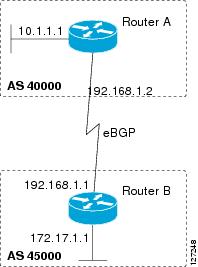
Examples: Aggregating Prefixes Using BGP
The following examples show how you can use aggregate routes in BGP either by redistributing an aggregate route into BGP or by using the BGP conditional aggregation routing feature.
In the following example, the
redistributestatic router configuration command is used to redistribute aggregate route 10.0.0.0:
The following configuration shows how to create an aggregate entry in the BGP routing table when at least one specific route falls into the specified range. The aggregate route will be advertised as coming from your autonomous system and has the atomic aggregate attribute set to show that information might be missing. (By default, atomic aggregate is set unless you use the
as-set keyword in the
aggregate-address router configuration command.)
The following example shows how to create an aggregate entry using the same rules as in the previous example, but the path advertised for this route will be an AS_SET consisting of all elements contained in all paths that are being summarized:
The following example configures a maximum route limit in the VRF named RED and configures BGP to not advertise inactive routes through the VRF named RED:
Device(config)# ip vrf RED
Device(config-vrf)# rd 50000:10
Device(config-vrf)# maximum routes 1000 10
Device(config-vrf)# exit
Device(config)# router bgp 50000
Device(config-router)# address-family ipv4 vrf RED
Device(config-router-af)# bgp suppress-inactive
Device(config-router-af)# end
Example: Configuring a BGP Peer Group
The following example shows how to use an address family to configure a peer group so that all members of the peer group are both unicast- and multicast-capable:
The following example creates a peer session template named CORE1. This example inherits the configuration of the peer session template named INTERNAL-BGP.
The following example configures the 192.168.3.2 neighbor to inherit the CORE1 peer session template. The 192.168.3.2 neighbor will also indirectly inherit the configuration from the peer session template named INTERNAL-BGP. The explicit
remote-as statement is required for the neighbor inherit statement to work. If a peering is not configured, the specified neighbor will not accept the session template.
The following example creates a peer policy template named GLOBAL and enters policy-template configuration mode:
router bgp 45000
template peer-policy GLOBAL
weight 1000
maximum-prefix 5000
prefix-list NO_SALES in
exit-peer-policy
The following example creates a peer policy template named PRIMARY-IN and enters policy-template configuration mode:
router bgp 45000
template peer-policy PRIMARY-IN
prefix-list ALLOW-PRIMARY-A in
route-map SET-LOCAL in
weight 2345
default-originate
exit-peer-policy
The following example creates a peer policy template named CUSTOMER-A. This peer policy template is configured to inherit the configuration from the peer policy templates named PRIMARY-IN and GLOBAL.
router bgp 45000
template peer-policy CUSTOMER-A
route-map SET-COMMUNITY in
filter-list 20 in
inherit peer-policy PRIMARY-IN 20
inherit peer-policy GLOBAL 10
exit-peer-policy
The following example configures the 192.168.2.2 neighbor in address family mode to inherit the peer policy template named CUSTOMER-A. Assuming this example is a continuation of the example above, because the peer policy template named CUSTOMER-A above inherited the configuration from the templates named PRIMARY-IN and GLOBAL, the 192.168.2.2 neighbor will also indirectly inherit the peer policy templates named PRIMARY-IN and GLOBAL.
Examples: Monitoring and Maintaining BGP Dynamic Update Peer-Groups
No configuration is required to enable the BGP dynamic update of peer groups and the algorithm runs automatically. The following examples show how BGP update group information can be cleared or displayed.
clear ip bgp update-group Example
The following example clears the membership of neighbor 10.0.0.1 from an update group:
Router# clear ip bgp update-group 10.0.0.1
debug ip bgp groups Example
The following example output from the
debugipbgpgroups command shows the recalculation of update groups after the
clearipbgpgroups command was issued:
Router# debug ip bgp groups
5w4d: %BGP-5-ADJCHANGE: neighbor 10.4.9.5 Down User reset
5w4d: BGP-DYN(0): Comparing neighbor 10.4.9.5 flags 0x0 cap 0x0 and updgrp 2 fl0
5w4d: BGP-DYN(0): Update-group 2 flags 0x0 cap 0x0 policies same as 10.4.9.5 fl0
5w4d: %BGP-5-ADJCHANGE: neighbor 10.4.9.8 Down User reset
5w4d: BGP-DYN(0): Comparing neighbor 10.4.9.8 flags 0x0 cap 0x0 and updgrp 2 fl0
5w4d: BGP-DYN(0): Update-group 2 flags 0x0 cap 0x0 policies same as 10.4.9.8 fl0
5w4d: %BGP-5-ADJCHANGE: neighbor 10.4.9.21 Down User reset
5w4d: BGP-DYN(0): Comparing neighbor 10.4.9.21 flags 0x0 cap 0x0 and updgrp 1 f0
5w4d: BGP-DYN(0): Update-group 1 flags 0x0 cap 0x0 policies same as 10.4.9.21 f0
5w4d: %BGP-5-ADJCHANGE: neighbor 10.4.9.5 Up
5w4d: %BGP-5-ADJCHANGE: neighbor 10.4.9.21 Up
5w4d: %BGP-5-ADJCHANGE: neighbor 10.4.9.8 Up
show ip bgp replication Example
The following sample output from the
showipbgpreplication command shows update group replication information for all for neighbors:
Router# show ip bgp replication
BGP Total Messages Formatted/Enqueued : 0/0
Index Type Members Leader MsgFmt MsgRepl Csize Qsize
1 internal 1 10.4.9.21 0 0 0 0
2 internal 2 10.4.9.5 0 0 0 0
show ip bgp update-group Example
The following sample output from the
showipbgpupdate-group command shows update group information for all neighbors:
Router# show ip bgp update-group
BGP version 4 update-group 1, internal, Address Family: IPv4 Unicast
BGP Update version : 0, messages 0/0
Route map for outgoing advertisements is COST1
Update messages formatted 0, replicated 0
Number of NLRIs in the update sent: max 0, min 0
Minimum time between advertisement runs is 5 seconds
Has 1 member:
10.4.9.21
BGP version 4 update-group 2, internal, Address Family: IPv4 Unicast
BGP Update version : 0, messages 0/0
Update messages formatted 0, replicated 0
Number of NLRIs in the update sent: max 0, min 0
Minimum time between advertisement runs is 5 seconds
Has 2 members:
10.4.9.5 10.4.9.8
Where to Go Next
If you want to connect to an external service provider, see the “Connecting to a Service Provider Using External BGP” module.
To configure BGP neighbor session options, proceed to the “Configuring BGP Neighbor Session Options” module.
If you want to configure some iBGP features, see the “Configuring Internal BGP Features” module.
Application of the Border Gateway Protocol in the Internet
RFC 1773
Experience with the BGP Protocol
RFC 1774
BGP-4 Protocol Analysis
RFC 1930
Guidelines for Creation, Selection, and Registration of an Autonomous System (AS)
RFC 2519
A Framework for Inter-Domain Route Aggregation
RFC 2858
Multiprotocol Extensions for BGP-4
RFC 2918
Route Refresh Capability for BGP-4
RFC 3392
Capabilities Advertisement with BGP-4
RFC 4271
A Border Gateway Protocol 4 (BGP-4)
RFC 4893
BGP Support for Four-octet AS Number Space
RFC 5396
Textual Representation of Autonomous system (AS) Numbers
RFC 5398
Autonomous System (AS) Number Reservation for Documentation Use
Technical Assistance
Description
Link
The Cisco Support and Documentation website provides online resources to download documentation, software, and tools. Use these resources to install and configure the software and to troubleshoot and resolve technical issues with Cisco products and technologies. Access to most tools on the Cisco Support and Documentation website requires a Cisco.com user ID and password.
Feature Information for Configuring a Basic BGP Network
The following table provides release information about the feature or features described in this module. This table lists only the software release that introduced support for a given feature in a given software release train. Unless noted otherwise, subsequent releases of that software release train also support that feature.
Use Cisco Feature Navigator to find information about platform support and Cisco software image support. To access Cisco Feature Navigator, go to
www.cisco.com/go/cfn. An account on Cisco.com is not required.
Table 2 Feature Information for Configuring a Basic BGP Network
Feature Name
Releases
Feature Configuration Information
BGP Conditional Route Injection
12.0(22)S
12.2(4)T
12.2(14)S
15.0(1)S
Cisco IOS XE 3.1.0SG
The BGP Conditional Route Injection feature allows you to inject more specific prefixes into a BGP routing table over less specific prefixes that were selected through normal route aggregation. These more specific prefixes can be used to provide a finer granularity of traffic engineering or administrative control than is possible with aggregated routes.
BGP Configuration Using Peer Templates
12.0(24)S
12.2(18)S
12.2(27)SBC
12.3(4)T
15.0(1)S
The BGP Configuration Using Peer Templates feature introduces a new mechanism that groups distinct neighbor configurations for BGP neighbors that share policies. This type of policy configuration has been traditionally configured with BGP peer groups. However, peer groups have certain limitations because peer group configuration is bound to update grouping and specific session characteristics. Configuration templates provide an alternative to peer group configuration and overcome some of the limitations of peer groups.
BGP Dynamic Update Peer Groups
12.0(24)S
12.2(18)S
12.2(27)SBC
12.3(4)T
15.0(1)S
Cisco IOS XE 3.1.0SG
The BGP Dynamic Update Peer Groups feature introduces a new algorithm that dynamically calculates and optimizes update groups of neighbors that share the same outbound policies and can share the same update messages. In previous versions of Cisco IOS software, BGP update messages were grouped based on peer-group configurations. This method of grouping updates limited outbound policies and specific-session configurations. The BGP Dynamic Update Peer Group feature separates update group replication from peer group configuration, which improves convergence time and flexibility of neighbor configuration.
BGP Hybrid CLI
12.0(22)S
12.2(15)T
15.0(1)S
The BGP Hybrid CLI feature simplifies the migration of BGP networks and existing configurations from the NLRI format to the AFI format. This new functionality allows the network operator to configure commands in the AFI format and save these command configurations to existing NLRI formatted configurations. The feature provides the network operator with the capability to take advantage of new features and provides support for migration from the NLRI format to the AFI format.
Suppress BGP Advertisement for Inactive Routes
12.2(25)S
12.2(33)SXH
15.0(1)M
15.0(1)S
The Suppress BGP Advertisements for Inactive Routes feature allows you to configure the suppression of advertisements for routes that are not installed in the Routing Information Base (RIB). Configuring this feature allows Border Gateway Protocol (BGP) updates to be more consistent with data used for traffic forwarding.