Guest

Cisco CWDM GBIC/SFP

Cisco 2-Channel SFP-Based Wavelength Converter Installation Note

Table Of Contents

Cisco 2-Channel SFP-Based Wavelength Converter Installation Note

Contents

Overview

LEDs

Safety Overview

Warning Definition

Installing the 2-Channel SFP-Based Wavelength Converter

Required Tools

Installing the 2-Slot Chassis (CWDM-CHASSIS-2=)

Installing the 2-Channel SFP-Based Wavelength Converter

Installing the SFP Transceivers

Cabling the 2-Channel SFP-Based Wavelength Converter

Regulatory Compliance

Translated Safety Warnings

Statement 1008—Class 1 Laser Product

Statement 1030—Equipment Installation

Statement 1040—Product Disposal

Statement 1051—Laser Radiation

Statement 1057—Hazardous Radiation Exposure

Obtaining Documentation

Cisco.com

Documentation DVD

Ordering Documentation

Documentation Feedback

Cisco Product Security Overview

Reporting Security Problems in Cisco Products

Obtaining Technical Assistance

Cisco Technical Support Website

Submitting a Service Request

Definitions of Service Request Severity

Obtaining Additional Publications and Information


Cisco 2-Channel SFP-Based Wavelength Converter Installation Note


Product Number: WDM-SFP-2CH-CONV=

This document provides installation instructions for the Cisco 2-Channel SFP-Based Wavelength Converter.

Contents

This installation note contains the following sections:

Overview

Safety Overview

Installing the 2-Channel SFP-Based Wavelength Converter

Installing the SFP Transceivers

Cabling the 2-Channel SFP-Based Wavelength Converter

Regulatory Compliance

Translated Safety Warnings

Obtaining Documentation

Documentation Feedback

Cisco Product Security Overview

Obtaining Technical Assistance

Obtaining Additional Publications and Information

Overview

The Cisco 2-Channel SFP-Based Wavelength Converter is a stand-alone dual-channel CWDM converter device. (See Figure 1.) The Cisco 2-Channel SFP-Based Wavelength Converter can accommodate protocols at any data rate between 125 Mbs and 2.67 Mbs. Any combination of SFP transceivers can be used in the converter.

Figure 1 2-Channel SFP-Based Wavelength Converter
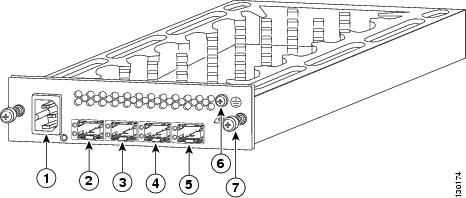
1

AC-in receptacle

5

Network2 (NTWK2) SFP socket

2

Equipment 1 (EQPT1) SFP socket

6

Chassis ground screw

3

Network 1 (NWK1) SFP socket

7

Captive installation screw

4

Equipment 2 (EQPT2) SFP socket


LEDs

The 2-Channel SFP-Based Wavelength Converter is equipped with LEDs to provide you with the operational status of the unit. Table 1 lists the LEDs and their meanings.

Table 1 2-Channel SFP-Based Wavelength Converter LED Descriptions 

LED
Status
Description

POWER

Off

Converter chassis power is off.


Green

Converter chassis power is on.

EQPT1and EQPT2 TX

Off

SFP transceiver is not detected in the Equipment 1 or in the Equipment 2 socket.

Green

SFP laser is on in the Equipment 1 socket or in the Equipment 2 socket.


Red

SFP laser is off in the EQUIPMENT 1 socket or in the EQUIPMENT 2 socket.

EQPT1and EQPT2 RX

Off

SFP transceiver is not detected in the Equipment 1 or in the Equipment 2 socket.

Green

SFP transceiver signal is detected.


Flashing Green

Loss of lock detected in SFP installed in the Equipment 1 or Equipment 2 socket.


Red

Equipment 1 or Equipment 2 SFP receiver is not detecting a signal.

NTWK1and NTWK2 TX

Off

SFP transceiver is not detected in the Network 1 or in the Network 2 socket.

Green

SFP transceiver laser is on.


Red

SFP transceiver laser is off.

NTWK1 and NTWK2 RX

Off

SFP transceiver is not detected in the NETWORK 1 or in the NETWORK 2 socket.

Green

Network 1 or Network 2 signal is detected by the SFP receiver.


Red

Network 1 or Network 2 SFP receiver is not detecting a signal.


Safety Overview

Throughout this publication, safety warnings appear in procedures that, if performed incorrectly, can harm you. A warning symbol precedes each warning statement.

Warning Definition

Warning


IMPORTANT SAFETY INSTRUCTIONS

This warning symbol means danger. You are in a situation that could cause bodily injury. Before you work on any equipment, be aware of the hazards involved with electrical circuitry and be familiar with standard practices for preventing accidents. Use the statement number provided at the end of each warning to locate its translation in the translated safety warnings that accompanied this device.

SAVE THESE INSTRUCTIONS

Waarschuwing

BELANGRIJKE VEILIGHEIDSINSTRUCTIES

Dit waarschuwingssymbool betekent gevaar. U verkeert in een situatie die lichamelijk letsel kan veroorzaken. Voordat u aan enige apparatuur gaat werken, dient u zich bewust te zijn van de bij elektrische schakelingen betrokken risico's en dient u op de hoogte te zijn van de standaard praktijken om ongelukken te voorkomen. Gebruik het nummer van de verklaring onderaan de waarschuwing als u een vertaling van de waarschuwing die bij het apparaat wordt geleverd, wilt raadplegen.

BEWAAR DEZE INSTRUCTIES

Varoitus

TÄRKEITÄ TURVALLISUUSOHJEITA

Tämä varoitusmerkki merkitsee vaaraa. Tilanne voi aiheuttaa ruumiillisia vammoja. Ennen kuin käsittelet laitteistoa, huomioi sähköpiirien käsittelemiseen liittyvät riskit ja tutustu onnettomuuksien yleisiin ehkäisytapoihin. Turvallisuusvaroitusten käännökset löytyvät laitteen mukana toimitettujen käännettyjen turvallisuusvaroitusten joukosta varoitusten lopussa näkyvien lausuntonumeroiden avulla.

SÄILYTÄ NÄMÄ OHJEET

Attention

IMPORTANTES INFORMATIONS DE SÉCURITÉ

Ce symbole d'avertissement indique un danger. Vous vous trouvez dans une situation pouvant entraîner des blessures ou des dommages corporels. Avant de travailler sur un équipement, soyez conscient des dangers liés aux circuits électriques et familiarisez-vous avec les procédures couramment utilisées pour éviter les accidents. Pour prendre connaissance des traductions des avertissements figurant dans les consignes de sécurité traduites qui accompagnent cet appareil, référez-vous au numéro de l'instruction situé à la fin de chaque avertissement.

CONSERVEZ CES INFORMATIONS

Warnung

WICHTIGE SICHERHEITSHINWEISE

Dieses Warnsymbol bedeutet Gefahr. Sie befinden sich in einer Situation, die zu Verletzungen führen kann. Machen Sie sich vor der Arbeit mit Geräten mit den Gefahren elektrischer Schaltungen und den üblichen Verfahren zur Vorbeugung vor Unfällen vertraut. Suchen Sie mit der am Ende jeder Warnung angegebenen Anweisungsnummer nach der jeweiligen Übersetzung in den übersetzten Sicherheitshinweisen, die zusammen mit diesem Gerät ausgeliefert wurden.

BEWAHREN SIE DIESE HINWEISE GUT AUF.

Avvertenza

IMPORTANTI ISTRUZIONI SULLA SICUREZZA

Questo simbolo di avvertenza indica un pericolo. La situazione potrebbe causare infortuni alle persone. Prima di intervenire su qualsiasi apparecchiatura, occorre essere al corrente dei pericoli relativi ai circuiti elettrici e conoscere le procedure standard per la prevenzione di incidenti. Utilizzare il numero di istruzione presente alla fine di ciascuna avvertenza per individuare le traduzioni delle avvertenze riportate in questo documento.

CONSERVARE QUESTE ISTRUZIONI

Advarsel

VIKTIGE SIKKERHETSINSTRUKSJONER

Dette advarselssymbolet betyr fare. Du er i en situasjon som kan føre til skade på person. Før du begynner å arbeide med noe av utstyret, må du være oppmerksom på farene forbundet med elektriske kretser, og kjenne til standardprosedyrer for å forhindre ulykker. Bruk nummeret i slutten av hver advarsel for å finne oversettelsen i de oversatte sikkerhetsadvarslene som fulgte med denne enheten.

TA VARE PÅ DISSE INSTRUKSJONENE

Aviso

INSTRUÇÕES IMPORTANTES DE SEGURANÇA

Este símbolo de aviso significa perigo. Você está em uma situação que poderá ser causadora de lesões corporais. Antes de iniciar a utilização de qualquer equipamento, tenha conhecimento dos perigos envolvidos no manuseio de circuitos elétricos e familiarize-se com as práticas habituais de prevenção de acidentes. Utilize o número da instrução fornecido ao final de cada aviso para localizar sua tradução nos avisos de segurança traduzidos que acompanham este dispositivo.

GUARDE ESTAS INSTRUÇÕES

¡Advertencia!

INSTRUCCIONES IMPORTANTES DE SEGURIDAD

Este símbolo de aviso indica peligro. Existe riesgo para su integridad física. Antes de manipular cualquier equipo, considere los riesgos de la corriente eléctrica y familiarícese con los procedimientos estándar de prevención de accidentes. Al final de cada advertencia encontrará el número que le ayudará a encontrar el texto traducido en el apartado de traducciones que acompaña a este dispositivo.

GUARDE ESTAS INSTRUCCIONES

Varning!

VIKTIGA SÄKERHETSANVISNINGAR

Denna varningssignal signalerar fara. Du befinner dig i en situation som kan leda till personskada. Innan du utför arbete på någon utrustning måste du vara medveten om farorna med elkretsar och känna till vanliga förfaranden för att förebygga olyckor. Använd det nummer som finns i slutet av varje varning för att hitta dess översättning i de översatta säkerhetsvarningar som medföljer denna anordning.

SPARA DESSA ANVISNINGAR

Aviso

INSTRUÇÕES IMPORTANTES DE SEGURANÇA

Este símbolo de aviso significa perigo. Você se encontra em uma situação em que há risco de lesões corporais. Antes de trabalhar com qualquer equipamento, esteja ciente dos riscos que envolvem os circuitos elétricos e familiarize-se com as práticas padrão de prevenção de acidentes. Use o número da declaração fornecido ao final de cada aviso para localizar sua tradução nos avisos de segurança traduzidos que acompanham o dispositivo.

GUARDE ESTAS INSTRUÇÕES

Advarsel

VIGTIGE SIKKERHEDSANVISNINGER

Dette advarselssymbol betyder fare. Du befinder dig i en situation med risiko for legemesbeskadigelse. Før du begynder arbejde på udstyr, skal du være opmærksom på de involverede risici, der er ved elektriske kredsløb, og du skal sætte dig ind i standardprocedurer til undgåelse af ulykker. Brug erklæringsnummeret efter hver advarsel for at finde oversættelsen i de oversatte advarsler, der fulgte med denne enhed.

GEM DISSE ANVISNINGER


Warning Only trained and qualified personnel should be allowed to install, replace, or service this equipment. Statement 1030


Warning Ultimate disposal of this product should be handled according to all national laws and regulations. Statement 1040


Warning Class 1 laser product. Statement 1008


Warning Use of controls, adjustments, or performing procedures other than those specified may result in hazardous radiation exposure. Statement 1057


Installing the 2-Channel SFP-Based Wavelength Converter

The following sections provide installation procedures for the 2-Channel SFP-Based Wavelength Converter:

Required Tools

Installing the 2-Slot Chassis (CWDM-CHASSIS-2=)

Installing the 2-Channel SFP-Based Wavelength Converter

Required Tools

You will need these tools to install the 2-Channel SFP-Based Wavelength Converter:

Number 2 Phillips screwdriver for the 10-32 or the 12-24 chassis installation screws.

Wrist strap or other personal grounding device to prevent ESD occurrences.

Antistatic mat or antistatic foam to place the equipment on.

Fiber-optic end-face cleaning tools and inspection equipment. For complete information on inspecting and cleaning fiber-optic connections, refer to the white paper at this URL:

http://www.cisco.com/en/US/tech/tk482/tk607/technologies_white_paper09186a0080254eba.shtml

Level (optional)

Tape measure (optional)

Installing the 2-Slot Chassis (CWDM-CHASSIS-2=)


Note Ensure that you install the 2-slot chassis in the same rack as your system or an adjacent rack to your system so that you can connect all cables between your 2-Channel SFP-Based Wavelength Converter and your system.


Caution When performing the following procedures, wear a grounding strap to avoid ESD damage to the 2-Channel SFP-Based Wavelength Converter. Some platforms have an ESD connector for attaching the wrist strap.

To mount the 2-slot chassis in an equipment rack, follow these steps:


Step 1 Remove the 2-slot chassis from the shipping packaging.

Step 2 Position the 2-slot chassis in the rack in which you are going to install it. Align the mounting holes in the chassis L brackets with the mounting holes in the equipment rack to ensure that the 2-slot chassis is mounted straight and level. Use a level or tape measure to verify that the chassis is mounted level in the rack.

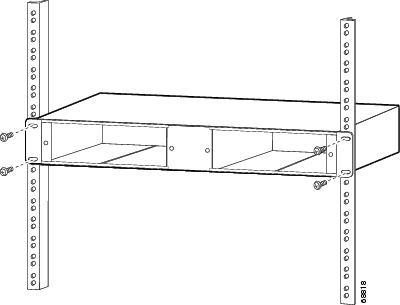
Step 3 Secure the 2-slot chassis by using four (two per side) 12-24 x 3/4-inch screws or four 10-32 x 3/4-inch screws. Thread the screws through the elongated holes in the L bracket and into the threaded holes in the mounting post. (See Figure 2.)

Figure 2 Mounting the 2-Slot Chassis in the Rack

Installing the 2-Channel SFP-Based Wavelength Converter

Caution When performing the following procedures, wear a grounding strap around your wrist to avoid ESD damage to the converter. Make sure that the other end of the ground strap is securely attached to a grounded point.

To install the 2-Channel SFP-Based Wavelength Converter in the 2-slot chassis, follow these steps:


Step 1 Remove the converter from its packaging.

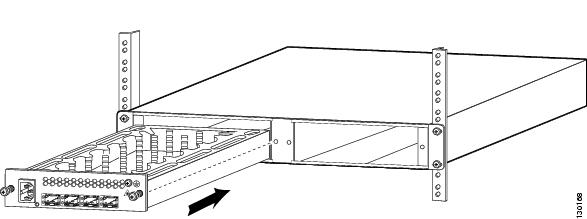
Step 2 Align the converter chassis with the open slot in the 2-slot chassis. (See Figure 3.)

Figure 3 Installing a 2-Channel SFP-Based Wavelength Converter

Step 3 Gently push the converter chassis into the open slot in the 2-slot chassis. Ensure that you line up the captive screws on the converter with the screw holes on the 2-slot chassis.

Step 4 Continue pushing the converter chassis into the open slot until the converter chassis faceplate makes contact with the 2-slot chassis faceplate.

Step 5 Tighten the two captive screws with the Number 2 Phillips screwdriver. Do not cross-thread or overtighten the captive screws.

Step 6 Attach a system ground wire to the chassis ground connection. (See Figure 4.)

Figure 4 AC In and Chassis Ground Connections
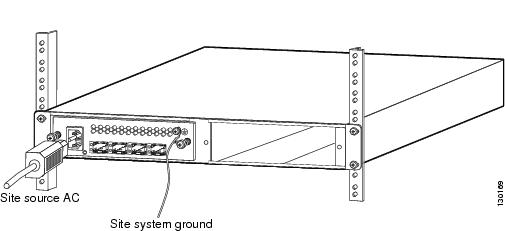
Step 7 Attach the AC power cord to the AC In connector on the converter chassis. (See Figure 4.) Connect the other end of the power cord to source AC.


Installing the SFP Transceivers


Caution We strongly recommend that you do not install or remove the SFP transceiver module with fiber-optic cables attached to it because of the potential damage to the cables, the cable connector, or the optical interfaces in the SFP transceiver. Disconnect all cables before removing or installing an SFP transceiver.

Removing and installing an SFP transceiver can shorten its useful life. Do not remove and insert SFP transceivers more often than is absolutely necessary.


Caution The SFP transceiver modules are static sensitive devices. Always use an ESD wrist strap or similar individual grounding device when handling SFP transceivers or coming in contact with modules.

SFP transceiver modules can have three types of latching devices to secure an SFP transceiver in a port socket:

Figure 5 shows an SFP transceiver with a Mylar tab latch.

Figure 6 shows an SFP transceiver with an actuator button latch.

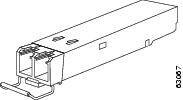
Figure 7 shows an SFP transceiver that has a bale-clasp latch.

Determine which type of latch your SFP transceiver uses before following the installation and removal procedures.

Figure 5 SFP Transceiver Module with a Mylar Tab Latch
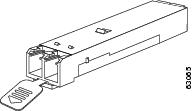
Figure 6 SFP Transceiver Module with an Actuator Button Latch
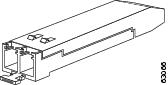
Figure 7 SFP Module with a Bale-Clasp Latch
To install an SFP transceiver, follow these steps:


Step 1 Attach an ESD-preventive wrist strap to your wrist and to the ESD ground connector or a bare metal surface on your chassis.

Step 2 Remove the SFP transceiver module from its protective packaging.


Note Do not remove the optical bore dust plugs until you are directed to do so later in the procedure.


Step 3 Check the label on the SFP transceiver body to verify that you have the correct model for your network.

Step 4 Find the send (TX) and receive (RX) markings that identify the top side of the SFP transceiver.


Note On some SFP transceivers, the TX and RX marking might be replaced by arrowheads pointing from the SFP transceiver connector (transmit direction or TX) and toward the connector (receive direction or RX).


Step 5 Position the SFP transceiver in front of the socket opening.

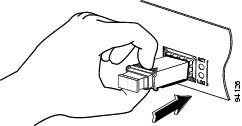
Step 6 Insert the SFP transceiver into the socket until you feel the SFP transceiver module connector snap into place in the socket connector. (See Figure 8.)

Figure 8 Inserting an SFP Transceiver into a Module Socket
Cabling the 2-Channel SFP-Based Wavelength Converter


Warning Invisible laser radiation may be emitted from disconnected fibers or connectors. Do not stare into beams or view directly with optical instruments. Statement 1051


Note For optical SFP transceivers, before removing the dust plugs and making any optical connections, observe the following guidelines:

Always keep the protective dust plugs on the unplugged fiber-optic cable connectors and the transceiver optical bores until you are ready to make a connection.

Always inspect and clean the LC connector end-faces just before making any connections. Refer to the Tip on this page for a pointer to a fiber-optic inspection and cleaning white paper.

Always grasp the LC connector housing to plug or unplug a fiber-optic cable.


To cable the converter, perform the following steps:


Step 1 Remove the dust plugs from the network interface cable LC connectors. Save the dust plugs for future use.

Step 2 Inspect and clean the LC connector's fiber-optic end-faces. Refer to the Tip below for a pointer to a fiber-optic inspection and cleaning white paper.


Tip For complete information on inspecting and cleaning fiber-optic connections, refer to the white paper at this URL:

http://www.cisco.com/en/US/tech/tk482/tk607/technologies_white_paper09186a0080254eba.shtml


Step 3 Remove the dust plugs from the SFP transceiver optical bores.

Step 4 Immediately attach the network interface cable LC connector to the SFP transceiver.

Step 5 To connect 1000BASE-T SFP transceivers to a copper network, perform the following substeps:


Caution To comply with GR-1089 intrabuilding lightning immunity requirements, you must use grounded, shielded, twisted-pair, Category 5 cabling.

a. Insert the Category 5 network cable RJ-45 connector into the SFP transceiver RJ-45 connector.


Note When connecting to a 1000BASE-T-compatible server, workstation, or router, use four twisted-pair, straight-through Category 5 cabling for the SFP transceiver port. When connecting to a 1000BASE-T-compatible switch or repeater, use four twisted-pair, crossover Category 5 cabling.


b. Insert the other end of the network cable into an RJ-45 connector on a 1000BASE-T-compatible target device.


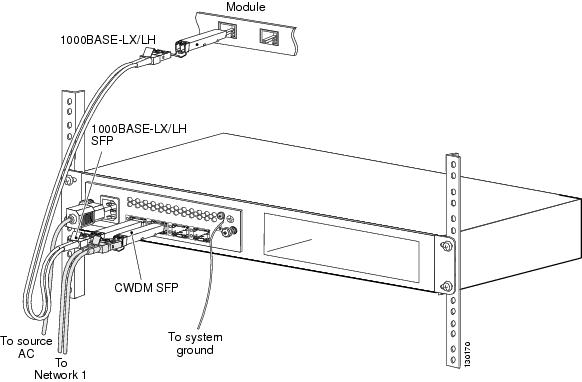
Figure 9 shows a sample cabling scheme for the 2-channel wavelength converter. In this example, you would use 1000BASE-LX/LH SFPs to interface between the module and the 2-channel wavelength converter, and you would use CWDM SFPs to interface from the 2-channel wavelength converter to the network.

Figure 9 Cabling the 2-Channel Wavelength Converter
Regulatory Compliance

This section includes all regulatory, safety, EMC (Class A or Class B), telecom, and NEBS standards. The 2-Channel SFP-Based Wavelength Converter is in compliance with the national and international standards that are listed in Table 2.

Table 2 Regulatory Standards Compliance

Specification
Standard

Regulatory Compliance

Products bearing the CE mark indicate compliance with the 73/23/EEC and 89/336/EEC directives, which include the safety and EMC standards in this table.

Safety

UL 60950-1


CAN/CSA-C22.2 No. 60950-1


EN 60950-1


IEC 60950-1


TS 001:1997


AS/NZS 60950


21CFR1040


ENG-60825-1


IEC 60825-1

EMC

FCC Part 15 (CFR 47) Class A


ICES-003 Class A


EN 55022 Class A


CISPR 22 Class A


CISPR 24


AS/NZS 3548 Class A


VCCI Class A


EN 55024


EN 300 386


EN 50082-1


EN61000-6-1


Translated Safety Warnings

This section contains the translations to the warnings that appear in this publication.

Statement 1008—Class 1 Laser Product

Warning


Class 1 laser product.

Waarschuwing

Klasse-1 laser produkt.

Varoitus

Luokan 1 lasertuote.

Attention

Produit laser de classe 1.

Warnung

Laserprodukt der Klasse 1.

Avvertenza

Prodotto laser di Classe 1.

Advarsel

Laserprodukt av klasse 1.

Aviso

Produto laser de classe 1.

¡Advertencia!

Producto láser Clase I.

Varning!

Laserprodukt av klass 1.

Aviso

Produto a laser de classe 1.

Advarsel

Klasse 1 laserprodukt.


Statement 1030—Equipment Installation

Warning


Only trained and qualified personnel should be allowed to install, replace, or service this equipment.

Waarschuwing

Deze apparatuur mag alleen worden geïnstalleerd, vervangen of hersteld door bevoegd geschoold personeel.

Varoitus

Tämän laitteen saa asentaa, vaihtaa tai huoltaa ainoastaan koulutettu ja laitteen tunteva henkilökunta.

Attention

Il est vivement recommandé de confier l'installation, le remplacement et la maintenance de ces équipements à des personnels qualifiés et expérimentés.

Warnung

Das Installieren, Ersetzen oder Bedienen dieser Ausrüstung sollte nur geschultem, qualifiziertem Personal gestattet werden.

Avvertenza

Questo apparato può essere installato, sostituito o mantenuto unicamente da un personale competente.

Advarsel

Bare opplært og kvalifisert personell skal foreta installasjoner, utskiftninger eller service på dette utstyret.

Aviso

Apenas pessoal treinado e qualificado deve ser autorizado a instalar, substituir ou fazer a revisão deste equipamento.

¡Advertencia!

Solamente el personal calificado debe instalar, reemplazar o utilizar este equipo.

Varning!

Endast utbildad och kvalificerad personal bör få tillåtelse att installera, byta ut eller reparera denna utrustning.

Aviso

Somente uma equipe treinada e qualificada tem permissão para instalar, substituir ou dar manutenção a este equipamento.

Advarsel

Kun uddannede personer må installere, udskifte komponenter i eller servicere dette udstyr.


Statement 1040—Product Disposal

Warning


Ultimate disposal of this product should be handled according to all national laws and regulations.

Waarschuwing

Het uiteindelijke wegruimen van dit product dient te geschieden in overeenstemming met alle nationale wetten en reglementen.

Varoitus

Tämä tuote on hävitettävä kansallisten lakien ja määräysten mukaisesti.

Attention

La mise au rebut ou le recyclage de ce produit sont généralement soumis à des lois et/ou directives de respect de l'environnement. Renseignez-vous auprès de l'organisme compétent.

Warnung

Die Entsorgung dieses Produkts sollte gemäß allen Bestimmungen und Gesetzen des Landes erfolgen.

Avvertenza

Lo smaltimento di questo prodotto deve essere eseguito secondo le leggi e regolazioni locali.

Advarsel

Endelig kassering av dette produktet skal være i henhold til alle relevante nasjonale lover og bestemmelser.

Aviso

Deitar fora este produto em conformidade com todas as leis e regulamentos nacionais.

¡Advertencia!

Al deshacerse por completo de este producto debe seguir todas las leyes y reglamentos nacionales.

Varning!

Vid deponering hanteras produkten enligt gällande lagar och bestämmelser.

Aviso

O descarte definitivo deste produto deve estar de acordo com todas as leis e regulamentações nacionais.

Advarsel

Endelig bortskaffelse af dette produkt skal ske i henhold til gældende love og regler.


Statement 1051—Laser Radiation

Warning


Invisible laser radiation may be emitted from disconnected fibers or connectors. Do not stare into beams or view directly with optical instruments.

Waarschuwing

Losgekoppelde of losgeraakte glasvezels of aansluitingen kunnen onzichtbare laserstraling produceren. Kijk niet rechtstreeks in de straling en gebruik geen optische instrumenten rond deze glasvezels of aansluitingen.

Varoitus

Irrotetuista kuiduista tai liittimistä voi tulla näkymätöntä lasersäteilyä. Älä tuijota säteitä tai katso niitä suoraan optisilla välineillä.

Attention

Les fibres ou connecteurs débranchés risquent d'émettre des rayonnements laser invisibles à l'œil. Ne regardez jamais directement les faisceaux laser à l'œil nu, ni d'ailleurs avec des instruments optiques.

Warnung

Unterbrochene Fasern oder Steckerverbindungenkönnen unsichtbare Laserstrahlung abgeben. Blicken Sie weder mit bloßem Auge noch mit optischen Instrumenten direkt in Laserstrahlen.

Avvertenza

Le fibre ottiche ed i relativi connettori possono emettere radiazioni laser. I fasci di luce non devono mai essere osservati direttamente o attraverso strumenti ottici.

Advarsel

Det kan forekomme usynlig laserstråling fra fiber eller kontakter som er frakoblet. Stirr ikke direkte inn i strålene eller se på dem direkte gjennom et optisk instrument.

Aviso

Radiação laser invisível pode ser emitida de conectores ou fibras desconectadas. Não olhe diretamente para os feixes ou com instrumentos ópticos.

¡Advertencia!

Es posible que las fibras desconectadas emitan radiación láser invisible. No fije la vista en los rayos ni examine éstos con instrumentos ópticos.

Varning!

Osynlig laserstrålning kan avges från frånkopplade fibrer eller kontaktdon. Rikta inte blicken in i strålar och titta aldrig direkt på dem med hjälp av optiska instrument.


Aviso

Radiação laser invisível pode ser emitida a partir de fibras ou conectores desconectados. Não fixe o olhar nos feixes e nem olhe diretamente com instrumentos ópticos.

Advarsel

Usynlig laserstråling kan forekomme fra brugte fibre eller stik. Stir ikke ind i stråler eller direkte med optiske instrumenter.



Statement 1057—Hazardous Radiation Exposure

Warning


Use of controls, adjustments, or performing procedures other than those specified may result in hazardous radiation exposure.

Waarschuwing

Het gebruik van regelaars of bijstellingen of het uitvoeren van procedures anders dan opgegeven kan leiden tot blootstelling aan gevaarlijke straling.

Varoitus

Säätimien tai säätöjen käyttö ja toimenpiteiden suorittaminen ohjeista poikkeavalla tavalla voi altistaa vaaralliselle säteilylle.

Attention

L'utilisation de commandes, de réglages ou de procédures autres que ceux spécifiés peut entraîner une exposition dangereuse à des radiations.

Warnung

Die Verwendung von nicht spezifizierten Steuerelementen, Einstellungen oder Verfahrensweisen kann eine gefährliche Strahlenexposition zur Folge haben.

Avvertenza

L'adozione di controlli, regolazioni o procedure diverse da quelle specificate può comportare il pericolo di esposizione a radiazioni.

Advarsel

Bruk av kontroller eller justeringer eller utførelse av prosedyrer som ikke er spesifiserte, kan resultere i farlig strålingseksponering.

Aviso

O uso de controles, ajustes ou desempenho de procedimentos diferentes dos especificados pode resultar em exposição prejudicial de radiação.

¡Advertencia!

La aplicación de controles, ajustes y procedimientos distintos a los especificados puede comportar una exposición peligrosa a la radiación.

Varning!  

Om andra kontroller eller justeringar än de angivna används, eller om andra processer än de angivna genomförs, kan skadlig strålning avges.


Aviso

O uso de controles, ajustes ou procedimentos diferentes daqueles especificados pode resultar em exposição perigosa à radiação.

Advarsel

Brug af kontrolfunktioner, justeringer, eller udførelse af procedurer andre end de, der er angivet, kan resultere i udsættelse for farlig bestråling.



Obtaining Documentation

Cisco documentation and additional literature are available on Cisco.com. Cisco also provides several ways to obtain technical assistance and other technical resources. These sections explain how to obtain technical information from Cisco Systems.

Cisco.com

You can access the most current Cisco documentation at this URL:

http://www.cisco.com/univercd/home/home.htm

You can access the Cisco website at this URL:

http://www.cisco.com

You can access international Cisco websites at this URL:

http://www.cisco.com/public/countries_languages.shtml

Documentation DVD

Cisco documentation and additional literature are available in a Documentation DVD package, which may have shipped with your product. The Documentation DVD is updated regularly and may be more current than printed documentation. The Documentation DVD package is available as a single unit.

Registered Cisco.com users (Cisco direct customers) can order a Cisco Documentation DVD (product number DOC-DOCDVD=) from the Ordering tool or Cisco Marketplace.

Cisco Ordering tool:

http://www.cisco.com/en/US/partner/ordering/

Cisco Marketplace:

http://www.cisco.com/go/marketplace/

Ordering Documentation

You can find instructions for ordering documentation at this URL:

http://www.cisco.com/univercd/cc/td/doc/es_inpck/pdi.htm

You can order Cisco documentation in these ways:

Registered Cisco.com users (Cisco direct customers) can order Cisco product documentation from the Ordering tool:

http://www.cisco.com/en/US/partner/ordering/

Nonregistered Cisco.com users can order documentation through a local account representative by calling Cisco Systems Corporate Headquarters (California, USA) at 408 526-7208 or, elsewhere in North America, by calling 1 800 553-NETS (6387).

Documentation Feedback

You can send comments about technical documentation to bug-doc@cisco.com.

You can submit comments by using the response card (if present) behind the front cover of your document or by writing to the following address:

Cisco Systems
Attn: Customer Document Ordering
170 West Tasman Drive
San Jose, CA 95134-9883

We appreciate your comments.

Cisco Product Security Overview

Cisco provides a free online Security Vulnerability Policy portal at this URL:

http://www.cisco.com/en/US/products/products_security_vulnerability_policy.html

From this site, you can perform these tasks:

Report security vulnerabilities in Cisco products.

Obtain assistance with security incidents that involve Cisco products.

Register to receive security information from Cisco.

A current list of security advisories and notices for Cisco products is available at this URL:

http://www.cisco.com/go/psirt

If you prefer to see advisories and notices as they are updated in real time, you can access a Product Security Incident Response Team Really Simple Syndication (PSIRT RSS) feed from this URL:

http://www.cisco.com/en/US/products/products_psirt_rss_feed.html

Reporting Security Problems in Cisco Products

Cisco is committed to delivering secure products. We test our products internally before we release them, and we strive to correct all vulnerabilities quickly. If you think that you might have identified a vulnerability in a Cisco product, contact PSIRT:

Emergencies — security-alert@cisco.com

Nonemergencies — psirt@cisco.com


Tip We encourage you to use Pretty Good Privacy (PGP) or a compatible product to encrypt any sensitive information that you send to Cisco. PSIRT can work from encrypted information that is compatible with PGP versions 2.x through 8.x.

Never use a revoked or an expired encryption key. The correct public key to use in your correspondence with PSIRT is the one that has the most recent creation date in this public key server list:

http://pgp.mit.edu:11371/pks/lookup?search=psirt%40cisco.com&op=index&exact=on


In an emergency, you can also reach PSIRT by telephone:

1 877 228-7302

1 408 525-6532

Obtaining Technical Assistance

For all customers, partners, resellers, and distributors who hold valid Cisco service contracts, Cisco Technical Support provides 24-hour-a-day, award-winning technical assistance. The Cisco Technical Support Website on Cisco.com features extensive online support resources. In addition, Cisco Technical Assistance Center (TAC) engineers provide telephone support. If you do not hold a valid Cisco service contract, contact your reseller.

Cisco Technical Support Website

The Cisco Technical Support Website provides online documents and tools for troubleshooting and resolving technical issues with Cisco products and technologies. The website is available 24 hours a day, 365 days a year, at this URL:

http://www.cisco.com/techsupport

Access to all tools on the Cisco Technical Support Website requires a Cisco.com user ID and password. If you have a valid service contract but do not have a user ID or password, you can register at this URL:

http://tools.cisco.com/RPF/register/register.do


Note Use the Cisco Product Identification (CPI) tool to locate your product serial number before submitting a web or phone request for service. You can access the CPI tool from the Cisco Technical Support Website by clicking the Tools & Resources link under Documentation & Tools. Choose Cisco Product Identification Tool from the Alphabetical Index drop-down list, or click the Cisco Product Identification Tool link under Alerts & RMAs. The CPI tool offers three search options: by product ID or model name; by tree view; or for certain products, by copying and pasting show command output. Search results show an illustration of your product with the serial number label location highlighted. Locate the serial number label on your product and record the information before placing a service call.


Submitting a Service Request

Using the online TAC Service Request Tool is the fastest way to open S3 and S4 service requests. (S3 and S4 service requests are those in which your network is minimally impaired or for which you require product information.) After you describe your situation, the TAC Service Request Tool provides recommended solutions. If your issue is not resolved using the recommended resources, your service request is assigned to a Cisco TAC engineer. The TAC Service Request Tool is located at this URL:

http://www.cisco.com/techsupport/servicerequest

For S1 or S2 service requests or if you do not have Internet access, contact the Cisco TAC by telephone. (S1 or S2 service requests are those in which your production network is down or severely degraded.) Cisco TAC engineers are assigned immediately to S1 and S2 service requests to help keep your business operations running smoothly.

To open a service request by telephone, use one of the following numbers:

Asia-Pacific: +61 2 8446 7411 (Australia: 1 800 805 227)
EMEA: +32 2 704 55 55
USA: 1 800 553-2447

For a complete list of Cisco TAC contacts, go to this URL:

http://www.cisco.com/techsupport/contacts

Definitions of Service Request Severity

To ensure that all service requests are reported in a standard format, Cisco has established severity definitions.

Severity 1 (S1)—Your network is "down," or there is a critical impact to your business operations. You and Cisco will commit all necessary resources around the clock to resolve the situation.

Severity 2 (S2)—Operation of an existing network is severely degraded, or significant aspects of your business operation are negatively affected by inadequate performance of Cisco products. You and Cisco will commit full-time resources during normal business hours to resolve the situation.

Severity 3 (S3)—Operational performance of your network is impaired, but most business operations remain functional. You and Cisco will commit resources during normal business hours to restore service to satisfactory levels.

Severity 4 (S4)—You require information or assistance with Cisco product capabilities, installation, or configuration. There is little or no effect on your business operations.

Obtaining Additional Publications and Information

Information about Cisco products, technologies, and network solutions is available from various online and printed sources.

Cisco Marketplace provides a variety of Cisco books, reference guides, and logo merchandise. Visit Cisco Marketplace, the company store, at this URL:

http://www.cisco.com/go/marketplace/

Cisco Press publishes a wide range of general networking, training and certification titles. Both new and experienced users will benefit from these publications. For current Cisco Press titles and other information, go to Cisco Press at this URL:

http://www.ciscopress.com

Packet magazine is the Cisco Systems technical user magazine for maximizing Internet and networking investments. Each quarter, Packet delivers coverage of the latest industry trends, technology breakthroughs, and Cisco products and solutions, as well as network deployment and troubleshooting tips, configuration examples, customer case studies, certification and training information, and links to scores of in-depth online resources. You can access Packet magazine at this URL:

http://www.cisco.com/packet

iQ Magazine is the quarterly publication from Cisco Systems designed to help growing companies learn how they can use technology to increase revenue, streamline their business, and expand services. The publication identifies the challenges facing these companies and the technologies to help solve them, using real-world case studies and business strategies to help readers make sound technology investment decisions. You can access iQ Magazine at this URL:

http://www.cisco.com/go/iqmagazine

Internet Protocol Journal is a quarterly journal published by Cisco Systems for engineering professionals involved in designing, developing, and operating public and private internets and intranets. You can access the Internet Protocol Journal at this URL:

http://www.cisco.com/ipj

World-class networking training is available from Cisco. You can view current offerings at this URL:

http://www.cisco.com/en/US/learning/index.html