Cisco Service Control GRE and GTP-U Insertion Solution Guide, Release 3.7.x
Available Languages
Table Of Contents
Cisco Service Control GRE and GTP Insertion Solution Guide,
Release 3.7.xOverview of the Service Control GRE and GTP Insertion Solution
Accounting and Bandwidth Management
GRE Tunnel Concatenation (GRE over Other Tunnels)
GTP Configuration and Monitoring
GRE and GTP Insertion Solution Limitations
Example of GTP-U Packets with Sequence Number Option
Example of GTP-U Packets Without Sequence Number Option
Obtaining Documentation and Submitting a Service Request
Cisco Service Control Solution Guide
Cisco Service Control GRE and GTP Insertion Solution Guide,
Release 3.7.x
Revised: June 13, 2011, OL-24169-01
Note
This document supports all 3.7.x releases.
1 Overview of the Service Control GRE and GTP Insertion Solution
This section provides an overview of the Generic Routing Encapsulation (GRE) and GPRS Tunneling Protocol (GTP) insertion solution. The GRE and GTP insertion solution enables the Cisco SCE to monitor and control the GRE and GTP. This section includes:
GRE Feature Overview
Tunneling protocols are used in many networks for various purposes, including VPNs, traffic engineering (TE), security, and so on. Some encapsulations are IP based such as GRE, and some are placed in lower levels, for example in Layer 2.5.
Cisco SCE natively analyzes IP-based traffic. IP addresses are the basis for flow classification (the 5-tuple contains IP addresses) and subscriber identification (most commonly used subscriber ID is the subscriber IP address).
In tunneled networks, the IP packet is further encapsulated by some encapsulation protocol. To analyze the IP packet, Cisco SCE needs to perform specific parsing of the encapsulating protocol.
Furthermore, in some networks, the IP addresses used inside the tunneled traffic are private IP addresses. For example, addresses that are not unique among the flows seen on a single SCE. In these cases, the identification of the source and destination of the packet must be based on both the IP address and the tunnel information found in the packet.
In networks with private IP addresses, or without them, it is desirable to treat a whole segment of the network as a single subscriber. Such a segment may be a whole VPN, a specific VLAN, a specific tunnel, and so on. In these cases, SCE defines the subscriber by a general identifier that applies to all the IP addresses generating traffic over that network segment. This method allows the SCE to disregard the specific client, and refer only to the group it is associated with, when defining the subscribers.
GTP Feature Overview
In a General Packet Radio Service (GPRS) backbone network, GTP is a high-level tunneling protocol used to carry signaling and data.
A GPRS backbone network (or core network) contains several nodes of GPRS Support Node (GSN), which communicate with each other using IP as shown in Figure 1. GSNs are either Serving GPRS Support Nodes (SGSNs) or Gateway GPRS Support Nodes (GGSNs). The SGSN is used to communicate with Mobile Terminal (MT) equipment or relay data inside the backbone network to outside connections and the GGSNs in turn controls these SGSNs. This relaying is implemented in the backbone network by using GTP on top of UDP/IP (GTPv1).
Figure 1 Cisco eGGGSN PCC Reference Model With DPI Intercept Application Manager
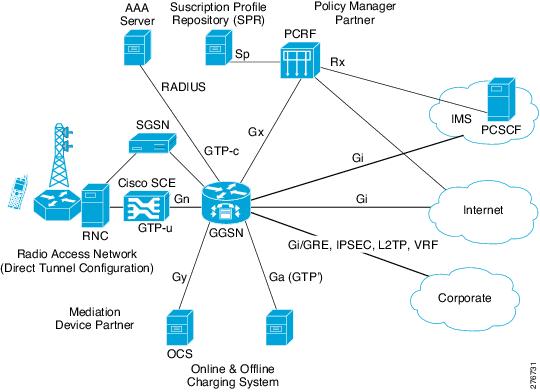
A GTP tunnel is a virtual connection between two GSNs (usually between SGSN/RNC and GGSN). One GTP Tunnel can contain several multiplexed user data connections (several MTs can share same GTP tunnel without any knowledge of each other). The GTP tunnel uses a packet data path in the GPRS backbone network, which is the UDP/IP path.
The evolvement of the wireless technology makes the wireless segment more similar to the wire line market and as a result the demand for deep packet inspection (DPI) applications in this segment is increased.
The GTP support allows SCE to monitor local and roaming traffic in the Gn/Gp pipes. Differentiated Services Code Point (DCSP) marking of active application can be implemented in the GTP environment as well.
2 GRE Tunneling Feature Details
This section summarizes the SCE 8000 support for GRE tunneling. It gives you these GRE tunneling information:
•
•
•
•
•
•
This section contains these subsections:
•
GRE Skip Mode
For GRE support to work, the GRE skip mode must be enabled. The default setting of the GRE skip mode is disabled. Use an administrator-level CLI command to configure the GRE skip mode. For additional information, see the "GRE and GTP CLI Commands" section.
GRE Active Actions
Active actions (drop, block, redirect, and so on) have the same level of support for GRE tunneling (including GRE over other tunnels) as in case of plain IP.
GRE Internal Protocol
The protocol field in the GRE header indicates the protocol of the inner payload; the only supported protocol type is IP version 4 (IPv4) with the value of 0x800. However, the system may be configured by using the CLI to support the value of 0xFFFF also as the protocol value for protocol type IPv4. For additional information, see the "GRE and GTP CLI Commands" section.
GRE IP Fragmentation
The SCOS supports internal and external fragmentation of the GRE tunneling protocol. When the GRE skip mode is disabled, the SCE hardware treats the GRE tunneling protocol as plain IP. When GRE skip is enabled, the fragments are handled as described in these sections:
•
Internal Fragments
Internal fragments are fully supported by using the same process as plain IP.
External Fragments
The first external fragment is delivered to the SCOS and then, if necessary, to the application. The additional fragments are bypassed.
Reorder
Minimal reordering of external fragments might be experienced because the first fragment is sent to the software application while the following fragments are bypassed.
The reordering can be prevented by using an appropriate Quick Forwarding Traffic rule. Using a Quick Forwarding rule might result in loss of certain active actions support, such as HTTP redirect.
Accounting and Bandwidth Management
Accounting and bandwidth management are handled as usual in the context of fragmented GRE traffic.
GRE and Other Traffic
This section provides details on:
GRE and Plain IP
A mix of GRE traffic and plain IP traffic is fully supported.
GRE and Other Tunnels
A mix of GRE traffic and traffic over other tunnels is fully supported.
This means that any type of tunnel supported by the SCE is still supported in GRE skip mode. For example, GRE alongside MPLS/VPN, and so on.
GRE Tunnel Concatenation (GRE over Other Tunnels)
GRE tunneling can be configured over other tunneling protocols.
These combinations are supported:
•
•
•
GRE DSCP Marking
In the GRE skip mode, DSCP marking can be configured on either the external IP header or the internal IP header. Both headers cannot be marked concurrently. The default is to mark the external header. Marking the internal IP header is configured through the CLI. For additional information, see the "GRE and GTP CLI Commands" section.
In external fragmentation, only the first fragment is marked.
GRE Versions and Platforms
GRE tunneling is supported only on SCE 8000 from SCOS Release 3.5.5 onwards.
3 GTP Tunneling Feature Details
This section describes the additional details of the GTP feature. It contains this subsection:
GTP Configuration and Monitoring
The behavior of the SCE in association with GTP is as follows:
•
•
•
•
•
–
–
GTP Configuration and Monitoring
GTP, like IPinIP, GRE, L2TP, and MPLS, is yet another tunnel header that the Cisco SCE supports. In general, the SCE has two modes of support for tunnels, namely skip and VPN aware. In these modes, the Cisco SCE uses the tunnel information for the classification. For GTP tunneling, the SCE supports only the skip mode.
GTP skip is configured by using a CLI command. When GPT skip mode is configured, the hardware applies quick forwarding on all GTP traffic to avoid GTP-U packet reordering. Additionally, the FPGA configuration of the GTP-U UDP port (default is 2152) is done by using a CLI command. For additional information on the CLI command, see the "GRE and GTP CLI Commands" section.
The GTP-U UDP port is searched on UDP destination port.
To check if there is Layer 3 data over GTP-U, the GTP header message type is compared to 0xFF to verify if the GTP-U data has a message type of 0xFF. GTP-U data with a message type other than 0xFF is bypassed through quick forwarding by using the skip mode. The default setting for the SCE GTP skip mode configuration is disabled.
The SCE counts the number of GTP-U packets received.
4 GRE and GTP Insertion Solution Limitations
Table 1 lists the hardware platform limitations for the GTP and GRE insertion solution.
Table 1 GTP and GRE Insertion Solution Hardware Limitations
GRE
Supported only on SCE 8000
GTP
Supported only on SCE 8000
5 GRE and GTP CLI Commands
Table 2 lists the GRE and GTP CLI commands.
6 Protocol Packet Examples
This section contains examples of protocol packets and contains these subsections:
•
•
Example of GTP-U Packets with Sequence Number Option
This is an example of GTP-U Packets with sequence number option:
No. Time Source Destination Protocol Info843 25.211434 172.16.108.65 13.248.2.1 GTP <TCP> [TCP segment of a reassembled PDU]Frame 843 (1314 bytes on wire, 1314 bytes captured)Ethernet II, Src: FoundryN_52:92:85 (00:0c:db:52:92:85), Dst: RisqModu_04:78:7a (00:c0:8b:04:78:7a)Internet Protocol, Src: 172.17.171.1 (172.17.171.1), Dst: 172.18.10.1 (172.18.10.1)User Datagram Protocol, Src Port: 2152 (2152), Dst Port: 2152 (2152)Source port: 2152 (2152)Destination port: 2152 (2152)Length: 1280Checksum: 0x0000 (none)GPRS Tunneling ProtocolFlags: 0x32001. .... = Version: GTP release 99 version (1)...1 .... = Protocol type: GTP (1).... 0... = Reserved: 0.... .0.. = Is Next Extension Header present?: no.... ..1. = Is Sequence Number present?: yes.... ...0 = Is N-PDU number present?: noMessage Type: T-PDU (0xff)Length: 1264TEID: 0x2c883699Sequence number: 0x01a5N-PDU Number: 0x00Next extension header type: 0x00Internet Protocol, Src: 172.16.108.65 (172.16.108.65), Dst: 13.248.2.1 (13.248.2.1)Transmission Control Protocol, Src Port: http (80), Dst Port: 11328 (11328), Seq: 420524, Ack: 908, Len: 1220Example of GTP-U Packets Without Sequence Number Option
This is an example of GTP-U packets without sequence number option:
No. Time Source Destination Protocol Info845 25.249872 13.248.2.1 172.16.108.65 GTP <TCP> 11328 > http [ACK] Seq=908 Ack=415208 Win=12287 Len=0Frame 845 (90 bytes on wire, 90 bytes captured)Ethernet II, Src: FoundryN_52:92:85 (00:0c:db:52:92:85), Dst: Cisco_21:44:80 (00:13:5f:21:44:80)Internet Protocol, Src: 172.18.10.1 (172.18.10.1), Dst: 172.17.171.1 (172.17.171.1)User Datagram Protocol, Src Port: 2152 (2152), Dst Port: 2152 (2152)Source port: 2152 (2152)Destination port: 2152 (2152)Length: 56Checksum: 0xd8af [correct]GPRS Tunneling ProtocolFlags: 0x30001. .... = Version: GTP release 99 version (1)...1 .... = Protocol type: GTP (1).... 0... = Reserved: 0.... .0.. = Is Next Extension Header present?: no.... ..0. = Is Sequence Number present?: no.... ...0 = Is N-PDU number present?: noMessage Type: T-PDU (0xff)Length: 40TEID: 0x00000016Internet Protocol, Src: 13.248.2.1 (13.248.2.1), Dst: 172.16.108.65 (172.16.108.65)Transmission Control Protocol, Src Port: 11328 (11328), Dst Port: http (80), Seq: 908, Ack: 415208, Len: 07 Obtaining Documentation and Submitting a Service Request
For information on obtaining documentation, submitting a service request, and gathering additional information, see the monthly What's New in Cisco Product Documentation, which also lists all new and revised Cisco technical documentation, at:
http://www.cisco.com/en/US/docs/general/whatsnew/whatsnew.html
Subscribe to the What's New in Cisco Product Documentation as a Really Simple Syndication (RSS) feed and set content to be delivered directly to your desktop using a reader application. The RSS feeds are a free service and Cisco currently supports RSS Version 2.0.
Cisco and the Cisco Logo are trademarks of Cisco Systems, Inc. and/or its affiliates in the U.S. and other countries. A listing of Cisco's trademarks can be found at www.cisco.com/go/trademarks. Third party trademarks mentioned are the property of their respective owners. The use of the word partner does not imply a partnership relationship between Cisco and any other company. (1005R)
Any Internet Protocol (IP) addresses used in this document are not intended to be actual addresses. Any examples, command display output, and figures included in the document are shown for illustrative purposes only. Any use of actual IP addresses in illustrative content is unintentional and coincidental.
© 2011 Cisco Systems, Inc. All rights reserved.
 Feedback